
About Anima
Anima is a free Figma plugin published by Anima in 2020. It works in Figma Design and Dev Mode and has 1,835,357 users and 17,129 likes on the Figma Community. It ranks #1 in AI, #2 in Free and #2 in Figma to Code on our lists.
In the developer's words
AI Powered Figma to Code, right in your favorite tool.
Get code, based on your design, and accelerate the design to development process.
What can you do with Anima?
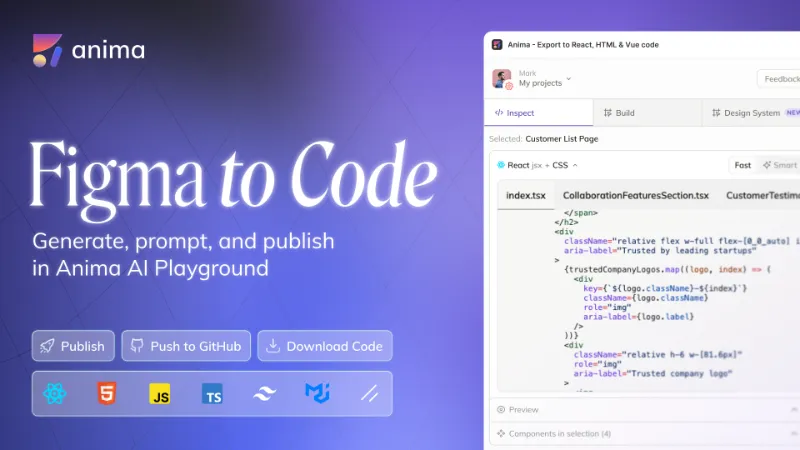
👩💻 Export Figma to code (HTML, React, or Vue code with CSS, Tailwind CSS or Styled Components)
- Convert Figma designs or components into interactive and responsive code, and React components in Dev Mode
- Share with developers, giving them the power to produce code according to their preferences
- Select UI Libraries (Shadcn, MUI)
✨ New! Anima’s Playground with AI Chat
The first UI-driven AI platform that understands both design and development.
🔹 Pixel-perfect UI – Generate high-quality shadcn + Tailwind code that’s production-ready
🔹 AI-powered iteration – Modify and improve your design with natural language prompts
🔹 Live previews – See changes instantly as you edit your code
🔹 Connect more screens – Add images, logos, and additional Figma screens with simple instructions
🔹 One-click publishing – Deploy your site or app directly through Anima
🔹 Own your code – Export to GitHub or download locally anytime
🔹 Powered by Bolt.new – Built for seamless development with the Bolt IDE
With Anima’s Playground, you can refine and customize code before exporting, ensuring it matches your needs—saving valuable development time.
✨ You can still prompt within Figma with Anima's plugin and customize the code Anima generates with free prompts, presets and code samples
🎨 Build code-based prototypes
- Create prototypes that feel like the real product
- Add charts, videos, live text inputs, google maps, drop-down menus, entrance animations, and embed any type of code with Anima
- Make your designs fully responsive with breakpoints and constraints support
🔗 Share a live URL with your team and users
- Get team feedback
- Perform user testing with a public or a private link
- Impress your stakeholders and clients with stunning demos
📩 Export Figma to email HTML with inline CSS
From Figma to Inbox
- In the plugin - Switch to ‘component code inspect’ / Or open in Dev mode.
- Select the framework & styling ‘HTML’ + ‘Email compatible’
- Open in playground and copy the code, including the links to the assets.
What does Anima’s developer-friendly code look like?
- Reusable code components: Anima automatically recognizes repeating components and minimizes code duplications. The result is code that is easy to read and maintain.
- Automatic flex-box layout: Anima’s Auto-Flexbox layout allows relative position for dynamic content.
- Zero dependencies: Anima’s code is meant to save engineers time while giving them complete control of the code.
Join our Anima Community on Twitterand Discord 👋🏻
Got questions?
We’ve got the answers! Check out our Help Center for dozens of helpful articles 💡
Figma to React: https://www.animaapp.com/blog/design-to-code/how-to-export-figma-to-react
Figma to HTML: https://www.animaapp.com/blog/design-to-code/how-to-export-figma-to-html
Figma to Vue: https://www.animaapp.com/blog/design-to-code/how-to-export-figma-to-vue
Figma to Tailwind: https://www.animaapp.com/blog/design-to-code/how-to-export-tailwind-from-figma
Figma to VSCode: https://www.animaapp.com/blog/genai/introducing-frontier-the-future-of-front-end-by-anima
Figma to email HTML: https://www.animaapp.com/blog/product-updates/figma-to-html-email-converting-designs-to-html-email-templates-with-inline-css/
What's new
Version 793 · released May 20, 2026
The developer didn't publish release notes for this version.
Permissions and privacy
Network access
Anima's manifest allows network access to any domain ("*"), so Figma doesn't limit where it can send data.
- *
Extra permissions
- Reads your Figma name and avatar
- Reads the file's key (its unique ID)
Read from the plugin's published manifest.
Where Anima ranks
Anima alternatives
- 1

Builder.io
by Steve Sewell
1.3M users23KFreeExport designs to clean, responsive code or turn Figma screens into AI apps and prototypes.
- 337K users1.9KFree
Convert Figma to Fully Responsive HTML CSS / React / Vue / Tailwind with AI
- 309K users5.8KFree
Capture, Transform, Create! Transform Screenshot into Stunning Editable Figma Designs with Ease!
- 4

Relume
by Relume
302K users6.2KFreeWebsites designed & built faster with AI
- 148K users2.3KFree
Design. Develop. Deliver full-stack Web and Mobile apps
- 6

Text to Design
by Ollie Martynov
136K users1.3KFree + paid featuresTurn your ideas or images into Figma designs with AI.



Anima FAQ
What does Anima do?
Anima - AI Powered Design to code. It's a Figma plugin by Anima that runs in Figma Design and Dev Mode.
Is Anima free?
Yes. Anima is free to install and run from the Figma Community, with no paid tier listed.
Is Anima safe to use?
Figma plugins can only reach the internet through domains listed in their manifest. Anima's manifest allows network access to any domain ("*"), so Figma doesn't limit where it can send data. As with any plugin, check the developer's privacy policy before using it on client work.
How do I install Anima?
Open it on the Figma Community, or search for it in the Actions menu (Cmd/Ctrl + K) inside any file you can edit. See how to install Figma plugins.
What are the best alternatives to Anima?
By user count, the closest alternatives are Builder.io, Figma to Fully Responsive HTML & Clean Code 20x Faster with AI and Codia AI Design: Screenshot to Editable Figma Design. Compare all of them on the best Figma plugins for ai.
Built this plugin?
Use this page as a landing page for Anima: link to it from your site, README or launch posts, or add a badge. Pick a style and copy the code.

Style
Label
Size
Code
<a href="https://figmaplugins.co/plugins/anima/" target="_blank" rel="noopener"><img src="https://figmaplugins.co/badges/featured-dark.svg" alt="Anima on figmaplugins.co" width="220" height="48"></a>