Best Figma mockup plugins for devices and print
Mockup Plugin by ls.graphics is the most-used Figma mockup plugin, with 1.5M users and a library of 3,800+ device and branding mockups. You pick a device, pick a frame, and your design appears on the screen. Parts of the library sit behind in-app purchases, so if you just need a clean phone or laptop render, free Clay Mockups 3D (612K users) covers it.
Top 20 picks

Mockup Plugin
#1 · 1.5M users
Quick answer
Our top picks
- #1
Most used
Mockup Plugin
by ls.graphics
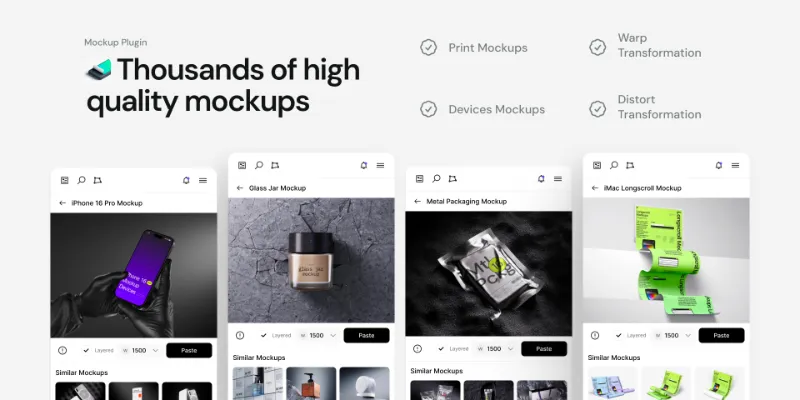
Mockup Plugin covers more than 3,800 device and branding mockups: select a device, choose a frame, and your design fills the screen. It suits designers who need many mockup types from one place, from phones to print. The full library relies on in-app purchases, so casual users may hit limits.1.5M 19KFree + paid - #3
Best free 3D option

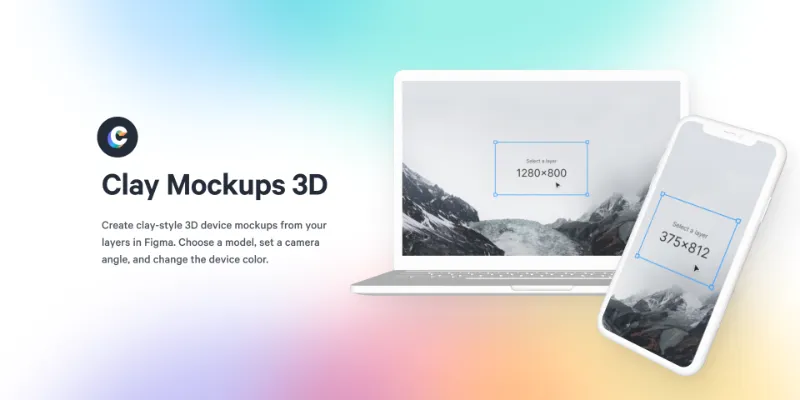
Clay Mockups 3D
by Hamish
Clay Mockups 3D renders your screen on clay-style device models, and you can change the colour, camera angle and device. It's free with no in-app purchases. Its listing names iPhone 11, Pixel 4 and MacBook Pro models, so check the device range suits a brief that calls for current hardware.612K 4.6KFree - #5
Best for perspective vectors

Angle Mockups
by Meng To
Angle Mockups applies screen designs to perspective device mockups, and the plugin is free without an account. Meng To's team sells a larger library of 1,000+ vector mockups on its website. It suits clean product marketing shots rather than photo scenes.467K 3.9KFree
The full list
The 20 most-used Figma plugins for mockups
- 011.5M19KFree + paid
- 02
 935K9.1KFree + paid
 - 03
Clay Mockups 3D
Create mockups with 3D clay-style device models. Customize the color, camera angle, and device model
Free · 4.6K likes
612K4.6KFree - 04
 587K5.7KFree + paid
 - 05467K3.9KFree
- 06
 343K4.2KFree
 - 07

MockRocket
Free + paid · 1.2K likes
335K1.2KFree + paid - 08

Rotato [MacOS] 3D Mockups + Explosions
Rotato for Mac companion plugin. Real 3D. Exploded layers.
Free · 1.6K likes
207K1.6KFree - 09

Mockup3D-Mockup Texturing,Device Mockups,Concept Promotional Mockup
Transform your designs into visually captivating masterpieces.
Free · 440 likes
174K440Free - 10
 160K999Free
 - 11
 158K764Free
 - 12

Visual Mockups
Various mockups and customized angles. Built to transform your design into realistic 3D mockups
Free · 904 likes
91K904Free - 13
 64K639Free
 - 14
 61K237Free
 - 15

3D iPhone & device mockups: promo video + still image
Your designs in real 3D device mockups, right in Figma. Animated. Stills.
Free · 235 likes
57K235Free - 16

Realibox 3D素材&样机(Mockups&Elements)
iPhone Mac 等丰富 3D 样机库,仅需 3 步生成带 UI 的样机图,更有海量 3D emoji、icon 等素材,丰富你的设计
Free · 344 likes
55K344Free - 17

BrandBird
Turn your Figma frames into beautiful mockups with device mockups, 3D effects, and more.
Free + paid · 477 likes
33K477Free + paid - 18
 32K82Free
 - 19
 28K107Free
 - 20
 8K30Free
Buying guide
What to look for
Figma's device presets set frame sizes, and prototype device frames only appear when presenting. There's no native way to place a screen into a photo scene or a 3D device. For case studies, a flat device frame from a UI kit is often enough; plugins pay off for perspective angles, lifestyle photos, and print or branding mockups like posters and packaging.
Check whether a plugin updates when your design changes. Snapshot says its perspective mockups sync in a click, while most others render a one-off image you redo after each edit. For more depth and rotation, see the 3D plugins.
- 01
What the library covers
Devices are standard. Print, branding and apparel mockups are not, so check for business cards, posters or T-shirts if you design beyond screens.
- 02
Synced or one-off
A mockup that re-renders from the source frame saves time during iteration. A one-off render is fine for a final portfolio shot.
- 03
Output quality
Check the export resolution and whether the result is a vector or an image. Vector device frames stay sharp at any size.
- 04
What's free
Several big libraries use in-app purchases for their full range. Clay Mockups 3D, Angle Mockups and 3D Transformer are free with no in-app purchases.
- 05
Setup outside Figma
Rotato's plugin is a companion to the Rotato app for Mac, so it's only useful if you have that app.
FAQ
Frequently asked questions
How do I make a mockup in Figma?
Either place your screen as an image fill inside a device frame from a UI kit, or run a plugin. With Mockup Plugin you select a device, choose the frame to use, and the plugin puts your design on the screen.
Are there free mockup plugins for Figma?
Yes. Clay Mockups 3D, Angle Mockups, 3D Transformer and Easy Mockup are free with no in-app purchases. Mockup Plugin, Artboard Mockups, Mockuuups Studio and MockRocket are free to install with in-app purchases.
How do I make a 3D mockup in Figma?
3D Transformer turns a frame into a 3D mockup, and Clay Mockups 3D renders screens on 3D device models. If you use the Rotato app for Mac, its companion plugin wraps frames in 3D devices with exploded layers.
Can I make print and branding mockups in Figma?
Yes. Mockup Plugin and Artboard Mockups both include branding mockups, Artboard Mockups adds apparel, and Mockuuups Studio now includes print mockups.
Can I make an animated device mockup in Figma?
3D iPhone & device mockups produces animated promo videos as well as still images. For simpler motion, our guide to making a GIF in Figma covers exporting animations.
Keep exploring
Related lists and guides



3D
3D objects and isometric designs
See the top picks


Images & Stock Photos
stock photos and images
See the top picks



Background Remover
removing image backgrounds
See the top picksGuides
- Figma Frame Sizes: Which Preset to Pick and How to Change ItPick a Figma frame size from the Phone, Tablet, Desktop or Paper presets, change an existing frame's size, and why you design at viewport size, not resolution.
- How to View a Figma Prototype on Your PhoneOpen a Figma prototype on a phone with the mobile app, a shared link or Mirror. Plus how to fix a zoomed-in prototype, set the device, and fit it to any screen.
- How to Add an Image in Figma (and Replace It Later)Add images in Figma with Shift+Cmd+K, drag and drop or the fill picker. How to put an image in a shape, replace it, and choose Fill, Fit, Crop or Tile mode.