Best Figma plugins for dummy text and mock data
Content Reel is the most-used Figma plugin for dummy text, with 1.1M users. It fills layers from shared collections of text strings, images and icons, so a team can publish one set of sample customers or prices and everyone pulls from it. For random realistic names, emails or headlines on the spot, Faker (50K users) is quicker.
Top 20 picks



Content Reel
#1 · 1.1M users
Quick answer
Our top picks
- #1
Most used
Content Reel
by Eugene Gavriloff
Content Reel lets you browse or search published collections of text strings, images and icons and drop them into your layers, and you can create your own collections to share. It fits teams that want every designer using the same sample products or users. It's free, though a shared collection takes some setting up before it saves time.1.1M 16KFree - #6
Best for quick placeholder text

Faker
by Cory Etzkorn
Select some objects, pick a type such as names, emails, URLs or headlines, and Faker replaces every text node in the selection. It's free and runs in Figma Design and FigJam. It only generates text, so pair it with another plugin for avatars or photos.50K 762Free - #3
Best for real data

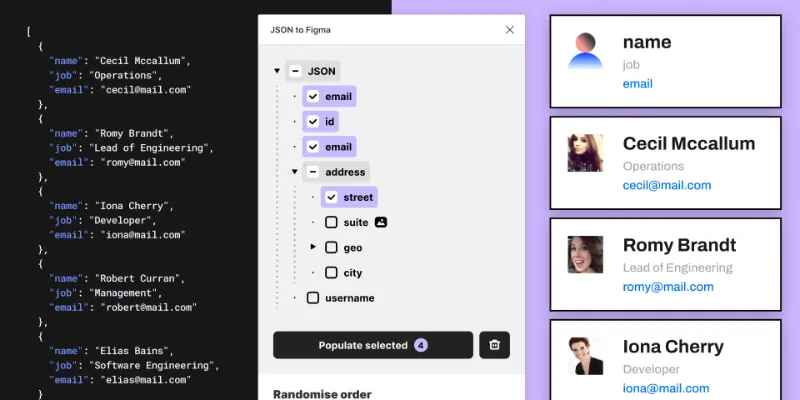
JSON to Figma
by Pavel Laptev
JSON to Figma populates layers with text and images from a local JSON file or a URL, and handles JPG, PNG, WEBP, SVG and GIF images. It suits designers whose developers can hand over a JSON export, so screens reflect real record shapes and lengths. Unlike Content Reel and Faker, it's a paid plugin.87K 931Free + $17
Outside the ranking · Disclosure
The full list
The 20 most-used Figma plugins for mock data & content
- 01
Content Reel
Design layouts more efficiently by pulling text strings, images, and icons.
Free · 16K likes
1.1M16KFree - 02
 167K720Free
 - 0387K931Free + $17
- 04

Avatars
Avatars is a comprehensive collection of diverse and eye-catching avatar images
Free · 868 likes
68K868Free - 05

FishText in Russian by Pavel Sherer
Самый удобный генератор случайного текста, умный Lorem Ipsum на русском языке
Free · 721 likes
50K721Free - 0650K762Free
- 07
 47K1.1KFree
 - 08

Chinese User Data Generator
Free · 954 likes
38K954Free - 09

uiLogos
Lorem ipusm for logos. Insert logos of brands into your figma or figjam file quickly.
Free · 729 likes
32K729Free - 10

Random Text Generator
Free · 132 likes
24K132Free - 11

JSON → Content
Free · 226 likes
17K226Free - 12

RealContent
Add live content from your CMS directly into Figma. See your designs flex with Real Content.
Free · 139 likes
14K139Free - 13
 12K5Free
 - 14
 10K183Free
 - 15

random number generator
Select text layers and replace them with randomly generated numbers, lightning fast.
Free · 59 likes
9.6K59Free - 16
 8.9K48Free
 - 17

CSV Populate
Free · 176 likes
8K176Free - 18
 8K16Free
 - 19
 7.2K9Free
 - 20

Lorem ipsum crypto
Free · 8 likes
7K8Free
Buying guide
What to look for
Figma AI now covers part of this job. Select layers, open the Actions menu with Cmd/Ctrl+K and choose Replace content to swap placeholders for realistic text. Plugins still earn a place when you need the same data every time (a fixed collection, a JSON file, a spreadsheet) or content AI text doesn't give you, like logos, avatars and numbers in a set format.
The top 20 also includes generators for Russian, Chinese and Indian-language text, which are useful for testing how a layout copes with a different script and text length. Our mock data guide walks through the full workflow.
- 01
The data types you need
Names and emails are everywhere. Prices, dates, avatars, company logos and long-tail cases like very long surnames are not, so list the fields in your screens before choosing.
- 02
Random or repeatable
Random data is fine for exploration. For reviews and usability tests you'll want the same records every time, which means a shared collection or a file-based source.
- 03
Filling many layers at once
Check that the plugin fills every selected text layer in one go, including text inside component instances, without detaching them.
- 04
Importing real data
If developers can give you JSON, CSV or a Google Sheet, a plugin that maps fields to layer names gets you screens with production-shaped content.
FAQ
Frequently asked questions
How do I add dummy text in Figma?
Select your text layers and use Replace content from the Actions menu (Cmd/Ctrl+K) for AI-generated text, or run a plugin like Faker or Content Reel for structured data such as names and emails. Our Figma mock data guide compares the methods.
What is the best lorem ipsum plugin for Figma?
Lorem ipsum hides problems like long names and short headlines, so most teams now prefer realistic content from Content Reel or Faker. If you do want lorem ipsum, loremipsum and Random Text Generator are both free.
How do I use data from a spreadsheet in Figma?
Spreadsheet Sync pulls from Google Sheets, CSV Populate reads CSV files, and JSON to Figma handles JSON. To bring in a spreadsheet as a table instead, see importing Excel into Figma.
How do I add placeholder logos to a Figma design?
Logoipsum inserts made-up logos, which is the safe choice for anything public. uiLogos inserts real brand logos; check each brand's usage rules before a design using them leaves your team.
Can Figma AI generate placeholder content?
Yes. Replace content in the Actions menu writes realistic text into selected layers, and Make image generates images from a prompt. Results change on every run, so for test data you need to reproduce exactly, use a file-based plugin instead.
Keep exploring
Related lists and guides




Tables
tables and spreadsheet data
See the top picks



Images & Stock Photos
stock photos and images
See the top picks



AI
AI-powered design
See the top picksGuides
- How to Add Realistic Mock Data in FigmaHow to fill Figma designs with realistic mock data: names, emails, addresses, and AI-written text. Native Figma AI, lorem ipsum plugins, and Mock Master AI.
- How to Import an Excel Table into FigmaFigma Design can't paste Excel cells as a table. Build one with auto layout, fill it from CSV or Google Sheets, or import .xlsx files with a free plugin.
- How to make a table in FigmaFigma Design has no table tool. Build one from a cell component and nested auto layout, add rows in one keystroke, or generate a styled table with a plugin.