
On this page
About AUTO FLOW
AUTO FLOW is a free Figma plugin published by Andrey Pelmegov in 2025. It works in Figma Design and has 15,192 users and 69 likes on the Figma Community. It ranks #11 in Flowcharts & User Flows on our lists.
In the developer's words
⚡️⚡️⚡️ How to BOOST plugin speed ⚡️⚡️⚡️
- In your project create page with name «Auto Flow Plugin»
- Copy connector to this page
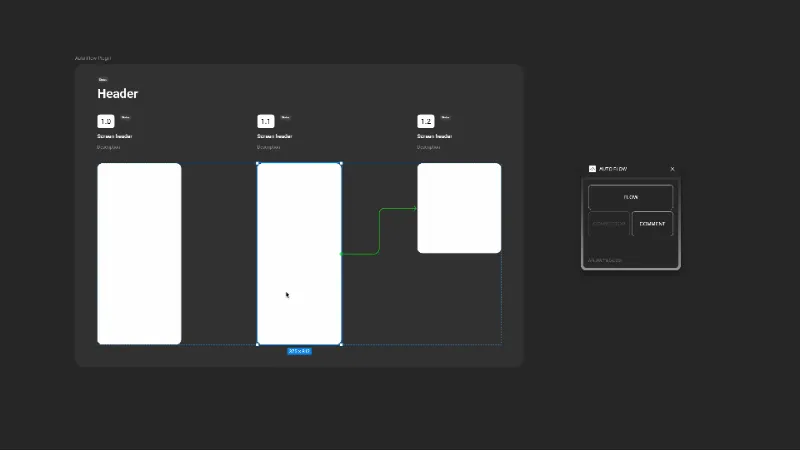
Easy create flow
Choose your designs and create user flow by one button with:
– flow name
– flow status
– screen name & description
– screen status
– automatic screen number
Add arrows between elements (FigJam connector in Figma):
Select two elements and click Connector button. Need to have 1 connector in project.
Free annotations
Without paid plan. Just click on Comment button and plugin create it in the center. Or select an element and you'll get an annotation linked with element using a flexible connector
What's new
Version 6 · released Oct 24, 2025
- Easy run: add plugin to right panel Figma
Permissions and privacy
Network access
AUTO FLOW declares no network access, so it runs entirely inside Figma and can't send your file anywhere.
Extra permissions
None beyond the standard access to the file you run it in.
Read from the plugin's published manifest.
Where AUTO FLOW ranks
AUTO FLOW alternatives
- 1

Simpleflow
by Lichin
107K users1.9KFree + $10 upgrade🪄 Create flowcharts in Figma with native FigJam connectors — stay perfectly in sync as you design!
- 2

ProToFlow
by Saeed Alipoor
81K users1.1KFreeGenerate Flow Arrows based on Prototype Interactions
- 3

Simple Arrow Drawer
by John Cho
70K users85FreeSimple Arrow Drawer
- 4

Mermaid in Figma
by art
46K users291FreeEnable to use Mermaid code in Figma
- 5

Flowy
by Nathan
41K users439FreeEffortlessly create and customize connections (user flows) between components in Figma.
- 6
Flow Connect
by Yunser
33K users27Free
AUTO FLOW FAQ
What does AUTO FLOW do?
Create flow, add figjam connector, free annotation. It's a Figma plugin by Andrey Pelmegov that runs in Figma Design.
Is AUTO FLOW free?
Yes. AUTO FLOW is free to install and run from the Figma Community, with no paid tier listed.
Is AUTO FLOW safe to use?
Figma plugins can only reach the internet through domains listed in their manifest. AUTO FLOW declares no network access, so it runs entirely inside Figma and can't send your file anywhere. As with any plugin, check the developer's privacy policy before using it on client work.
How do I install AUTO FLOW?
Open it on the Figma Community, or search for it in the Actions menu (Cmd/Ctrl + K) inside any file you can edit. See how to install Figma plugins.
What are the best alternatives to AUTO FLOW?
By user count, the closest alternatives are Simpleflow, ProToFlow and Simple Arrow Drawer. Compare all of them on the best Figma plugins for flowcharts & user flows.
Built this plugin?
Use this page as a landing page for AUTO FLOW: link to it from your site, README or launch posts, or add a badge. Pick a style and copy the code.

Style
Label
Size
Code
<a href="https://figmaplugins.co/plugins/auto-flow/" target="_blank" rel="noopener"><img src="https://figmaplugins.co/badges/featured-dark.svg" alt="AUTO FLOW on figmaplugins.co" width="220" height="48"></a>