
On this page
About Balloon Annotations
Balloon Annotations is a free Figma plugin published by Christian Schmidt in 2023. It works in Figma Design and has 3,647 users and 29 likes on the Figma Community. It ranks #17 in Annotations on our lists.
In the developer's words
A simple little annotation plugin as my first contribution to the Figma communiy. I developed it primarily for myself and my team. But feel free to use it if you like it.
Instructions for use
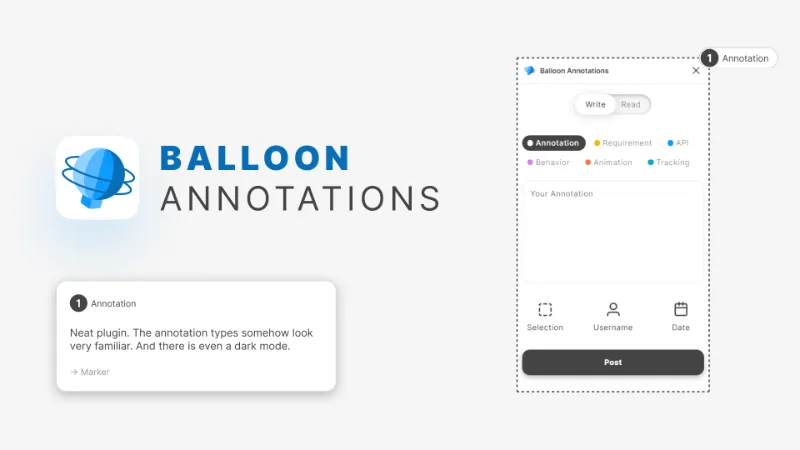
1. [optional] Select a frame, component, section, etc.
2. Choose the annotation type
3. Write your annotation
4. Make a few settings
- Outline selection
- Show usernames
- Show date
5. Post your annotation
Under the "Read" tab, all annotations on the current page of the document are listed.
A few notes
- Annotations can be edited later in the respective frame. Text changes are also applied under the "Read" tab after a refresh of the list.
- The "Read" list can be refreshed by clicking on "Write" and then on "Read" again.
- If the number is subsequently changed, only the number from the annotation is taken into account in the "Read" list, not the number from the marker.
- The automatic incrementing of numbers only takes integers into account. (no a, b, c etc.)
- If an annotation is deleted, it is no longer shown in the "Read" list after a refresh.
- Missing numbers in the sequence are automatically replaced with the next annotation ( integers only)
Please be patient with me, I'm a designer for a living and a developer for fun.
What's new
Version 2 · released Jan 19, 2024
- New annotation type: Accessibility
- Annotations in the "Read" list are now sorted by their number
Permissions and privacy
Network access
Balloon Annotations declares no network access, so it runs entirely inside Figma and can't send your file anywhere.
Extra permissions
- Reads your Figma name and avatar
Read from the plugin's published manifest.
Where Balloon Annotations ranks
Balloon Annotations alternatives
- 1

Measure
by Philip
158K users3.2KFreeAdd measurement lines and additional helpful information to your designs
- 2

Redlines
by Danny Keane
141K users3.8KFree - 3

Specs Classic
by Directed Edges Plugins
136K users5.5KFree + $8/mo upgradeGenerate component specs including anatomy, props and layout & spacing
- 4

DesignDoc [Spectral]: Measures, Annotations, and Handoff
by Marka Plugin Dev
132K users3KFree📐 Effortlessly hand off your Figma designs to the development team
- 5

Accessibility Assistant
by Eugene Gavriloff
38K users1.6KFreeAdd reader output and focus order to your layout
- 6

Annotate Design
by Alexandru Buncea
35K users485FreeQuickly add annotations to your designs
Balloon Annotations FAQ
What does Balloon Annotations do?
Write simple annotations on your designs to better collaborate with your team. It's a Figma plugin by Christian Schmidt that runs in Figma Design.
Is Balloon Annotations free?
Yes. Balloon Annotations is free to install and run from the Figma Community, with no paid tier listed.
Is Balloon Annotations safe to use?
Figma plugins can only reach the internet through domains listed in their manifest. Balloon Annotations declares no network access, so it runs entirely inside Figma and can't send your file anywhere. As with any plugin, check the developer's privacy policy before using it on client work.
How do I install Balloon Annotations?
Open it on the Figma Community, or search for it in the Actions menu (Cmd/Ctrl + K) inside any file you can edit. See how to install Figma plugins.
What are the best alternatives to Balloon Annotations?
By user count, the closest alternatives are Measure, Redlines and Specs Classic. Compare all of them on the best Figma plugins for annotations.
Built this plugin?
Use this page as a landing page for Balloon Annotations: link to it from your site, README or launch posts, or add a badge. Pick a style and copy the code.

Style
Label
Size
Code
<a href="https://figmaplugins.co/plugins/balloon-annotations/" target="_blank" rel="noopener"><img src="https://figmaplugins.co/badges/featured-dark.svg" alt="Balloon Annotations on figmaplugins.co" width="220" height="48"></a>