
On this page
About Color Variables Style Guide Generator
Color Variables Style Guide Generator is a free Figma plugin published by Jan Gugler in 2024. It works in Figma Design and has 18,251 users and 393 likes on the Figma Community.
In the developer's words
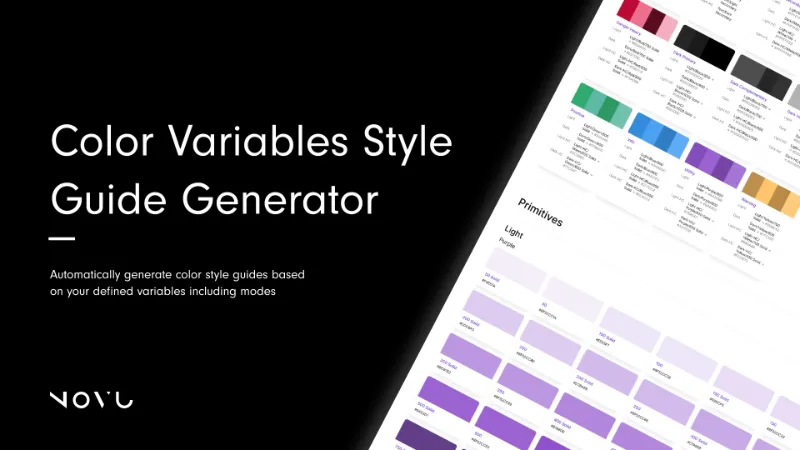
This plugin enables you to generate a color style guide based on your local variables.
Tailored for teams following the Tailwind Design system and its naming convention (e.g., "Blue/500"), the generator displays styles in sections according to the defined groups in the variables panel, with subgroups if applicable.
For each color, a swatch is generated. If the collection includes modes, these will be displayed alongside the color swatches, showing the hex code or referenced variable for each mode. The generator traces references to display the hex code of the original variable. However, if a referenced variable includes modes, it will simply display the variable name, as determining the hex code in such cases is not feasible.
Enjoy and looking forward to your feedback.
What's new
Version 1 · released Mar 28, 2024
- Text fixes
Permissions and privacy
Network access
Color Variables Style Guide Generator declares no network access, so it runs entirely inside Figma and can't send your file anywhere.
Extra permissions
None beyond the standard access to the file you run it in.
Read from the plugin's published manifest.
Color Variables Style Guide Generator alternatives
- 1
Table Creator
by Gavin McFarland
827K users6.8KFreeEasily create tables that can be edited, resized and maintained using your design system
- 2

Table Generator & Creator
by Appcano
207K users1.2KFree + $2/mo upgradeGenerate and customize tables in seconds
- 3

Design System Organizer
by Arthur
205K users3.1KFree + paid featuresExtended swap for variables/styles/components, export variables/styles, bulk-audit library & mockups
- 4

Rename It
by Rodrigo Soares
201K users3.7KFree - 5

Tablefy
by Kiko Herrschaft
195K users256Free - 6

Downsize
by Alex Einarsson
153K users2.2KFreeCompress and resize images without leaving Figma!
Color Variables Style Guide Generator FAQ
What does Color Variables Style Guide Generator do?
Automatically generate color style guides based on your defined variables including modes. It's a Figma plugin by Jan Gugler that runs in Figma Design.
Is Color Variables Style Guide Generator free?
Yes. Color Variables Style Guide Generator is free to install and run from the Figma Community, with no paid tier listed.
Is Color Variables Style Guide Generator safe to use?
Figma plugins can only reach the internet through domains listed in their manifest. Color Variables Style Guide Generator declares no network access, so it runs entirely inside Figma and can't send your file anywhere. As with any plugin, check the developer's privacy policy before using it on client work.
How do I install Color Variables Style Guide Generator?
Open it on the Figma Community, or search for it in the Actions menu (Cmd/Ctrl + K) inside any file you can edit. See how to install Figma plugins.
What are the best alternatives to Color Variables Style Guide Generator?
By user count, the closest alternatives are Table Creator by Gavin McFarland, Table Generator & Creator and Design System Organizer.
Built this plugin?
Use this page as a landing page for Color Variables Style Guide Generator: link to it from your site, README or launch posts, or add a badge. Pick a style and copy the code.

Style
Label
Size
Code
<a href="https://figmaplugins.co/plugins/color-variables-style-guide-generator/" target="_blank" rel="noopener"><img src="https://figmaplugins.co/badges/featured-dark.svg" alt="Color Variables Style Guide Generator on figmaplugins.co" width="220" height="48"></a>Want it featured on figmaplugins.co? Submit it for review