
On this page
About Frame Renamer
Frame Renamer is a free Figma plugin published by Sascha Wohlgemuth in 2023. It works in Figma Design and has 25,586 users and 117 likes on the Figma Community. It ranks #18 in Layer Management on our lists.
In the developer's words
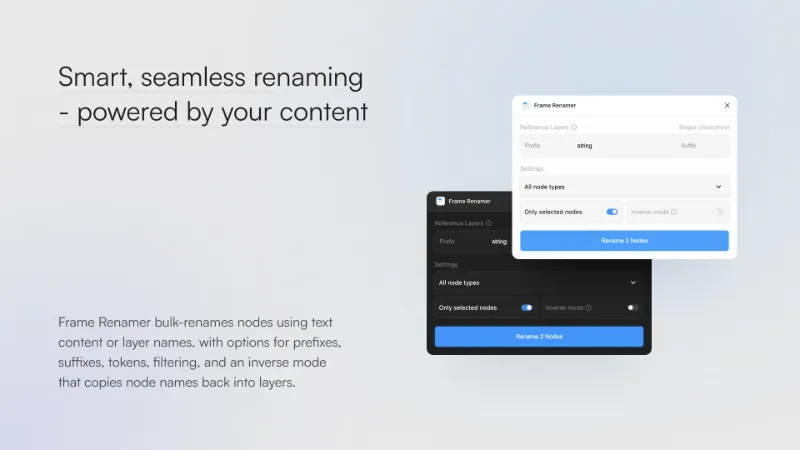
Frame Renamer renames frames, components, slices, sections, and more using the characters from one or more text layers you specify. Build names from a prefix, base layer, and suffix - each can come from another layer or be plain text. Use {+…} tokens to insert custom snippets or {‑…}/{‑/regex/} tokens to strip out text, and optionally run in inverse mode to write node names back into the source layer instead.
View the Regex cheatsheet here.
How to Use
- Fill Prefix / Layer / Suffix: Enter any combination of prefix, base layer, and suffix lookups. Each field can reference another layer (text content or descendant node names) or literal text, and none of them ship with a default value—"Headline" is only used if you type it. Tokens such as {+…} and {‑…} work in every field, letting you insert extra strings or strip matched fragments. Wrap patterns in slashes—/pattern/flags—to run regex lookups; without slashes the value is matched literally. When inverse mode is enabled, the composed result is written back into the matched text node instead of the node name.
- Select Nodes: Manually select the nodes you want to rename. If nothing is selected, the plugin targets every supported node on the current page.
- Choose Node Type: Use the dropdown to restrict renaming to a specific node type, or leave it on "All" to rename every supported type.
- Toggle & Rename: Use the "Only selected nodes" checkbox to choose between renaming every eligible node or just your selection. Enable "Inverse mode" to mirror node names into the referenced text node (with optional prefix and suffix) instead of renaming the node itself. Click "Rename" to run the scan; the button displays a spinner and progress text while nodes are processed.
- Review: After the renaming process is complete, review the nodes to ensure they meet your requirements.
Core Features
- Multi-layer Composition: Combine prefix, base layer, and suffix references to build node names from multiple sources in a single pass.
- Token-aware Editing: Use {+…} insertions and {‑…} exclusions in any field to fine-tune how text is inserted or removed.
- Selective Renaming: Choose to rename either all nodes on the current page or only those you've selected.
- Node Type Filtering: Limit the operation to a single node type or apply it to all supported types.
- Batch Renaming: Rename multiple nodes at once using content pulled from referenced layers.
- Inverse Mode: Optionally write each node's current name into the referenced text node (alongside prefix and suffix edits) instead of renaming the node.
Key Benefits
- Efficiency: Save time and effort by composing node names from layered references and running batch updates.
- Flexibility: Tailor the workflow with token-driven insert/strip operations, selective targeting, and inverse mode.
- Clarity: Maintain a cleaner, more organized project by keeping node names in sync with underlying text content.
- User-Friendly: The plugin features an intuitive interface with straightforward options, making it accessible for users of all skill levels.
What's new
Version 10 · released Nov 6, 2025
- Documented and added a link to a concise cheatsheet of common Regex tokens and usage notes.
- Expanded the README instructions to explain how literal and regex lookups behave, where matches are sourced from, and how capturing groups influence the renamed text.
- When a literal pattern hits a text layer, the plugin now feeds the actual characters into downstream renames instead of the layer name, ensuring the frame inherits the visible copy users expect.
- Introduced a regex: prefix that accepts either bare patterns or /pattern/flags syntax, making it easier to toggle regex mode without relying solely on leading and trailing slashes.
- Refactored the matcher to walk descendant nodes, run regex searches against both layer names and text contents, and return capture groups when available.
Permissions and privacy
Network access
Frame Renamer declares no network access, so it runs entirely inside Figma and can't send your file anywhere.
Extra permissions
None beyond the standard access to the file you run it in.
Read from the plugin's published manifest.
Where Frame Renamer ranks
Frame Renamer alternatives
- 1

Find and Replace
by Jackie Chui
223K users2.6KFreeFind and replace text in your file like a text editor
- 2

Rename It
by Rodrigo Soares
197K users3.6KFree - 3

Detach Component
by Patrick Morgan
140K users1.3KFree - 4

Similayer
by Dave
136K users3.1KFree - 5

Clean Document
by Yuan Qing Lim
124K users3KFree + paid featuresAutomagically organize and clean up your Figma document
- 6

Sorter
by Tom
81K users1.5KFreeQuickly sort layers in different ways
Frame Renamer FAQ
What does Frame Renamer do?
Smart, seamless renaming - powered by your content. It's a Figma plugin by Sascha Wohlgemuth that runs in Figma Design.
Is Frame Renamer free?
Yes. Frame Renamer is free to install and run from the Figma Community, with no paid tier listed.
Is Frame Renamer safe to use?
Figma plugins can only reach the internet through domains listed in their manifest. Frame Renamer declares no network access, so it runs entirely inside Figma and can't send your file anywhere. As with any plugin, check the developer's privacy policy before using it on client work.
How do I install Frame Renamer?
Open it on the Figma Community, or search for it in the Actions menu (Cmd/Ctrl + K) inside any file you can edit. See how to install Figma plugins.
What are the best alternatives to Frame Renamer?
By user count, the closest alternatives are Find and Replace by Jackie Chui, Rename It and Detach Component. Compare all of them on the best Figma plugins for layer management.
Built this plugin?
Use this page as a landing page for Frame Renamer: link to it from your site, README or launch posts, or add a badge. Pick a style and copy the code.

Style
Label
Size
Code
<a href="https://figmaplugins.co/plugins/frame-renamer/" target="_blank" rel="noopener"><img src="https://figmaplugins.co/badges/featured-dark.svg" alt="Frame Renamer on figmaplugins.co" width="220" height="48"></a>