
On this page
About GradientForge
GradientForge is a free Figma plugin published by Pavel Kolesnikov in 2025. It works in Figma Design, Figma Slides and FigJam and has 35,563 users and 86 likes on the Figma Community. It ranks #17 in Best of 2025 on our lists.
In the developer's words
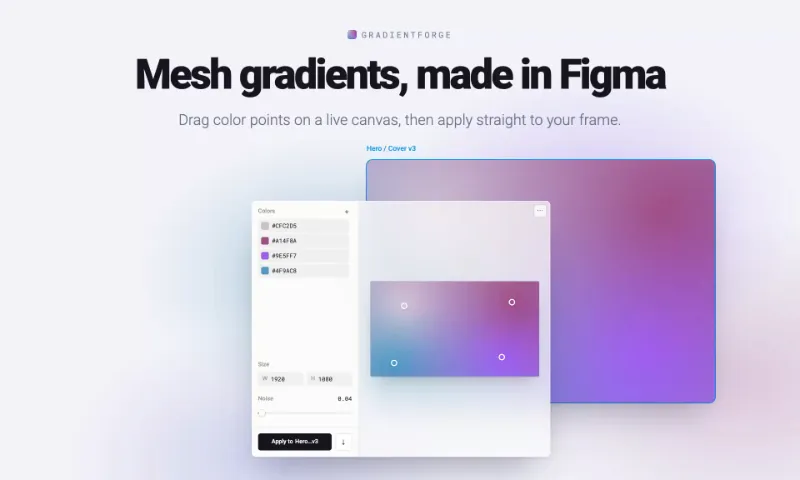
This tool allows you to create beautiful mesh gradients with customizable color points. You can:
- Add and remove color points
- Adjust colors using the color picker
- Apply noise effect to your gradients
- Change the aspect ratio
- Apply gradients directly to your designs
- Or save them as PNG files
The gradients are generated using WebGL and RBF interpolation for smooth performance and high-quality output.
Website version: https://pkolesnikov.com/meshgradients
What's new
Version 20 · released Apr 19, 2026
The developer didn't publish release notes for this version.
Permissions and privacy
Network access
GradientForge's manifest allows network access to any domain ("*"), so Figma doesn't limit where it can send data.
- *
- pkolesnikov.com
- fonts.googleapis.com
- fonts.gstatic.com
- firebase.googleapis.com
- www.googletagmanager.com
- *.google-analytics.com
- *.googleapis.com
Extra permissions
- Reads your Figma name and avatar
Read from the plugin's published manifest.
Where GradientForge ranks
GradientForge alternatives
- 1

Icons Library + 300,000 icon
by sadik sajid
231K users554FreeAccess 300,000+ free icons instantly inside Figma!
- 2

Iconoir Icons Library iconfy alternative
by sadik sajid
112K users133Free🧩 Iconoir Icons by Iconify – Free, modern, and fully customizable icons for your Figma designs 🎨
- 3

image.to.design
by divRIOTS
92K users2.2KFreeImport images or screenshots as editable layers
- 4

Curved Text
by Dee
86K users262FreeCreate text along curved paths. Customize text properties and add background images.
- 5

Magic Animator • AI Animation Generator for Figma
by Alistair Thomson
74K users3.4KFreeAnimate your Figma designs with AI - generate editable motion, export as Lottie / GIF / MP4
- 6

Talk To Figma MCP Plugin
by Sonny Lazuardi
73K users2.3KFreeAllowing Cursor to communicate with Figma for reading designs and modifying them programmatically
GradientForge FAQ
What does GradientForge do?
Customizable gradients generator. It's a Figma plugin by Pavel Kolesnikov that runs in Figma Design, Figma Slides and FigJam.
Is GradientForge free?
Yes. GradientForge is free to install and run from the Figma Community, with no paid tier listed.
Is GradientForge safe to use?
Figma plugins can only reach the internet through domains listed in their manifest. GradientForge's manifest allows network access to any domain ("*"), so Figma doesn't limit where it can send data. As with any plugin, check the developer's privacy policy before using it on client work.
How do I install GradientForge?
Open it on the Figma Community, or search for it in the Actions menu (Cmd/Ctrl + K) inside any file you can edit. See how to install Figma plugins.
What are the best alternatives to GradientForge?
By user count, the closest alternatives are Icons Library + 300,000 icon, Iconoir Icons Library iconfy alternative and image.to.design. Compare all of them on the best Figma plugins for best of 2025.
Built this plugin?
Use this page as a landing page for GradientForge: link to it from your site, README or launch posts, or add a badge. Pick a style and copy the code.

Style
Label
Size
Code
<a href="https://figmaplugins.co/plugins/gradientforge/" target="_blank" rel="noopener"><img src="https://figmaplugins.co/badges/featured-dark.svg" alt="GradientForge on figmaplugins.co" width="220" height="48"></a>Want it featured on figmaplugins.co? Submit it for review