
On this page
About IconScout
IconScout is a free + paid features Figma plugin published by IconScout in 2019. It works in Figma Design, Figma Slides and FigJam and has 1,180,333 users and 4,658 likes on the Figma Community. It ranks #2 in Illustrations and #3 in Figma Slides on our lists.
In the developer's words
🎨 IconScout For Figma - Access 14.1 Million+ Design Assets seamlessly right within Figma
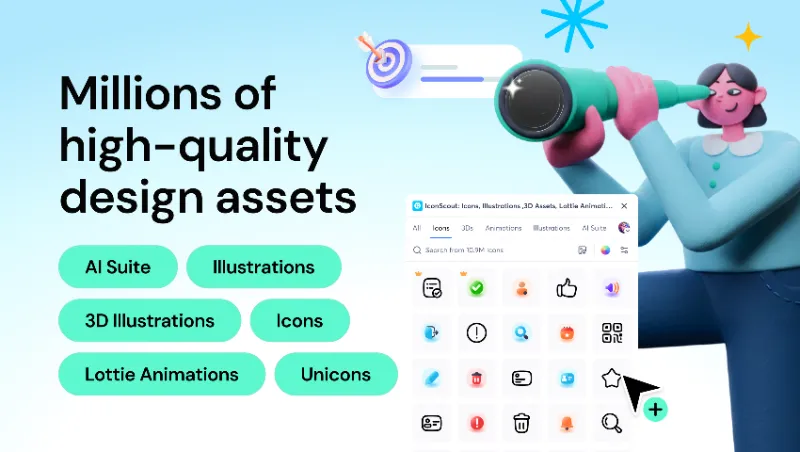
Unleash your creativity with IconScout for Figma, the ultimate Figma plugin that takes your designs to the next level. Whether you’re a seasoned pro or just starting out, our feature-packed plugin has essential design elements and premium content.
Bring your designs to life without leaving Figma, ready for any digital platform.
Key Features:
👥 Guest Mode: Let your creativity shine without the hassle of login – accessible for everyone.
🖼️ Icons: Explore a vast library of millions of icons to enhance your user interface effortlessly.
🌐 3D Icons: Add depth and realism with stunning 3D icons featuring 360 glTF views.
🚀 Lottie Animations: Boost user engagement by incorporating dynamic and engaging Lottie animations.
💎 Illustrations: Infuse personality into your projects with a diverse collection of illustrations.
🌟 Unicons as Default Profile (Enhanced Icon Experience): We've made Unicons the default profile in the plugin's sidebar. With their sleek and modern design, Unicons provide a versatile and high-quality icon set ready to use in your projects.
🌈 Lottie Color Swapper: Change colors in your Lottie animations effortlessly. Customize and fine-tune your designs like never before.
🎨 Custom Color Palette: Tailor your designs precisely using our custom color palette feature.
🔎 Reverse Image Search: Discover a world of inspiration with our powerful Reverse Image Search feature, finding similar images effortlessly.
💼 Team Access: You can collaborate with your team members never like before. Share and access design assets with your entire team directly inside the IconScout Figma plugin. It will allow you to use your team color palette and collections to simplified your team work efficiency.
💎 Premium Content: Level up your designs with premium icons, illustrations, 3D illustrations and Lottie animations.
✨ AI Asset Generator: Instantly generate custom icons, illustrations and 3D assets using prompts – no design skills required.
🧩 PNG to SVG Vectorizer: Turn raster images into clean, scalable SVGs with a single click.
🧼 Background Remover: Remove image backgrounds using the AI and keep your focus on what matters.
⚙️ How to Use:
- Install IconScout for Figma from the Figma community.
- Explore a world of design possibilities – 3D Icons, Lottie Animations, Icons, and Illustrations.
- Customize effortlessly with the built-in color palette and unlock premium content with a subscription.
💬 Feedback & Support: Your feedback is invaluable to us! Reach out for comments, inquiries, or assistance at support@iconscout.com.
Contact Us:
Instagram · X (formerly Twitter) · LinkedIn · Facebook · Dribbble
Learn more about the IconScout for Figma plugin at https://iconscout.com/figma
What's new
Version 28 · released May 29, 2025
- 🚀 Release Notes – Version 2.6.3
- We’re excited to bring you a major update to the IconScout Plugin for Figma and Figma Slides! This version introduces powerful AI tools, enhanced customization features, and access to 11.3 million+ design assets.
- 🎉🌟 What's New?
- 🤖 AI-Powered Design Tools
- ✨ AI Asset Generator
- Instantly generate custom illustrations and 3D assets using prompts – no design skills required.
- 🧩 PNG to SVG Vectorizer
- Turn raster images into clean, scalable SVGs with a single click.
- 🧼 Background Remover
- Remove image backgrounds using the AI and keep your focus on what matters.
- 📥 Update Now!
- Upgrade to the latest version of the IconScout plugin and experience smarter, faster, and more creative workflows — now in Figma and Figma Slides.
- As always, we love hearing from you. Share your feedback or queries at support@iconscout.com
Permissions and privacy
Network access
This plugin's manifest doesn't declare its network access, which is common for older plugins. Figma shows a warning on the Community page for plugins like this.
Extra permissions
None beyond the standard access to the file you run it in.
Read from the plugin's published manifest.
Where IconScout ranks
IconScout alternatives
- 1

Icons8
by Icons8 Team
2.3M users9.7KFree + paid featuresAll our graphics at your fingertips.
- 2

Blush
by Pablo Stanley
666K users12KFree + paid features - 3

Illustrations
by Manthankumar Satani
483K users5.2KFreeFree Popular Illustration libraries for everyone.
- 4

Streamline
by Streamline
469K users6.5KFree + paid features🏆 Voted Figma's Best Graphic Design Resource at Config
- 5

Flaticon by Magnific
by Freepik: Integrations
369K users2KFree + paid featuresSearch through 5,000,000+ pixel-perfect icons, stickers and vectors (from Freepik)
- 6

Storyset by Magnific
by Freepik: Integrations
365K users5.2KFreeAccess over 50,000 customizable illustrations from Magnific
IconScout FAQ
What does IconScout do?
Access 14.1M+ Free & Premium Icons, 3D, Illustrations & Lottie Animations. Stickers, Logos & Emojis. It's a Figma plugin by IconScout that runs in Figma Design, Figma Slides and FigJam.
Is IconScout free?
IconScout is free to install, but some features are unlocked through a paid plan on the developer's site.
How do I install IconScout?
Open it on the Figma Community, or search for it in the Actions menu (Cmd/Ctrl + K) inside any file you can edit. See how to install Figma plugins.
What are the best alternatives to IconScout?
By user count, the closest alternatives are Icons8, Blush and Illustrations. Compare all of them on the best Figma plugins for illustrations.
Built this plugin?
Use this page as a landing page for IconScout: link to it from your site, README or launch posts, or add a badge. Pick a style and copy the code.

Style
Label
Size
Code
<a href="https://figmaplugins.co/plugins/iconscout/" target="_blank" rel="noopener"><img src="https://figmaplugins.co/badges/featured-dark.svg" alt="IconScout on figmaplugins.co" width="220" height="48"></a>