
About Jitter
Jitter is a free Figma plugin published by Jitter in 2021. It works in Figma Buzz, Figma Design and Figma Slides and has 507,216 users and 11,562 likes on the Figma Community. It ranks #3 in Animation and #6 in Figma Slides on our lists.
In the developer's words
Jitter is a fast and simple animation tool on the web:
- ✨ Animate all your interfaces (mobile apps, websites, landing pages, micro-interactions…) and content (social media, videos, ads…)
- 🎬 Export as a video, GIF, or Lottie
- 📐 Create your motion design system
- 🤖 Hand off the animation specs to the developers
- 🤝 Hand off your animated templates to the marketing team
It’s like Figma, but for motion design. 💫
How to use the plugin
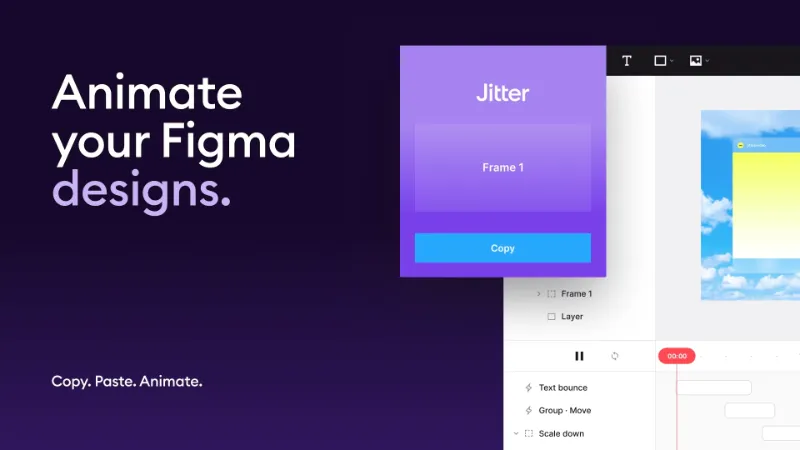
- Select a frame or layer in Figma, and click the “Copy” button on the plugin
- Open a new Jitter file and hit ⌘V to paste
- Animate ✨
Pro tip: Hit ⇧⌘V to update a layer in Jitter (use shift + ctrl + V on Windows): we’ll sync your changes from Figma and keep your animations in place.
Features
Pixel-perfect import
Import your designs in Jitter in 1 click: they look exactly like Figma. It feels like magic. ✨
Text animations
Animate the letters, words and lines of your titles and texts super easily.
Animation presets
Explore ideas faster with animation presets: add presets to your layers in one click, customize everything afterwards.
Customize everything
We give you full design control over the animation parameters. Your imagination is the limit.
Export to video, GIF and Lottie
Export your animated designs as videos (up to 4K and 60 fps in the .mp4, .mov and .webm formats), GIF, and Lottie. You can even export videos and GIFs with a transparent background.
Handoff your animation parameters to developers
Share your file URL with the developers so that they can inspect the animation parameters: they will get all the information they need to recreate your animations autonomously.
FAQ
What can I do with the plugin?
You can import your Figma files into Jitter, and animate them easily. To do so:
1. Select a frame or layer in Figma and click the “Copy” button on the plugin
2. From there, you can:
- Create a new Jitter file → Click the “Open in Jitter” button in the plugin
- Paste in Jitter → Open a Jitter file and hit ⌘V (use ctrl + V on Windows)
- Sync your changes from Figma → In Jitter, select your layer and hit ⇧⌘V (use shift + ctrl + V on Windows): we’ll update it with the latest changes from Figma, and keep your animations in place
3. Animate ✨
What kind of animations can I do with Jitter?
You can animate anything with Jitter: whether you are designing an interface, an app, a website, an illustration, a presentation video, a social media post, an Instagram story, a YouTube intro, or anything else, you can import your design into Jitter in 1 click and animate right away. We are a design tool like Figma, so we give you total control over the parameters: your imagination is the limit.
Can I export to Lottie?
Yes, Jitter actually the best workflow to do that today: you can import your Figma designs in 1 click with this plugin, add your animations in Jitter, and export to the Lottie format. Then you can include your Lottie animations to your apps, websites, Webflow projects, LottieFiles workspace, or anything else.
Can I design micro-interactions?
Yes, you can animate all the basic properties of your layers, groups, and masks: position, size, rotation, scale, opacity, corner radius, shadow, stroke…
How are you different from other plugins?
We use a unique way to make animations: After Effects and most animations plugins (e.g. Motion, Figmotion, Aninix, SVG Motion, Bannerify and the other Figmatic plugins…) use the traditional keyframe system, which is complex to use.
Instead, we use an animation model where we give instructions to the layers (like “Slide in”, “Fade out”…): building an animation is more intuitive, and the timeline is easy to read.
In fact, creating animations in Jitter is as simple as building an animation in PowerPoint or Keynote, but you have total control over the parameters: Jitter is a modern alternative to After Effects, with no learning curve. It's fast, simple, and collaborative.
I found a bug, what should I do?
If you encounter any bugs, please reach out to us at support@jitter.video and we'll be able to fix it rapidly! ⚡️
Known limitations
Our priority is to make a pixel-perfect import. We support most Figma properties natively in Jitter. For layers with unsupported properties, we convert them to PNG or SVG so that you always get a pixel-perfect version in Jitter.
A layer will be exported as a PNG or SVG if it has one of these properties:
- Rich text (different colors or font weights in the same text layer)
- Variable font
- Independent corner radius
- Gradient fill on text layers
- Multiple fills
- Gradient stroke
- Individual stroke
- Multiple strokes
- Multiple shadows
Here are the other known limitations:
- You can only export 1 frame or layer at a time
- Blend modes are not supported in Jitter
- Only simple masks are supported in Jitter (when the masking layer is the last layer of the group) – in all other cases, mask groups are exported as images
Contact
If you want to share your feedback, please reach out to us at support@jitter.video.
What's new
Version 55 · released Jun 1, 2026
The developer didn't publish release notes for this version.
Permissions and privacy
Network access
Jitter can only connect to the 6 domains declared in its manifest: assets.jitter.video, figma-plugin-backend-prod1.jitter.video, figma-plugin-backend-prod2.jitter.video, snackthis-userdata-tmp.s3.eu-west-1.amazonaws.com, sentry.jitter.video and *.amplitude.com.
- assets.jitter.video
- figma-plugin-backend-prod1.jitter.video
- figma-plugin-backend-prod2.jitter.video
- snackthis-userdata-tmp.s3.eu-west-1.amazonaws.com
- sentry.jitter.video
- *.amplitude.com
Extra permissions
None beyond the standard access to the file you run it in.
Read from the plugin's published manifest.
Where Jitter ranks
Jitter alternatives
- 1

LottieFiles
by LottieFiles
990K users15KFreeAnimate Your Designs with Lottie Animations
- 2

Figmotion
by L
513K users7.4KFreeBringing motion to your Figma designs
- 3

Motion
by Pavel Babkin
367K users5.6KFree + paid featuresAnimate UI in Figma. Export to video, GIF, SVG.
- 4

Export to GIF/Video
by Evan at CreativeFlow
311K users3KFree + paid featuresExport animations to GIF or Video in one-click
- 5

Aninix
by Tony Pinkevych
160K users2.4KFree + paid featuresCreate motion design within Figma. Export Lottie animations, GIFs, or mp4.
- 6

SVG motion
by Vladislav
142K users2.9KFree + paid featuresPlugin for Figma which helps to create attractive animations for your product.
Jitter FAQ
What does Jitter do?
Animate your Figma designs, export to video / GIF / Lottie, handoff animation specs to developers. It's a Figma plugin by Jitter that runs in Figma Buzz, Figma Design and Figma Slides.
Is Jitter free?
Yes. Jitter is free to install and run from the Figma Community, with no paid tier listed.
Is Jitter safe to use?
Figma plugins can only reach the internet through domains listed in their manifest. Jitter can only connect to the 6 domains declared in its manifest: assets.jitter.video, figma-plugin-backend-prod1.jitter.video, figma-plugin-backend-prod2.jitter.video, snackthis-userdata-tmp.s3.eu-west-1.amazonaws.com, sentry.jitter.video and *.amplitude.com. As with any plugin, check the developer's privacy policy before using it on client work.
How do I install Jitter?
Open it on the Figma Community, or search for it in the Actions menu (Cmd/Ctrl + K) inside any file you can edit. See how to install Figma plugins.
What are the best alternatives to Jitter?
By user count, the closest alternatives are LottieFiles, Figmotion and Motion. Compare all of them on the best Figma plugins for animation.
Built this plugin?
Use this page as a landing page for Jitter: link to it from your site, README or launch posts, or add a badge. Pick a style and copy the code.

Style
Label
Size
Code
<a href="https://figmaplugins.co/plugins/jitter/" target="_blank" rel="noopener"><img src="https://figmaplugins.co/badges/featured-dark.svg" alt="Jitter on figmaplugins.co" width="220" height="48"></a>