
On this page
About Similayer
Similayer is a free Figma plugin published by Dave in 2019. It works in Figma Design and FigJam and has 136,264 users and 3,150 likes on the Figma Community. It ranks #4 in Layer Management on our lists.
In the developer's words
This plugin takes Figma’s in-built ‘Select all with...’ command to the next level. 🔥
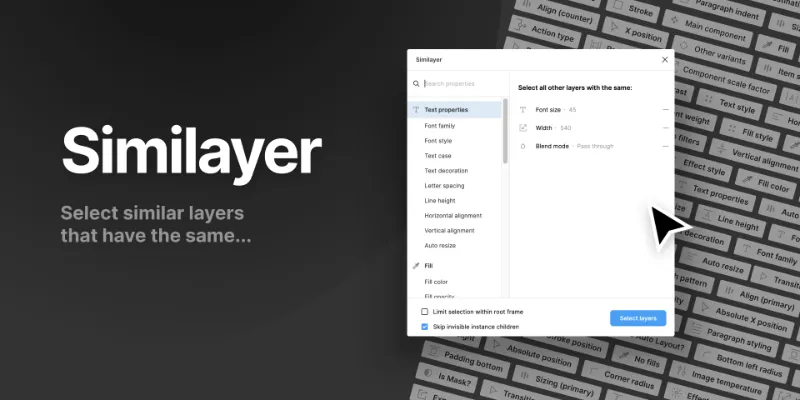
Select similar layers; based on a whole range of properties.
Select other layers...
After selecting a layer, run this plugin to select all other layers based on specific properties.
[NEW] Select within...
If you select multiple layers first, you can choose which properties and values to reduce the selection.
---
A small favour — if you find this plugin helpful, why not support me by Buying me a Coffee
---
Example use cases:
• Selecting all instances of a specific component to swap out for a different one
• Changing all layers with a specific Text Style to a new one
• Selecting all ‘cards’ with the same corner radius and fill color
• etc.
Supported properties
Here's a full list of all the properties that this plugin supports. If there's one missing that you'd love to see. Let me know at david@williames.com
Components:
- Other component instances
- Other component variants
- Component scale factor
Text
- Text Style
- Font size
- Font family
- Font style
- Text case
- Text decoration
- Letter spacing
- Line height
- Horizontal alignment
- Vertical alignments
- Auto resize
- Text characters
- Paragraph style
- Paragraph indent
- Paragraph spacing
Fills
- Fill Style
- Fill color
- Fill opacity
- No fills
Strokes
- Stroke Style
- Stroke color
- Stroke width
- Stroke opacity
- Stroke position
- Stroke cap
- Stroke join
- Stroke dash pattern
- No strokes
Effects
- Effect Style
- Effect radius
- Shadow color
- Shadow offset
Auto Layout
- Has Auto layout?
- Layout direction
- Layout sizing (Primary direction)
- Layout sizing (Counter direction)
- Layout alignment (Primary direction)
- Layout alignment (Counter direction)
- Item spacing
- Padding (All)
- Top padding
- Right padding
- Bottom padding
- Left padding
Layout
- Size
- Width
- Height
- Position (all)
- X Position
- Y Position
- Absolute position (all)
- Absolute X position
- Absolute Y position
- Rotation
- Corner radius (all)
- Top-left radius
- Top-right radius
- Bottom-right radius
- Bottom-left radius
Layers
- Layer name
- Blend mode
- Layer opacity
- Layer type
- Is locked?
- Is mask?
- Is visible?
Images
- Image filters (all)
- Image exposure
- Image contrast
- Image saturation
- Image temperature
- Image tint
- Image highlights
- Image shadows
Export settings
- Export settings (all)
- Export format
- Export suffix
- Export constraint
- Export contents only?
Prototype
- Prototype reactions (all)
- Action destination
- Action type
- Navigation type
- Trigger type
- Prototype transition (all)
- Transition type
- Transition easing
- Transition duration
- Transition direction
What's new
Version 11 · released Nov 6, 2022
- FIXED:
- Corner radius will now work for filtering on Frames and Components
- NEW:
- When using the "select within.." functionality, it will now order the property values alphabetically — also if there's more than 4 values, you can search to filter those values to find exactly what you need.
Permissions and privacy
Network access
This plugin's manifest doesn't declare its network access, which is common for older plugins. Figma shows a warning on the Community page for plugins like this.
Extra permissions
None beyond the standard access to the file you run it in.
Read from the plugin's published manifest.
Where Similayer ranks
Similayer alternatives
- 1

Find and Replace
by Jackie Chui
223K users2.6KFreeFind and replace text in your file like a text editor
- 2

Rename It
by Rodrigo Soares
197K users3.6KFree - 3

Detach Component
by Patrick Morgan
140K users1.3KFree - 4

Clean Document
by Yuan Qing Lim
124K users3KFree + paid featuresAutomagically organize and clean up your Figma document
- 5

Sorter
by Tom
81K users1.5KFreeQuickly sort layers in different ways
- 6

Super Tidy
by Ismael Canal
77K users2KFreeClean and organize your canvas in one click.
Similayer FAQ
What does Similayer do?
It's a Figma plugin by Dave that runs in Figma Design and FigJam.
Is Similayer free?
Yes. Similayer is free to install and run from the Figma Community, with no paid tier listed.
How do I install Similayer?
Open it on the Figma Community, or search for it in the Actions menu (Cmd/Ctrl + K) inside any file you can edit. See how to install Figma plugins.
What are the best alternatives to Similayer?
By user count, the closest alternatives are Find and Replace by Jackie Chui, Rename It and Detach Component. Compare all of them on the best Figma plugins for layer management.
Built this plugin?
Use this page as a landing page for Similayer: link to it from your site, README or launch posts, or add a badge. Pick a style and copy the code.

Style
Label
Size
Code
<a href="https://figmaplugins.co/plugins/similayer/" target="_blank" rel="noopener"><img src="https://figmaplugins.co/badges/featured-dark.svg" alt="Similayer on figmaplugins.co" width="220" height="48"></a>