
On this page
About Simple Sort
Simple Sort is a free Figma plugin published by Jimbo in 2021. It works in Figma Design and has 25,771 users and 1,219 likes on the Figma Community. It ranks #13 in Design Systems on our lists.
In the developer's words
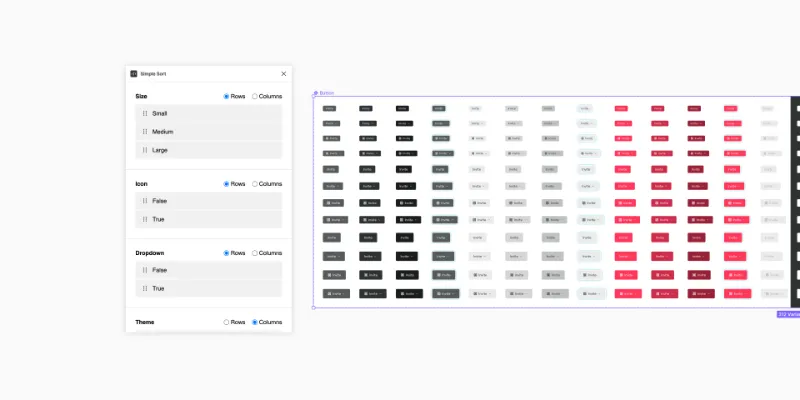
Automatically applies a basic structure to your component sets (variants) which can be customised to your liking.
---
Manual Mode
Rows & Columns
Decide whether the variants for a particular property should be arranged horizontally or vertically.
Order of values
You can rearrange each of the values for a particular property within the row or column.
Order of properties
Unfortunately this still has to be done in Figma. If you'd like to change the order of properties do so in Figma's right-hand side panel when a component set is selected. You'll need to re-rerun the plugin (or at least deselect and re-select the component set) to see the changes.
Auto Mode
The intended use of auto is to reapply the last applied settings without opening the plugin UI.
If the plugin has not been run on a particular component set yet then the most basic settings (first property in rows, all others in columns) will be applied.
---
Known issues:
- I can't handle the maths for rotated objects, so I just reset rotation to 0. If this is a problem for anyone please let me know.
What's new
Version 8 · released Dec 4, 2023
- Use SHIFT key to do bigger steps in spacing input, rather than forcing steps of 10.
Permissions and privacy
Network access
Simple Sort declares no network access, so it runs entirely inside Figma and can't send your file anywhere.
Extra permissions
None beyond the standard access to the file you run it in.
Read from the plugin's published manifest.
Where Simple Sort ranks
Simple Sort alternatives
- 1

Styler
by Andrei Iancu
229K users3.4KFreeBulk management of styles based on layer properties.
- 2

Design Lint
by Daniel Destefanis
142K users5.7KFreeFind and fix errors in your designs
- 3

Specs Classic
by Directed Edges Plugins
136K users5.5KFree + $8/mo upgradeGenerate component specs including anatomy, props and layout & spacing
- 4

Styles & Variables Organizer
by Chenmu Wu
134K users3.2KFree + $15 upgradeApply styles and variables to all your designs with one click!
- 5

Instance Finder
by Idan Arbel
96K users1.8KFree - 6

Color Style Guide
by hiloki
79K users1.4KFreeCreate the brillant Color Styleguide page using your local Color Styles.
Simple Sort FAQ
What does Simple Sort do?
An easy way to sort your variants. It's a Figma plugin by Jimbo that runs in Figma Design.
Is Simple Sort free?
Yes. Simple Sort is free to install and run from the Figma Community, with no paid tier listed.
Is Simple Sort safe to use?
Figma plugins can only reach the internet through domains listed in their manifest. Simple Sort declares no network access, so it runs entirely inside Figma and can't send your file anywhere. As with any plugin, check the developer's privacy policy before using it on client work.
How do I install Simple Sort?
Open it on the Figma Community, or search for it in the Actions menu (Cmd/Ctrl + K) inside any file you can edit. See how to install Figma plugins.
What are the best alternatives to Simple Sort?
By user count, the closest alternatives are Styler, Design Lint and Specs Classic. Compare all of them on the best Figma plugins for design systems.
Built this plugin?
Use this page as a landing page for Simple Sort: link to it from your site, README or launch posts, or add a badge. Pick a style and copy the code.

Style
Label
Size
Code
<a href="https://figmaplugins.co/plugins/simple-sort/" target="_blank" rel="noopener"><img src="https://figmaplugins.co/badges/featured-dark.svg" alt="Simple Sort on figmaplugins.co" width="220" height="48"></a>