On this page
About Table Templates with Auto Layout
Table Templates with Auto Layout is a free Figma plugin published by Superbig in 2024. It works in Figma Design and FigJam and has 10,656 users and 103 likes on the Figma Community. It ranks #10 in Tables and #17 in FigJam on our lists.
In the developer's words
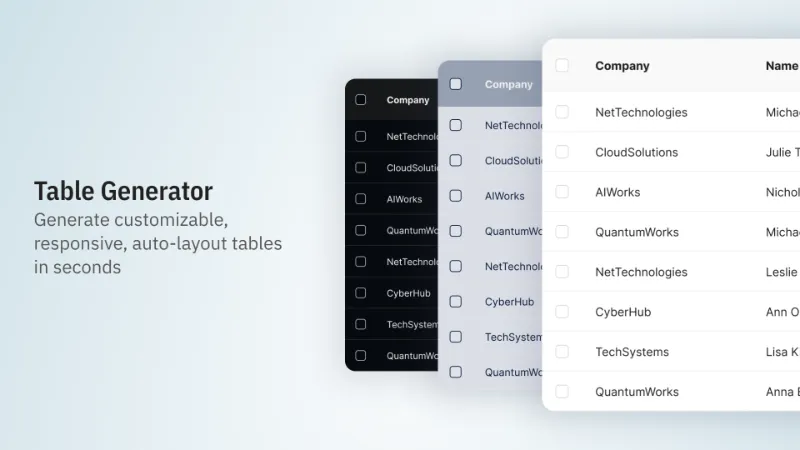
Table Templates is a free tool for Figma that helps you create responsive, auto-layout tables with custom styling in just a few clicks.
100% free to use.
Customize your table:
- Choose number of columns and rows
- Customize text, cell, and border colors
- Choose from 8 border styles
- Set custom cell text padding
- Set rows to fixed height, hug or fill
- Add a checkbox column
What's new
Version 3 · released Apr 17, 2024
The developer didn't publish release notes for this version.
Permissions and privacy
Network access
Table Templates with Auto Layout can only connect to the 3 domains declared in its manifest: fonts.googleapis.com, api-js.mixpanel.com and fonts.gstatic.com.
- fonts.googleapis.com
- api-js.mixpanel.com
- fonts.gstatic.com
Extra permissions
None beyond the standard access to the file you run it in.
Read from the plugin's published manifest.
Where Table Templates with Auto Layout ranks
Table Templates with Auto Layout alternatives
- 1

Table Creator
by Gavin McFarland
795K users6.5KFreeEasily create tables that can be edited, resized and maintained using your design system
- 2

Google Sheets Sync
by Dave
215K users5.8KFreeSync content from Google Sheets directly into your Figma file.
- 3

Table Generator & Creator
by Appcano
201K users1.1KFree + $5/mo upgradeGenerate and customize tables in seconds
- 4

Tablefy
by Kiko Herrschaft
184K users245Free - 5

data.to.design
by divRIOTS
40K users1.2KFreeDesign with your data from Google Sheets, CSV, JSON, Airtable, Notion, or generate using AI
- 6

Quick table
by Carter Xiao
40K users212FreeSpreadsheet to table frame in seconds
Table Templates with Auto Layout FAQ
What does Table Templates with Auto Layout do?
Customizable, responsive, auto-layout tables in seconds. It's a Figma plugin by Superbig that runs in Figma Design and FigJam.
Is Table Templates with Auto Layout free?
Yes. Table Templates with Auto Layout is free to install and run from the Figma Community, with no paid tier listed.
Is Table Templates with Auto Layout safe to use?
Figma plugins can only reach the internet through domains listed in their manifest. Table Templates with Auto Layout can only connect to the 3 domains declared in its manifest: fonts.googleapis.com, api-js.mixpanel.com and fonts.gstatic.com. As with any plugin, check the developer's privacy policy before using it on client work.
How do I install Table Templates with Auto Layout?
Open it on the Figma Community, or search for it in the Actions menu (Cmd/Ctrl + K) inside any file you can edit. See how to install Figma plugins.
What are the best alternatives to Table Templates with Auto Layout?
By user count, the closest alternatives are Table Creator by Gavin McFarland, Google Sheets Sync and Table Generator & Creator. Compare all of them on the best Figma plugins for tables.
Built this plugin?
Use this page as a landing page for Table Templates with Auto Layout: link to it from your site, README or launch posts, or add a badge. Pick a style and copy the code.

Style
Label
Size
Code
<a href="https://figmaplugins.co/plugins/table-templates-with-auto-layout/" target="_blank" rel="noopener"><img src="https://figmaplugins.co/badges/featured-dark.svg" alt="Table Templates with Auto Layout on figmaplugins.co" width="220" height="48"></a>