
On this page
About Text To Table
Text To Table is a free Figma plugin published by hiroaki hiraga in 2025. It works in Figma Design, Figma Slides and FigJam and has 8,606 users and 24 likes on the Figma Community. It ranks #14 in Tables and #19 in FigJam on our lists.
In the developer's words
Text to Table Figma Plugin
Overview
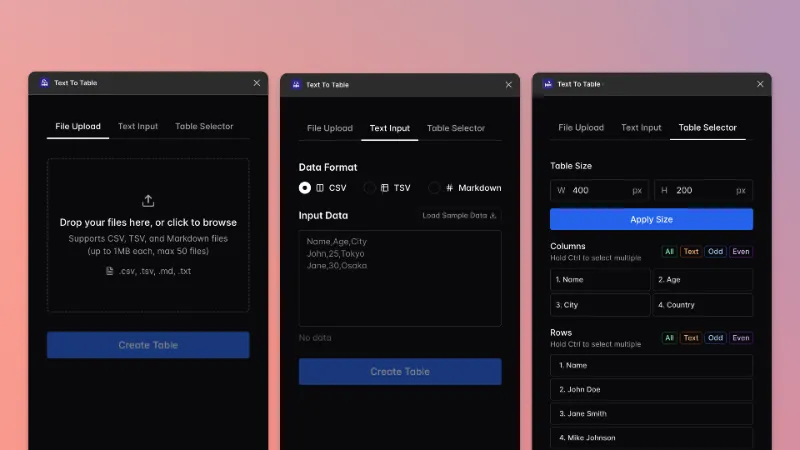
Text to Table is a Figma plugin that converts text data (CSV, TSV, Markdown, etc.) into beautiful tables directly in Figma. You can easily layout external data as tables and incorporate them into your Figma designs.
Key Features
- Generate tables in Figma by inputting CSV/TSV/Markdown text data into a form
- Supports multiple file uploads (.csv, .tsv, .md, .txt)
- Edit created tables using the selection tool
- Smart Markdown processing: automatically detects multiple tables, supports bold formatting and hyperlinks within cells
Recommended For
- Those who want to visualize large amounts of data as tables in Figma
- Users who want to import AI-generated Markdown tables into Figma
- Anyone who wants to quickly prototype data in Figma
How to Use
- Launch the plugin
- Paste your text data
- Click the "Create Table" button to generate a table in Figma
Support
For questions, bug reports, feature suggestions, or contributions, please visit the GitHub repository: https://github.com/karutt/text-to-table
You can also leave a comment on this page. Your feedback is appreciated and helps us improve the plugin.
What's new
Version 7 · released Nov 27, 2025
The developer didn't publish release notes for this version.
Permissions and privacy
Network access
Text To Table declares no network access, so it runs entirely inside Figma and can't send your file anywhere.
Extra permissions
None beyond the standard access to the file you run it in.
Read from the plugin's published manifest.
Where Text To Table ranks
Text To Table alternatives
- 1

Table Creator
by Gavin McFarland
795K users6.5KFreeEasily create tables that can be edited, resized and maintained using your design system
- 2

Google Sheets Sync
by Dave
215K users5.8KFreeSync content from Google Sheets directly into your Figma file.
- 3

Table Generator & Creator
by Appcano
201K users1.1KFree + $5/mo upgradeGenerate and customize tables in seconds
- 4

Tablefy
by Kiko Herrschaft
184K users245Free - 5

data.to.design
by divRIOTS
40K users1.2KFreeDesign with your data from Google Sheets, CSV, JSON, Airtable, Notion, or generate using AI
- 6

Quick table
by Carter Xiao
40K users212FreeSpreadsheet to table frame in seconds
Text To Table FAQ
What does Text To Table do?
Effortless table creation from CSV, TSV, or Markdown—right in Figma. It's a Figma plugin by hiroaki hiraga that runs in Figma Design, Figma Slides and FigJam.
Is Text To Table free?
Yes. Text To Table is free to install and run from the Figma Community, with no paid tier listed.
Is Text To Table safe to use?
Figma plugins can only reach the internet through domains listed in their manifest. Text To Table declares no network access, so it runs entirely inside Figma and can't send your file anywhere. As with any plugin, check the developer's privacy policy before using it on client work.
How do I install Text To Table?
Open it on the Figma Community, or search for it in the Actions menu (Cmd/Ctrl + K) inside any file you can edit. See how to install Figma plugins.
What are the best alternatives to Text To Table?
By user count, the closest alternatives are Table Creator by Gavin McFarland, Google Sheets Sync and Table Generator & Creator. Compare all of them on the best Figma plugins for tables.
Built this plugin?
Use this page as a landing page for Text To Table: link to it from your site, README or launch posts, or add a badge. Pick a style and copy the code.

Style
Label
Size
Code
<a href="https://figmaplugins.co/plugins/text-to-table/" target="_blank" rel="noopener"><img src="https://figmaplugins.co/badges/featured-dark.svg" alt="Text To Table on figmaplugins.co" width="220" height="48"></a>