
On this page
About Bannerify Banner Studio
Bannerify Banner Studio is a free + paid features Figma plugin published by Hypermatic in 2020. It works in Figma Design and has 76,291 users and 1,056 likes on the Figma Community. It ranks #6 in GIF & Video and #11 in Animation on our lists.
In the developer's words
Documentation & Video Tutorials
For plugin documentation and step by step video tutorials, please visit https://docs.hypermatic.com/bannerify
Questions & Support
Bannerify is still a baby panda, so if you notice any bugs or have any questions about the plugin, please get in touch directly via https://hypermatic.com/contact and we'll help you troubleshoot and resolve them as quickly as possible.
Security
Bannerify is designed to be privacy and security focused — for details about security and how the plugin works, please visit https://docs.hypermatic.com/bannerify/security
Features
- Criminally easy timeline animation and real-time previews inside Figma.
- Generates all the images, HTML, CSS and Javascript you need for every banner.
- Export your animated banners to GIF, MP4, WebM or animated WebP files.
- Embed Lottie file animations or MP4 video files to any layers in your timeline.
- Add an optional .mp3 audio track to your MP4 video exports
- Create your own keyframes, or use dozens of professional presets.
- Set a maximum file size (kb) per banner for automatic asset optimization.
- Optionally include static fallback "backup.jpg" for every banner.
- Impress your clients with beautifully responsive HTML preview pages (with optionally auto-upload to Netlify, Zapier or Make).
- Export to HTML/CSS, GIF, MP4, WebM, animated WebP and animated PNG files, GSAP (Greensock), and more than a dozen ad platforms (eg. Google Ads) with one click.
- Automatically saves all of your exported banners and preview page as a single .zip file.
The easiest animation timeline you've ever used.
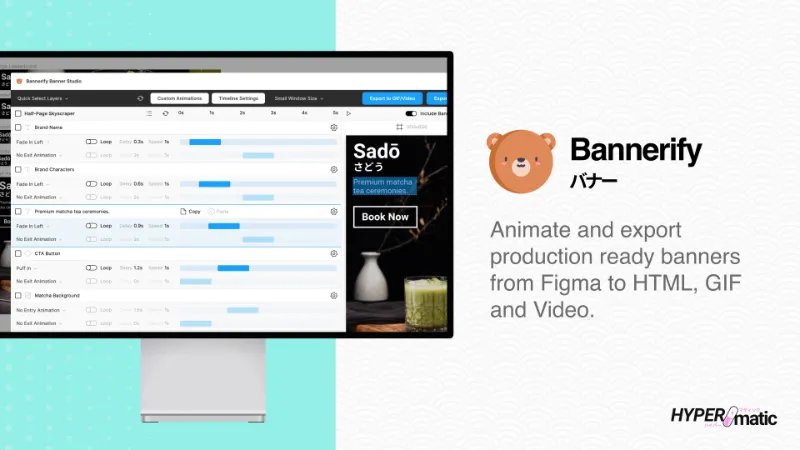
Craft and preview your banner animations in real-time, directly inside Figma using the Bannerify timeline. Select from dozens of premium animation presets and adjust them to fit your creative.
Export production ready HTML, GIF or MP4 video banners in seconds.
With one click, Bannerify automatically exports your banners to export for HTML/CSS, GIF, MP4, WebM, animated WebP and animated PNG files, GSAP (Greensock), AdForm, AdForm Mobile (MRAID), Adition, AdRoll, Adobe Ad Cloud, AppNexus, Basis, Delta Projects, DoubleClick (DCM), DoubleClick Studio, DV360, FlashTalking, Google Ads, Google Display Network, IAB, Jivox (Dynamic Creative), Responsive Display Ad, 6sense (Dynamic Creative), Sizmek, StackAdapt, DemandScience (formerly Terminus), The Trade Desk, BidTheatre, Xandr, Amazon Ads, USSD (Tap to SMS), USSD (Tap to Call), Yandex and more.
Embed Video or Lottie files to any Figma layer
Add a video or Lottie file embed to your banner layers instantly, just by pasting the link to a .mp4/.webm video file or a .json Lottie file.
Impress your clients with beautiful preview pages.
Bannerify automatically generates a beautiful preview pages to review all your animated banners at the same time, and optionally deploy it to a URL using the built-in Netlify integration.
Automate 10 hours of manual coding in 10 seconds.
Bannerify helps you hit tight deadlines with ease, reducing the design/development feedback loop to zero. It’s the secret weapon inside top creative teams.
Bannerify Pro
10 free trials of Bannerify Pro are included with the free version, and if you're a casual user, you can continue using the free version of Bannerify forever.
If you're a power user, you can optionally upgrade to continue using all the extra features that are only available in the pro version of Bannerify.
To learn more about Bannerify Pro, please visit https://www.hypermatic.com/bannerify/#pro
What's new
Version 582 · released Jun 10, 2026
The developer didn't publish release notes for this version.
Permissions and privacy
Network access
Bannerify Banner Studio can only connect to the 3 domains declared in its manifest: *.hypermatic.com, fonts.googleapis.com and fonts.gstatic.com.
- *.hypermatic.com
- fonts.googleapis.com
- fonts.gstatic.com
Extra permissions
- Reads your Figma name and avatar
- Sees who else is in the file
Read from the plugin's published manifest.
Where Bannerify Banner Studio ranks
Bannerify Banner Studio alternatives
- 1

Motion
by Pavel Babkin
367K users5.6KFree + paid featuresAnimate UI in Figma. Export to video, GIF, SVG.
- 2

Export to GIF/Video
by Evan at CreativeFlow
311K users3KFree + paid featuresExport animations to GIF or Video in one-click
- 3

GIF Export
by Appcano
306K users2.7KFreeExport gifs or frames with gifs in them!
- 4

Animated Gif Maker
by Dustin Gamester
99K users969FreeGenerate and export animaged gifs without leaving Figma
- 5

SVG Animate
by Tobias Strebitzer
76K users571Free + $9/mo upgradeBring your Figma creations to life with stunning animations and seamless export to web and video.
- 6

SUPA
by SUPA Team
71K users751FreeCreate video from Figma design
Bannerify Banner Studio FAQ
What does Bannerify Banner Studio do?
Animate and export production ready banners from Figma to HTML, GIFs and Videos. It's a Figma plugin by Hypermatic that runs in Figma Design.
Is Bannerify Banner Studio free?
Bannerify Banner Studio is free to install, but some features are unlocked through a paid plan on the developer's site.
Is Bannerify Banner Studio safe to use?
Figma plugins can only reach the internet through domains listed in their manifest. Bannerify Banner Studio can only connect to the 3 domains declared in its manifest: *.hypermatic.com, fonts.googleapis.com and fonts.gstatic.com. As with any plugin, check the developer's privacy policy before using it on client work.
How do I install Bannerify Banner Studio?
Open it on the Figma Community, or search for it in the Actions menu (Cmd/Ctrl + K) inside any file you can edit. See how to install Figma plugins.
What are the best alternatives to Bannerify Banner Studio?
By user count, the closest alternatives are Motion, Export to GIF/Video and GIF Export by Appcano. Compare all of them on the best Figma plugins for gif & video.
Built this plugin?
Use this page as a landing page for Bannerify Banner Studio: link to it from your site, README or launch posts, or add a badge. Pick a style and copy the code.

Style
Label
Size
Code
<a href="https://figmaplugins.co/plugins/bannerify-banner-studio/" target="_blank" rel="noopener"><img src="https://figmaplugins.co/badges/featured-dark.svg" alt="Bannerify Banner Studio on figmaplugins.co" width="220" height="48"></a>