
On this page
About Color Compass
Color Compass is a free Figma plugin with a paid upgrade ($30) published by Jaclyn Tan in 2019. It works in Figma Design and FigJam and has 90,997 users and 1,574 likes on the Figma Community. It ranks #8 in Color Palettes on our lists.
In the developer's words
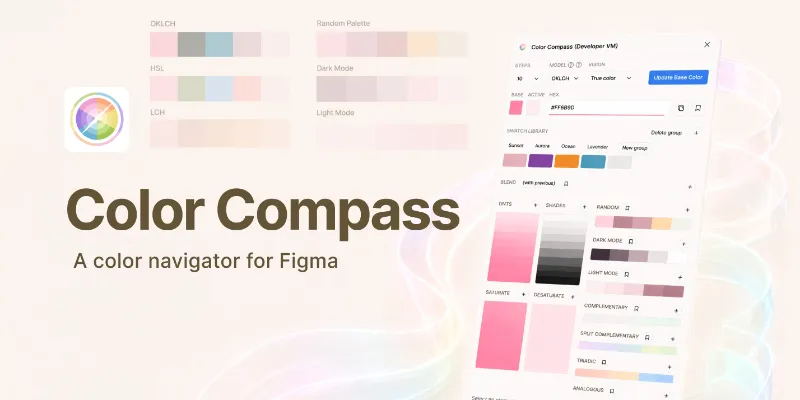
🌈 Quickly navigate the color spectrum with designer-focused accuracy
Say goodbye to eyeballing and colour picking randomly from the colour palette!
Feed a base colour to this plugin by clicking on an existing element or updating the hex code and clicking 'Update'.
- Generate tints, shades, tones, and complementary colours to quickly build custom color palettes.
- Increase or decrease the step value to hone in on the exact shade you want.
- Experiment with different swatches and interact with elements directly from the plugin.
- Save favourite swatches and use them across all your Figma and Figjam files
- Drag and drop saved swatches as you go
---
Upgrade
You will be asked to upgrade this plugin after 10 uses. Upgrading is a one time payment of $30 and includes all future updates and unlimited usage. Thank you for your support!
You may contact the Figma team for a refund if you are unsatisfied with your purchase in any way.
---
➡️ To Use
- Run the plugin from Figma
- Select an element containing a fill, background, or stroke
- Click on the Update button
- Click on a plugin swatch while an element is selected to update a pre-existing fill, background, or stroke.
➡️ Usage Notes
- Copy the hex code from the plugin by clicking on the clipboard icon
- Save an active swatch by clicking on the star button
- You can keep clicking on Update to generate random colour palettes based on your previous colour selection.
- Click on the plus button in a palette to add the swatches to your document.
- This plugin will work on any element that is able to display a solid fill, stroke, or background
- Drag and drop saved swatches to reorder them
---
If you run into any bugs or have any feature requests please submit an issue on Github.
What's new
Version 47 · released May 7, 2025
- Updated favourite icon
- Fixed a bug so saved colors are displayed when the plugin is first opened
Permissions and privacy
Network access
Color Compass declares no network access, so it runs entirely inside Figma and can't send your file anywhere.
Extra permissions
- Reads your Figma name and avatar
- Sees who else is in the file
- Sees the people who have access to the file
- Can offer paid features through Figma's checkout
Read from the plugin's published manifest.
Where Color Compass ranks
Color Compass alternatives
- 1

Color Palettes
by Manthankumar Satani
437K users3.9KFreeA free suite of integrated Color & Accessibility tools - 10+ tools free access 🔥
- 2

Color Designer
by Wojciech Banaś
110K users1.7KFree - 3

Tailwind CSS Color Generator
by Erik de Vries
108K users3.6KFreeCreate custom Tailwind CSS color scales based on a given Hex code or HSL color
- 4

Supa Palette
by Angelo Libero
102K users2.8KFree + paid featuresThe ultimate color palette generator for Figma
- 5

Find and Replace Colors
by Wei Zhong
97K users833FreeQuickly recolor for templates
- 6

Chroma Colors
by Miguel Solorio
92K users966FreeCreate bulk color styles from selection
Color Compass FAQ
What does Color Compass do?
Quickly navigate the color spectrum with designer-focused accuracy. It's a Figma plugin by Jaclyn Tan that runs in Figma Design and FigJam.
Is Color Compass free?
Partly. Color Compass is free to install and use, and a paid upgrade on the Figma Community ($30 one-time) unlocks the rest.
Is Color Compass safe to use?
Figma plugins can only reach the internet through domains listed in their manifest. Color Compass declares no network access, so it runs entirely inside Figma and can't send your file anywhere. As with any plugin, check the developer's privacy policy before using it on client work.
How do I install Color Compass?
Open it on the Figma Community, or search for it in the Actions menu (Cmd/Ctrl + K) inside any file you can edit. See how to install Figma plugins.
What are the best alternatives to Color Compass?
By user count, the closest alternatives are Color Palettes, Color Designer and Tailwind CSS Color Generator. Compare all of them on the best Figma plugins for color palettes.
Built this plugin?
Use this page as a landing page for Color Compass: link to it from your site, README or launch posts, or add a badge. Pick a style and copy the code.

Style
Label
Size
Code
<a href="https://figmaplugins.co/plugins/color-compass/" target="_blank" rel="noopener"><img src="https://figmaplugins.co/badges/featured-dark.svg" alt="Color Compass on figmaplugins.co" width="220" height="48"></a>