
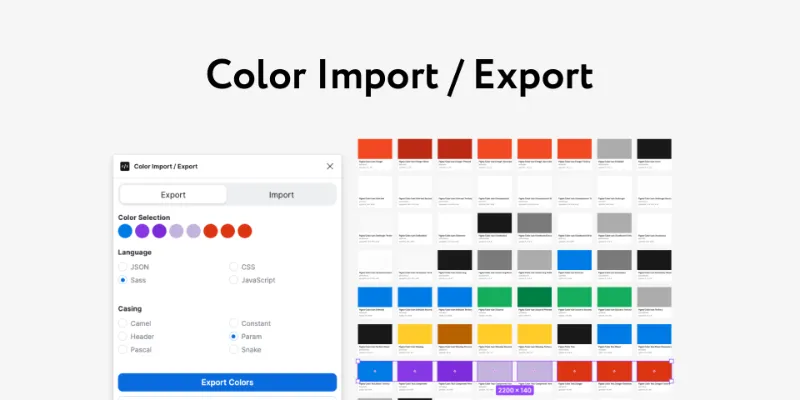
About Color Import / Export
Color Import / Export is a free Figma plugin published by Jon Sakas in 2022. It works in Figma Design and has 24,404 users and 330 likes on the Figma Community.
In the developer's words
This plugin aims to help design and development teams stay in sync by providing import and export tools for Figma color palettes.
**📺 Watch The Video Tutorial**
Features
Import
- Import color styles into Figma from JSON objects
- Group color styles and color cards by folders
- Preview imported colors in real time
Export
- Export selected color styles to JSON, JavaScript, CSS, or Sass
- Choose between HEX, RGB, or HSL output color models
- Choose output casing style such as camel case, snake case, and more
- Preview color export by simply selecting objects on the canvas
Bugs Reports & Feature Requests
Found a bug or have a feature you'd like to see? Please open an issue on the GitHub page at https://github.com/jsakas/figma-plugin-color-import-export.
What's new
Version 6 · released Apr 6, 2023
- Features:
- add support for grouping & filters on import
- automatically detect selection on plugin open
- add an option to exclude folders from color names
- Bug Fixes:
- reset selected paint styles when navigating between tabs
Permissions and privacy
Network access
This plugin's manifest doesn't declare its network access, which is common for older plugins. Figma shows a warning on the Community page for plugins like this.
Extra permissions
None beyond the standard access to the file you run it in.
Read from the plugin's published manifest.
Color Import / Export alternatives
- 1

html.to.design
by divRIOTS
2.7M users39KFree + $18/mo upgradeConvert any website into fully editable Figma designs
- 2
Figma to HTML
by Figma2HTML
688K users7KFreeConvert Figma design to HTML
- 3

Convertify Sketch/Adobe/Google
by Hypermatic
539K users5.3KFree + paid featuresExport to Sketch, XD, After Effects, PSD, InDesign — or — Import XD, Illustrator, PSD, InDesign, PDF
- 4

TinyImage Compressor
by Hypermatic
527K users4.7KFree + paid featuresExport/downsize compressed JPG, PNG, SVG, WebP, GIF, WebM, MP4, AVIF and PDF image files from Figma
- 5

Pitchdeck Presentation Studio
by Hypermatic
502K users6KFree + paid featuresTurn your Figma designs into animated slide decks or export them to PowerPoint/PDF
- 6

PDF to Figma
by Gautham 🌶
337K users2.7KFreeImport a PDF file into Figma as an image
Color Import / Export FAQ
What does Color Import / Export do?
Help design and dev teams stay in sync by providing import and export tools for color palettes. It's a Figma plugin by Jon Sakas that runs in Figma Design.
Is Color Import / Export free?
Yes. Color Import / Export is free to install and run from the Figma Community, with no paid tier listed.
How do I install Color Import / Export?
Open it on the Figma Community, or search for it in the Actions menu (Cmd/Ctrl + K) inside any file you can edit. See how to install Figma plugins.
What are the best alternatives to Color Import / Export?
By user count, the closest alternatives are html.to.design, Figma to HTML and Convertify Sketch/Adobe/Google.
Built this plugin?
Use this page as a landing page for Color Import / Export: link to it from your site, README or launch posts, or add a badge. Pick a style and copy the code.

Style
Label
Size
Code
<a href="https://figmaplugins.co/plugins/color-import-export/" target="_blank" rel="noopener"><img src="https://figmaplugins.co/badges/featured-dark.svg" alt="Color Import / Export on figmaplugins.co" width="220" height="48"></a>Want it featured on figmaplugins.co? Submit it for review