
On this page
About TinyImage Compressor
TinyImage Compressor is a free + paid features Figma plugin published by Hypermatic in 2019. It works in Figma Buzz, Figma Design and Figma Slides and has 511,671 users and 4,623 likes on the Figma Community. It ranks #5 in Import & Export on our lists.
In the developer's words
Documentation & Video Tutorials
For plugin documentation and step by step video tutorials, please visit https://docs.hypermatic.com/tinyimage
Questions & Support
TinyImage is still a baby panda, so if you notice any bugs or have any questions about the plugin, please get in touch directly via https://hypermatic.com/contact and we'll help you troubleshoot and resolve them as quickly as possible.
Security
TinyImage is designed to be privacy and security focused — for details about security and how the plugin works, please visit https://docs.hypermatic.com/tinyimage/security
Features
- Exports images up to 95% smaller than the default exports from Figma.
- Privacy focused — no image data ever leaves your Figma file.
- Create and export animated GIF, animated PNG (APNG), animated WebP, WebM or MP4 videos from selected layers (with optional transition effects).
- Optionally add .mp3 audio files to MP4 video exports.
- Downsize and compress your Figma image fills to their layer size.
- Built-in ICC color profile support for PNG exports.
- Convert JPG and PNGs to WebP, AVIF, Progressive JPEG, or SVG to Tiny 1.2 format.
- Use percentage based compression, or maximum KB file size targets.
- Set specific compression level overrides per image.
- Merge Figma frames into a single compressed PDF file.
- Add custom password protection to exported PDF files.
- Export PDFs as RGB, CMYK or Greyscale (with optional Bleed and Crop Marks).
- Supports compressing/exporting multiple sizes and formats per layer.
- Advanced custom filenames (eg. "#{name}_#{width}x#{height}_#{date}).
- Automatically saves multiple images as a .zip file.
It’s like “Ludicrous Mode” for your Figma image export options.
Don’t waste time manually dragging images exported from Figma into other apps to compress images one by one. It’s so easy, a cat can use it.
Simple, fast and effective image compression directly in Figma.
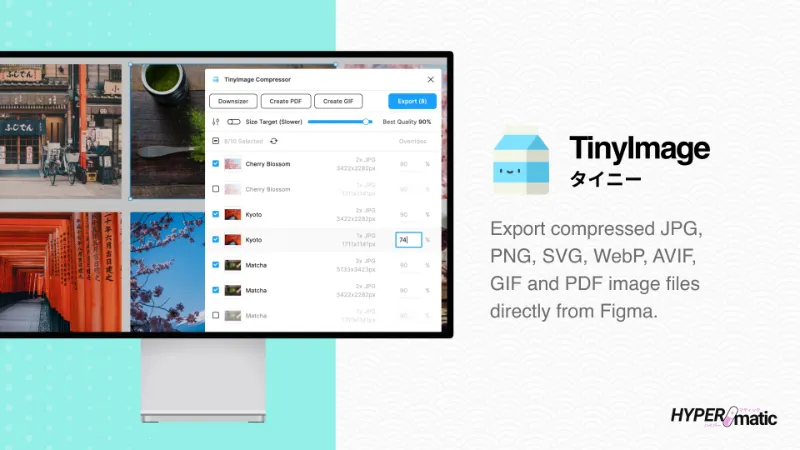
Easily export compressed JPG, PNG, SVG, WebP, AVIF, GIF and PDF images from Figma without needing any other apps or websites.
Up to 95% smaller than the image exports from Figma.
Even without using aggressive compression levels, TinyImage will drastically compress your image exports from Figma, making them friendly your websites, apps, emails, presentations or banners.
Privacy and security focused — nothing ever leaves your Figma file.
TinyImage doesn’t upload, store or process any image data outside of the plugin, everything happens securely inside your Figma file, and any exported files are downloaded directly to your computer.
Downsize Figma image fills to their layer size.
Speed up and optimize your Figma files by automatically downscaling Figma image fills to their layer size. Perfect for those tiny 64px avatar layers with huge 4000px image fills.
Export custom animated GIFs or MP4s from any layers.
TinyImage lets you easily create animated GIFs, animated PNGs (APNG), animated WebPs or WebM and MP4 videos (with optional audio and frame transition effects) directly from your selected layers. You have total control over the speed, playback counts, image smoothing and scaling.
Advanced settings for Figma power users.
Convert image formats, add passwords to PDFs, set custom ICC color profiles, or mix & match your own text with dynamic values from each Figma layer into any naming format you like to suit you or your clients.
Get huge savings with super tiny PDFs.
TinyImage supports optimising PDF exports, saving up to 95% on their original exported filesize. Export individual frames or merge them into a single PDF, super easy page re-ordering, export as RGB, CMYK or greyscale (with optional Bleed and Crop Marks), and secure the files with password protection.
TinyImage Pro
10 free trials of TinyImage Pro are included with the free version, and if you're a casual user, you can continue using the free version of TinyImage forever.
If you're a power user, you can optionally upgrade to continue using all the extra features that are only available in the pro version of TinyImage.
To learn more about TinyImage Pro, please visit https://www.hypermatic.com/tinyimage/#pro
What's new
Version 285 · released Jun 4, 2026
The developer didn't publish release notes for this version.
Permissions and privacy
Network access
TinyImage Compressor can only connect to the domain declared in its manifest: *.hypermatic.com.
- *.hypermatic.com
Extra permissions
- Reads your Figma name and avatar
- Sees who else is in the file
Read from the plugin's published manifest.
Where TinyImage Compressor ranks
TinyImage Compressor alternatives
- 1

html.to.design
by divRIOTS
2.4M users37KFree + $18/mo upgradeConvert any website into fully editable Figma designs
- 2

Anima
by Anima
1.8M users17KFreeAnima - AI Powered Design to code
- 3

Figma to HTML
by Figma2HTML
670K users6.7KFreeConvert Figma design to HTML
- 4

Convertify Sketch/Adobe/Google
by Hypermatic
519K users5.1KFree + paid featuresExport to Sketch, XD, After Effects, PSD, InDesign — or — Import XD, Illustrator, PSD, InDesign, PDF
- 5

Pitchdeck Presentation Studio
by Hypermatic
485K users5.9KFree + paid featuresTurn your Figma designs into animated slide decks or export them to PowerPoint/PDF
- 6

PDF to Figma
by Gautham 🌶
314K users2.6KFreeImport a PDF file into Figma as an image
TinyImage Compressor FAQ
What does TinyImage Compressor do?
Export/downsize compressed JPG, PNG, SVG, WebP, GIF, WebM, MP4, AVIF and PDF image files from Figma. It's a Figma plugin by Hypermatic that runs in Figma Buzz, Figma Design and Figma Slides.
Is TinyImage Compressor free?
TinyImage Compressor is free to install, but some features are unlocked through a paid plan on the developer's site.
Is TinyImage Compressor safe to use?
Figma plugins can only reach the internet through domains listed in their manifest. TinyImage Compressor can only connect to the domain declared in its manifest: *.hypermatic.com. As with any plugin, check the developer's privacy policy before using it on client work.
How do I install TinyImage Compressor?
Open it on the Figma Community, or search for it in the Actions menu (Cmd/Ctrl + K) inside any file you can edit. See how to install Figma plugins.
What are the best alternatives to TinyImage Compressor?
By user count, the closest alternatives are html.to.design, Anima and Figma to HTML. Compare all of them on the best Figma plugins for import & export.
Built this plugin?
Use this page as a landing page for TinyImage Compressor: link to it from your site, README or launch posts, or add a badge. Pick a style and copy the code.

Style
Label
Size
Code
<a href="https://figmaplugins.co/plugins/tinyimage-compressor/" target="_blank" rel="noopener"><img src="https://figmaplugins.co/badges/featured-dark.svg" alt="TinyImage Compressor on figmaplugins.co" width="220" height="48"></a>