
On this page
About Easing Gradients
Easing Gradients is a free Figma plugin published by Alex Widua in 2020. It works in Figma Design and has 103,639 users and 1,597 likes on the Figma Community. It ranks #9 in Gradients on our lists.
In the developer's words
Create smooth gradient transitions with cubic easing functions ✨
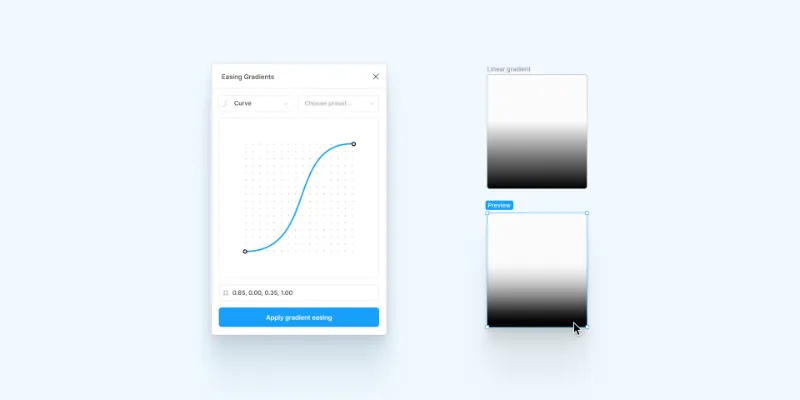
Allows smoothing of gradient fills in Figma using custom cubic-bézier or step easing functions (think of transition easing). This is especially useful when dealing with transparent gradients but also allows for creative exploration.
Usage
The plugin is 'gradient-agnostic' in that sense that it doesn't care about the type (linear, radial etc.) and orientation of the gradient.
It takes the first and last color stop as parameters and eases the gradient with the given easing function value. One caveat with this is that all other color steps in between are discarded.
The plugin is open source and MIT licensed.
This plugin is based on the great work of Andreas Larsen.
What's new
Version 7 · released Aug 20, 2021
- This major update brings a few changes:
- Easing previews moved from the plugin to the canvas✨ Select an element with a gradient fill and watch the element update as you drag the bézier handles
- 💾 It's now possible to save your easing functions as presets
- If you encounter any bugs, use the comment section to reach out or open an issue on GitHub.
Permissions and privacy
Network access
This plugin's manifest doesn't declare its network access, which is common for older plugins. Figma shows a warning on the Community page for plugins like this.
Extra permissions
None beyond the standard access to the file you run it in.
Read from the plugin's published manifest. Questions about data handling go to the developer's support page.
Where Easing Gradients ranks
Easing Gradients alternatives
- 1

Morph
by Milan Maheshwari
352K users7.1KFreeCreate awesome effects like Skeuomorph, Neon, Glass, Mesh Gradients, & more!
- 2

Mesh Gradient
by Gautham 🌶
348K users5.2KFreeAdd beautiful mesh gradients to your Figma files!
- 3

Noisy Gradients
by vijay verma
334K users6.2KFreeCreate beautiful grainy gradient backgrounds
- 4

Mesh gradients
by oodesign
300K users1.9KFree + paid featuresCreate awesome real mesh gradients right inside Figma.
- 5

Grainy Gradient
by Shuvojit Das
221K users2.6KFreeAdd a trendy twist to your designs with Grainy Gradient.
- 6

uiGradients
by Kamal Nayan
214K users3.3KFreeAdds gradients to groups, text and frames in single click.
Easing Gradients FAQ
What does Easing Gradients do?
It's a Figma plugin by Alex Widua that runs in Figma Design.
Is Easing Gradients free?
Yes. Easing Gradients is free to install and run from the Figma Community, with no paid tier listed.
How do I install Easing Gradients?
Open it on the Figma Community, or search for it in the Actions menu (Cmd/Ctrl + K) inside any file you can edit. See how to install Figma plugins.
What are the best alternatives to Easing Gradients?
By user count, the closest alternatives are Morph, Mesh Gradient and Noisy Gradients. Compare all of them on the best Figma plugins for gradients.
Built this plugin?
Use this page as a landing page for Easing Gradients: link to it from your site, README or launch posts, or add a badge. Pick a style and copy the code.

Style
Label
Size
Code
<a href="https://figmaplugins.co/plugins/easing-gradients/" target="_blank" rel="noopener"><img src="https://figmaplugins.co/badges/featured-dark.svg" alt="Easing Gradients on figmaplugins.co" width="220" height="48"></a>Want it featured on figmaplugins.co? Submit it for review