About FPPT
FPPT is a free Figma plugin published by Chuan Hu in 2025. It works in Figma Buzz, Figma Design, Figma Slides and FigJam and has 19,615 users and 118 likes on the Figma Community. It ranks #15 in Figma Slides on our lists.
In the developer's words
Stop Rebuilding Slides. Directly Export from Figma to Editable PowerPoint.
One-Click Export. Truly Editable. Zero Cleanup.
FPPT Convert your Figma designs into presentation-ready slides.
No screenshots. No rebuilding. No broken layouts.
🚀 Core Features: As of Update(2026/06/09)
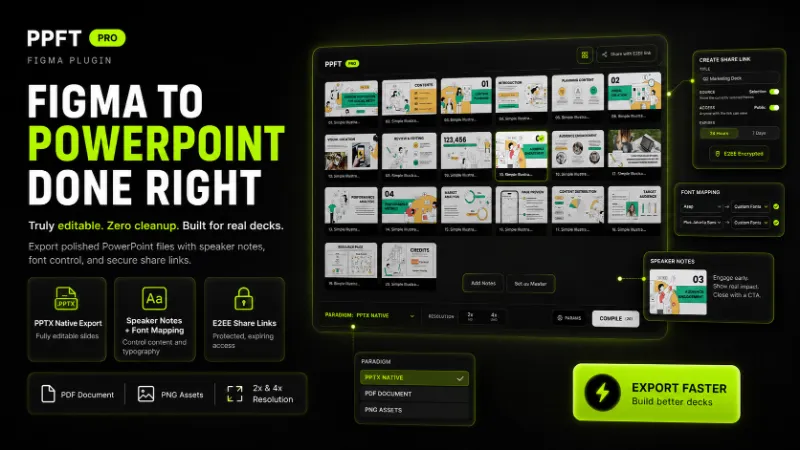
- 100% Editable PPTX: Convert Figma text layers into native PowerPoint text boxes. Edit typos, change dates, and update copy directly in PPT.
- [NEW] Add multi-language support:Korean, German, French, Spanish
- [NEW] Added a new Mini View mode:for faster exports without covering the Figma canvas.
- [NEW] All-new UI with fully interactive experience
- [NEW] End-to-End Encrypted Share Links:Share selected frames with browser-based links and optional password protection. Only the sender and recipient can decrypt the content — no third party can access the preview.
- [NEW] Professional PNG Export: You can now Export Figma to PNG.
- [NEW]Smart Master System: Transform Figma designs into reusable templates. Generate PPT Master Slides that sync brand colors and typography globally (Industry First).
- [NEW] Professional PDF Export: Export Figma as PDF with smart compression. Supports Text-to-Outline to ensure perfect rendering on any device.
- [NEW] Custom Font Mapping: Map Figma styles to native PowerPoint fonts. Solve missing font issues and ensure brand consistency across different OS.
- [NEW] Design Specifications: Automatically generate project overview slides. Includes global color palettes, typography hierarchy, and slide statistics for seamless design handoff.
- Speaker Notes & Split View: Add and export speaker notes in batches. Choose Split View Layout (slides on top, notes below) for professional presenting.
- Figma Slides Support: Fully optimized for Figma’s official Slide product. Convert Figma Slides to PPTX with perfect fidelity.
- Hyperlinks & Interactivity: Export clickable links from Figma to PowerPoint, keeping your pitch deck interactive.
- Vector & Layer Preservation: Export Figma vectors and shapes as individual, movable assets. No more flat screenshots.
- High-Fidelity Rendering: Support for 4K image assets, blurs, shadows, and complex gradients for pixel-perfect presentations.
✨ WHY DESIGNERS LOVE FPPT
One-Click Export. Truly Editable. Zero Cleanup.
The fastest way to move your designs from Figma into native PowerPoint objects.
No Screenshots. No Rebuilding. No Broken Layouts.
Say goodbye to the nightmare of manually recreating every slide from scratch.
One Master. Global Sync. Instant Updates.
Leverage our Smart Master System to update logos and footers across 100+ slides at once.
Perfect Fonts. Any Device. No More Errors.
Our Font Mapping ensures your typography stays flawless on both Mac and PC.
Tiny Files. Sharp Vectors. Secure Delivery.
Export high-fidelity, Compressed PDFs with outlined text for professional, email-ready handoffs.
Speaker Notes. Design Specs. Pro Handoff.
Sync your scripts and auto-generate project summaries for a seamless team workflow.
🏆 POWERFUL EXPORT CAPABILITIES
- End the "Small Change" Nightmare: Stop wasting time on tiny client feedback. Export 100% editable PPTX files so your clients can fix their own typos and update dates directly in PowerPoint.
- Scale Without the Manual Labor: Forget updating 100 slides one by one. Use the Smart Master System to generate real PPT templates—update your logo or footer once in Powerpoint, and it syncs across the entire deck instantly.
- Deliver Lightweight, Secure Decks: No more email bounce-backs due to giant files. Our Professional PDF Export offers smart compression for tiny file sizes and Text-to-Outline to protect your design's integrity under NDA.
- Cross-Platform Font Consistency: Stop worrying about "Missing Font" errors on your client's PC. Use Custom Font Mapping to bridge the gap between Figma styles and native OS fonts for a perfect look on any machine.
- Handoff Like a Pro: Eliminate messy handoff chats. Design Specifications auto-generate a professional overview slide with your color palette and typography stats, giving your team everything they need to succeed.
- Present with Confidence: Never lose your train of thought during a pitch. Sync your scripts as Native Speaker Notes and use Split View Layout to prepare the perfect presenter experience.
- Unlock Figma Slides for the Boardroom: Bridge the gap between design and business. Fully optimized for Figma Slides, allowing you to move your creative work into the corporate world’s standard PPTX format without losing a detail.
- Keep Your Decks Interactive: Don't let your presentation feel like a static image. Our Hyperlink Support ensures your pitch deck remains a clickable, navigable journey for your stakeholders.
- Total Post-Export Control: Stop settling for blurry screenshots. We preserve Vectors and Individual Layers, meaning every icon and shape remains movable and resizable for native animations inside PowerPoint.
- Premium Visual Integrity: Protect your high-end design work. Our engine renders 4K Assets, Shadows, and Blurs with high fidelity, ensuring your slides look just as premium in the boardroom as they do on your retina display.
📋 How to Convert Figma to Presentation Slides
- Select: Pick your Figma Frame(s) or Figma Slides.
- Run: Open the FPPT plugin.
- Map: Use Font Mapping to ensure typography is perfect.
- Export: Choose PPTX (Editable) or PDF (Compressed).
Done: Open your professional slide deck in PowerPoint, Google Slides, or Keynote.
🎯 Perfect for
Designers — Hand off decks without worrying about layout damage
Consultants — Design templates in Figma, edit content in PPT
Teams — Add native PowerPoint animations to individual layers
What's new
Version 90 · released Jun 8, 2026
- Optimized the export algorithm
Permissions and privacy
Network access
FPPT can only connect to the 7 domains declared in its manifest: icc-profiles.timori.uk, unpkg.com, api.gumroad.com, cdn.jsdelivr.net, cdn.tailwindcss.com, export-lab-auth-worker.timori.uk and share.fppt.timori.uk.
- icc-profiles.timori.uk
- unpkg.com
- api.gumroad.com
- cdn.jsdelivr.net
- cdn.tailwindcss.com
- export-lab-auth-worker.timori.uk
- share.fppt.timori.uk
Extra permissions
- Reads your Figma name and avatar
Read from the plugin's published manifest.
Where FPPT ranks
FPPT alternatives
- 1

Icons8
by Icons8 Team
2.2M users9.4KFree + paid featuresAll our graphics at your fingertips.
- 2

LottieFiles
by LottieFiles
990K users15KFreeAnimate Your Designs with Lottie Animations
- 3

Artboard Mockups
by Artboard Studio
935K users9.1KFree + paid featuresDevice mockups, branding mockups, apparel mockups and more
- 4

Vectary
by VECTARY
792K users10KFree + paid featuresLoad your 3D models, set your view and materials as you desire and export it to a frame!
- 5

Mockuuups Studio
by Mockuuups
587K users5.7KFree + paid featuresMockup generator with 5100+ mockups.
- 6

Jitter
by Jitter
507K users12KFreeAnimate your Figma designs, export to video / GIF / Lottie, handoff animation specs to developers
FPPT FAQ
What does FPPT do?
Convert Instantly. Truly Editable. Zero Cleanup. It's a Figma plugin by Chuan Hu that runs in Figma Buzz, Figma Design, Figma Slides and FigJam.
Is FPPT free?
Yes. FPPT is free to install and run from the Figma Community, with no paid tier listed.
Is FPPT safe to use?
Figma plugins can only reach the internet through domains listed in their manifest. FPPT can only connect to the 7 domains declared in its manifest: icc-profiles.timori.uk, unpkg.com, api.gumroad.com, cdn.jsdelivr.net, cdn.tailwindcss.com, export-lab-auth-worker.timori.uk and share.fppt.timori.uk. As with any plugin, check the developer's privacy policy before using it on client work.
How do I install FPPT?
Open it on the Figma Community, or search for it in the Actions menu (Cmd/Ctrl + K) inside any file you can edit. See how to install Figma plugins.
What are the best alternatives to FPPT?
By user count, the closest alternatives are Icons8, LottieFiles and Artboard Mockups. Compare all of them on the best Figma plugins for figma slides.
Built this plugin?
Use this page as a landing page for FPPT: link to it from your site, README or launch posts, or add a badge. Pick a style and copy the code.

Style
Label
Size
Code
<a href="https://figmaplugins.co/plugins/fppt/" target="_blank" rel="noopener"><img src="https://figmaplugins.co/badges/featured-dark.svg" alt="FPPT on figmaplugins.co" width="220" height="48"></a>