
About Ghost
Ghost is a free Figma plugin published by Christopher Kark in 2021. It works in Figma Design and has 85,488 users and 2,792 likes on the Figma Community. It ranks #2 in Wireframing on our lists.
In the developer's words
How it Works
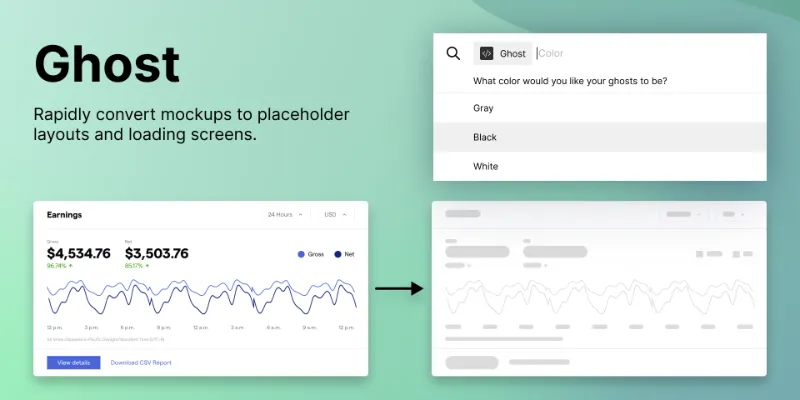
Ghost recursively detects all nodes in a selection. It then measures their dimensions before replacing them with shapes; the original layers are removed. To generate a layout faithful to the original, Ghost removes properties like auto-layout, effects, strokes, and fills, thereby preventing anomalies that occur when inserting placeholder shapes onto the canvas.
A Note on Frames
Since a frame has varied uses—creating components (e.g., buttons, toggle switches, etc.) and containers (e.g., cards and screens)—altering or removing its background color may prove disruptive. Accordingly, Ghost instead detaches and retains each frame's background color while removing strokes and effects.
Basic Usage
- Select a shape, text box, or an entire screen.
- Select a color.
- Ghost!
Recommended Usage
Loading is a state specific design akin to disabled or destructive, hover or active. Create a ghostified loading variant.
Roadmap
A color picker—depending on whether Figma’s new input parameters add support for HTML-like inputs like input type=color.
End Notes
I’m relatively new to Typescript and working with Figma’s API in general. For questions and (constructive) feedback, send me a message.
What's new
Version 48 · released Jan 14, 2026
The developer didn't publish release notes for this version.
Permissions and privacy
Network access
Ghost declares no network access, so it runs entirely inside Figma and can't send your file anywhere.
Extra permissions
None beyond the standard access to the file you run it in.
Read from the plugin's published manifest.
Where Ghost ranks
Ghost alternatives
- 1

Relume
by Relume
302K users6.2KFreeWebsites designed & built faster with AI
- 2

Higherframer
by Joe Fajnor
53K users342FreeConvert high fidelity screens to wireframe!
- 3

AI Design Copilot: Text to UI Generator
by Vova Parkhomchuk
51K users675FreeBanani AI. Generate design wireframes filled with a copy in seconds. Use full power of GPT.
- 4
Wireframe Generator
by Matheus Duarte
24K users106FreeWireframes in seconds: choose your options, click "generate" and your wireframes will be created
- 5

MockFlow
by MockFlow
23K users163Free + paid featuresExport MockFlow Wireframes to Figma
- 6

Lo-Fier
by Migo
21K users156Free + $2/mo upgradeTurn your Hi-Fi to Lo-Fi with only one click
Ghost FAQ
What does Ghost do?
Ghost is a lightweight plugin that converts high fidelity mockups to loading or “skeleton” screens. It's a Figma plugin by Christopher Kark that runs in Figma Design.
Is Ghost free?
Yes. Ghost is free to install and run from the Figma Community, with no paid tier listed.
Is Ghost safe to use?
Figma plugins can only reach the internet through domains listed in their manifest. Ghost declares no network access, so it runs entirely inside Figma and can't send your file anywhere. As with any plugin, check the developer's privacy policy before using it on client work.
How do I install Ghost?
Open it on the Figma Community, or search for it in the Actions menu (Cmd/Ctrl + K) inside any file you can edit. See how to install Figma plugins.
What are the best alternatives to Ghost?
By user count, the closest alternatives are Relume, Higherframer and AI Design Copilot: Text to UI Generator. Compare all of them on the best Figma plugins for wireframing.
Built this plugin?
Use this page as a landing page for Ghost: link to it from your site, README or launch posts, or add a badge. Pick a style and copy the code.

Style
Label
Size
Code
<a href="https://figmaplugins.co/plugins/ghost/" target="_blank" rel="noopener"><img src="https://figmaplugins.co/badges/featured-dark.svg" alt="Ghost on figmaplugins.co" width="220" height="48"></a>