The best Figma wireframe plugins in 2026
Relume is the most-installed wireframe plugin for Figma, with 302K users, because it takes a whole website from sitemap to wireframe with AI and hands it to you as editable Figma layers. For app screens, or for turning finished designs back into wireframes, Ghost and Higherframer are the next most used.
Top 20 picks



Relume
#1 · 302K users
Quick answer
Our top picks
- #1
Best for website wireframes
Relume
by Relume
Relume generates a sitemap and wireframes with AI in its Site Builder, then lets you pull them into Figma to edit. It fits agencies and freelancers scoping marketing sites. It's built around websites, so app flows are a weaker fit, and the real work happens in Relume's own app.302K 6.2KFree - #2
Best for loading states

Ghost
by Christopher Kark
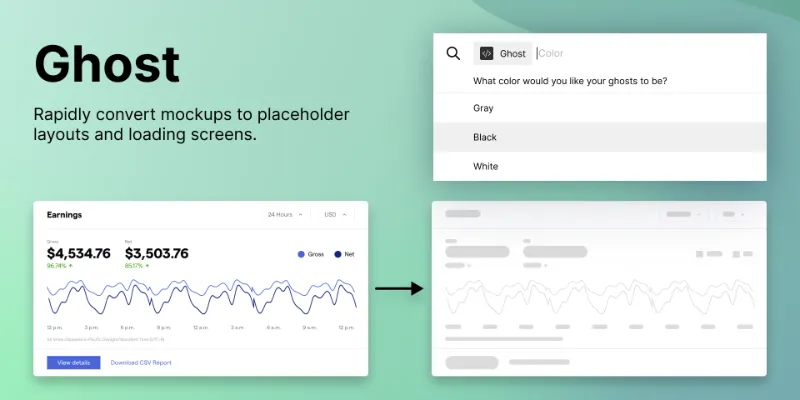
Ghost measures every layer in a selection and replaces it with a shape, turning a finished screen into a skeleton or loading state while keeping the original layers. It's free, has 85K users and 3K likes. It handles loading screens well but doesn't produce annotated wireframes.85K 2.8KFree - #3
Best hi-fi to lo-fi converter

Higherframer
by Joe Fajnor
Higherframer converts a high-fidelity screen into a wireframe using settings you adjust before converting. It's handy when a case study or review needs the wireframe you skipped. It's free with 53K users; expect to tidy the result, since automatic conversion can't know which details matter.53K 342Free
Outside the ranking · Disclosure
The full list
The 20 most-used Figma plugins for wireframing
- 01302K6.2KFree
- 02
Ghost
Ghost is a lightweight plugin that converts high fidelity mockups to loading or “skeleton” screens.
Free · 2.8K likes
85K2.8KFree - 0353K342Free
- 04

AI Design Copilot: Text to UI Generator
Banani AI. Generate design wireframes filled with a copy in seconds. Use full power of GPT.
Free · 675 likes
51K675Free - 05
Wireframe Generator
Wireframes in seconds: choose your options, click "generate" and your wireframes will be created
Free · 106 likes
24K106Free - 06
 23K163Free + paid
 - 07
 21K156Free + $2/mo
 - 08
 16K295Free
 - 09
 14K81Free
 - 10
 14K119Free
 - 11
 12K233Free
 - 12
 11K76Free
 - 13
 9K27Free + $10/mo
 - 14
 6.8K43Free
 - 15

Hand drawing sketching
Hand-drawn look and feel tool for arrows, paths boxes and circles
Free + $4/mo · 18 likes
6.5K18Free + $4/mo - 16
 5.8K33Free
 - 17
 5.4K29Free + $5
 - 18

Aaply
Aaply is a tool, that helps to work out the logic of the mobile app, plan flows, design wireframes.
Free · 46 likes
4.1K46Free - 19

Claritee layouts & wireframes to Figma
Export layouts & wireframes from Claritee to Figma
Free + paid · 14 likes
3.8K14Free + paid - 20
Grayscale Wireframe Converter
Transform designs into sleek grayscale wireframes instantly
Free · 26 likes
3.1K26Free
Buying guide
What to look for
You don't need a plugin to wireframe in Figma. Grey rectangles, auto layout and a small component kit go a long way, and Figma AI on paid plans can draft a first layout from a prompt. Plugins help in three situations: planning a multi-page site quickly (Relume, Octopus.do), converting polished screens into lo-fi versions for case studies or stakeholder reviews (Higherframer, Lo-Fier), and generating loading skeletons (Ghost, Skeleton loader).
Skeleton screens overlap with wireframing because both strip a design down to boxes. Our skeleton loader guide covers that job in detail, and mock data plugins help once your wireframes need realistic content.
- 01
Starting point
Some plugins generate wireframes from nothing (Relume, Wireframe Generator, AI Design Copilot); others convert existing designs (Higherframer, Lo-Fier, Design to Wireframe Converter). Pick based on where your project is.
- 02
Editable, auto layout output
Wireframes should be easy to rearrange. Check whether generated layouts use auto layout and components or arrive as loose shapes you'll rebuild.
- 03
Fidelity and style
Grey boxes read as structure; hand-drawn styles like Sketch Pencil signal "this isn't final" to stakeholders. Choose the look that gets the feedback you want.
- 04
AI keys and accounts
Some AI wireframe tools ask for your own API key, like Gemini AI Wireframe Creator. Others need an account in an external app. Check before you install for a team.
FAQ
Frequently asked questions
Can you wireframe in Figma without a plugin?
Yes. Rectangles, text, auto layout and a simple component kit are enough for most wireframes, and paid plans include Figma AI tools that can draft a first layout. Plugins mainly save time on site planning, conversion and skeleton screens.
How do I convert a high-fidelity design into a wireframe?
Select the screen and run Higherframer or Lo-Fier, which strip colour and detail into a lo-fi version. Keep the original frame and convert a duplicate.
How do I make a skeleton loader in Figma?
Run Ghost on a finished screen to replace its layers with placeholder shapes, then add a shimmer with Smart Animate. The skeleton loader guide has the full steps.
Is Relume free?
The Relume plugin is free to install and listed as free on Figma Community. The wireframes are made in Relume's Site Builder, which is a separate product with its own account.
Keep exploring
Related lists and guides




Prototyping
prototyping and user testing
See the top picks



Flowcharts & User Flows
flowcharts, user flows and connector arrows
See the top picks



Mock Data & Content
realistic placeholder content and mock data
See the top picksGuides
- Why Are Constraints Not Showing in Figma?Constraints in Figma not showing? In UI3 they sit in the Position section, and only for layers inside a plain frame. Here's why they vanish and how to fix it.
- How to Add a Grid to a Frame in FigmaAdd a column, row or uniform grid to a Figma frame with layout guides, set count, margin and gutter, remove it, and fix a layout grid that isn't showing up.
- How to Make a Skeleton Loader in FigmaHow to design a skeleton loader in Figma: grey blocks with auto layout, a component with variants, a Smart Animate shimmer, and a plugin that converts frames.
- Figma Frame Sizes: Which Preset to Pick and How to Change ItPick a Figma frame size from the Phone, Tablet, Desktop or Paper presets, change an existing frame's size, and why you design at viewport size, not resolution.
- How to Use the Grid Flow in Figma Auto LayoutFigma's auto layout Grid flow puts children into rows and columns. How to set it up, size tracks, span cells, and how it differs from layout guides.