
On this page
About Isometric Studio
Isometric Studio is a free Figma plugin published by Ren Yi in 2024. It works in Figma Buzz, Figma Design, Figma Slides and FigJam and has 94,167 users and 1,784 likes on the Figma Community. It ranks #5 in Illustrations and #9 in 3D on our lists.
In the developer's words
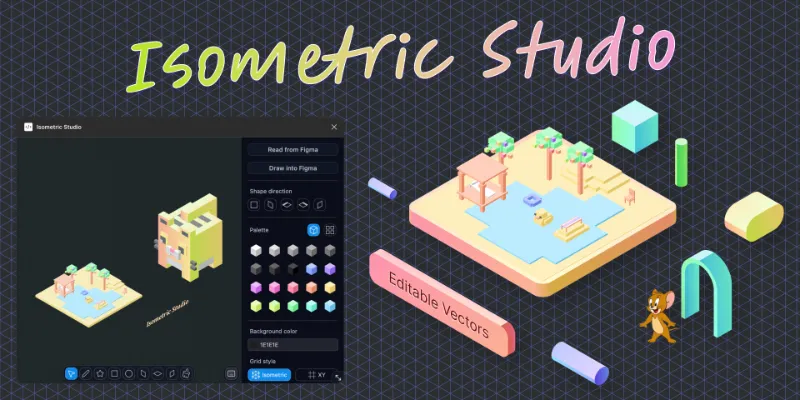
Isometric Studio is a native tool for creating Isometric illustrations.
- It helps you draw clean, structured visuals with consistent isometric angle geometries.
- It comes with an isometric grid and a rectangle-first workflow.
- Every UX detail is designed specifically for native isometric drawing.
- It preserves most of the shortcuts you already use in Figma.
- Snapping, alignment, isometric offsets, and smart guides keep everything precise.
- You can build complex scenes efficiently while maintaining a coherent layout.
- Isometric Studio also supports reusable palettes and a component library.
- It can read and write Figma design nodes, enabling Figma to have enhanced capability of isometric style drawings.
- It’s well-suited for product visuals, UI/feature scenes, explainer graphics, and brand assets.
Support:
Email: renyi6199@gmail.com
Twitter: https://twitter.com/scriabin_design
What's new
Version 29 · released Apr 4, 2026
The developer didn't publish release notes for this version.
Permissions and privacy
Network access
Isometric Studio can only connect to the 2 domains declared in its manifest: cms.ezze.design and ezze.design.
- cms.ezze.design
- ezze.design
Extra permissions
- Reads your Figma name and avatar
Read from the plugin's published manifest.
Where Isometric Studio ranks
Isometric Studio alternatives
- 1

Icons8
by Icons8 Team
2.2M users9.4KFree + paid featuresAll our graphics at your fingertips.
- 2

Illustrations
by Manthankumar Satani
476K users5.1KFreeFree Popular Illustration libraries for everyone.
- 3

Flaticon by Magnific
by Freepik: Integrations
357K users1.9KFree + paid featuresSearch through 5,000,000+ pixel-perfect icons, stickers and vectors (from Freepik)
- 4

Fast Isometric
by Ren Yi
125K users2.3KFreeFast isometric shapes creator. Accelerate your 3D illustration.
- 5

Logo & Illustration Maker
by Berry
53K users196FreeCreate a logo or illustration, powered by OpenAI and Dall-e
- 6

Pictographic: Free illustrations
by Pictographic
27K users562Free80,000+ free illustrations over 10 styles
Isometric Studio FAQ
What does Isometric Studio do?
Native Isometric Drawing Tool. It's a Figma plugin by Ren Yi that runs in Figma Buzz, Figma Design, Figma Slides and FigJam.
Is Isometric Studio free?
Yes. Isometric Studio is free to install and run from the Figma Community, with no paid tier listed.
Is Isometric Studio safe to use?
Figma plugins can only reach the internet through domains listed in their manifest. Isometric Studio can only connect to the 2 domains declared in its manifest: cms.ezze.design and ezze.design. As with any plugin, check the developer's privacy policy before using it on client work.
How do I install Isometric Studio?
Open it on the Figma Community, or search for it in the Actions menu (Cmd/Ctrl + K) inside any file you can edit. See how to install Figma plugins.
What are the best alternatives to Isometric Studio?
By user count, the closest alternatives are Icons8, Illustrations and Flaticon by Magnific. Compare all of them on the best Figma plugins for illustrations.
Built this plugin?
Use this page as a landing page for Isometric Studio: link to it from your site, README or launch posts, or add a badge. Pick a style and copy the code.

Style
Label
Size
Code
<a href="https://figmaplugins.co/plugins/isometric-studio/" target="_blank" rel="noopener"><img src="https://figmaplugins.co/badges/featured-dark.svg" alt="Isometric Studio on figmaplugins.co" width="220" height="48"></a>