
On this page
About JSON to Figma
JSON to Figma is a free Figma plugin with a paid upgrade ($17) published by Pavel Laptev in 2019. It works in Figma Design and has 87,103 users and 931 likes on the Figma Community. It ranks #3 in Mock Data & Content on our lists.
In the developer's words
An easy way to use real data in Figma.
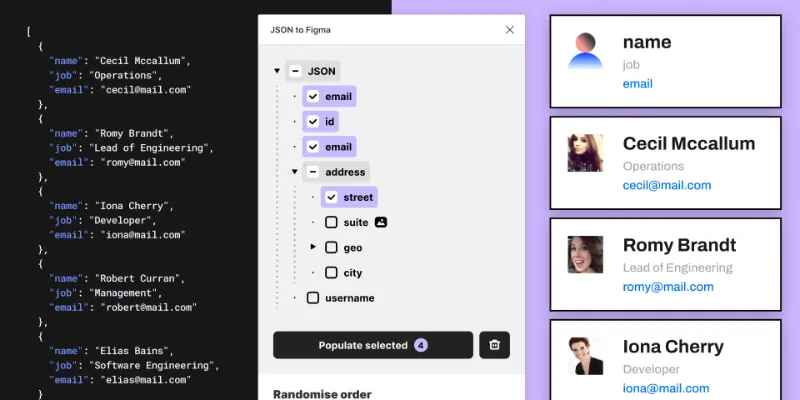
The plugin can parse local or JSON files from a URL link. You can populate any layers with text or images.
💡 Features:
- Load local files and fetch from URL
- Fetch images
- Supported formats JPG, PNG, WEBP, SVG, GIF
- Parsing JSON files with any amount of nested levels
- Flexible keys selection
- Populate in random order
- Select any ranges from JSON file
- Ability to skip layers
- Remember user settings and JSON using
clientStorage - Custom URL for your own proxy
📚 Documentation:
https://pavellaptev.notion.site/JSON-to-Figma-e4f79e250b54413ba5797c1d4a806070
🎥 Video Tutorial:
https://youtube.com/watch?v=OO2yeeNuj7A&si=EnSIkaIECMiOmarE
🤙 Feedback:
Please if you have any troubles with the plugin or ideas how I could improve the plugin.
What's new
Version 61 · released Apr 23, 2026
- Fix proxy URL fetch compatibility for remote JSON
Permissions and privacy
Network access
JSON to Figma's manifest allows network access to any domain ("*"), so Figma doesn't limit where it can send data.
- *
Extra permissions
- Can offer paid features through Figma's checkout
Read from the plugin's published manifest.
Where JSON to Figma ranks
JSON to Figma alternatives
- 1

Content Reel
by Eugene Gavriloff
1.1M users16KFreeDesign layouts more efficiently by pulling text strings, images, and icons.
- 2

Logoipsum
by Rizal Renaldi
167K users720FreeLorem ipsum of logo
- 3

Avatars
by Alohe
68K users868FreeAvatars is a comprehensive collection of diverse and eye-catching avatar images
- 4

FishText in Russian by Pavel Sherer
by Pavel Sherer
50K users721FreeСамый удобный генератор случайного текста, умный Lorem Ipsum на русском языке
- 5

Faker
by Cory Etzkorn
50K users762FreeRealistic placeholder text. Names, emails, URLs, headlines, and more.
- 6

Chinese Content Filling Assistant
by NB Charts
47K users1.1KFreeNB Text
JSON to Figma FAQ
What does JSON to Figma do?
json, population, images. It's a Figma plugin by Pavel Laptev that runs in Figma Design.
Is JSON to Figma free?
Partly. JSON to Figma is free to install and use, and a paid upgrade on the Figma Community ($17 one-time) unlocks the rest.
Is JSON to Figma safe to use?
Figma plugins can only reach the internet through domains listed in their manifest. JSON to Figma's manifest allows network access to any domain ("*"), so Figma doesn't limit where it can send data. As with any plugin, check the developer's privacy policy before using it on client work.
How do I install JSON to Figma?
Open it on the Figma Community, or search for it in the Actions menu (Cmd/Ctrl + K) inside any file you can edit. See how to install Figma plugins.
What are the best alternatives to JSON to Figma?
By user count, the closest alternatives are Content Reel, Logoipsum and Avatars. Compare all of them on the best Figma plugins for mock data & content.
Built this plugin?
Use this page as a landing page for JSON to Figma: link to it from your site, README or launch posts, or add a badge. Pick a style and copy the code.

Style
Label
Size
Code
<a href="https://figmaplugins.co/plugins/json-to-figma/" target="_blank" rel="noopener"><img src="https://figmaplugins.co/badges/featured-dark.svg" alt="JSON to Figma on figmaplugins.co" width="220" height="48"></a>