
On this page
About Map Builder
Map Builder is a free + paid features Figma plugin published by Alt Design Club in 2024. It works in Figma Design and FigJam and has 5,523 users and 51 likes on the Figma Community. It ranks #12 in Maps on our lists.
In the developer's words
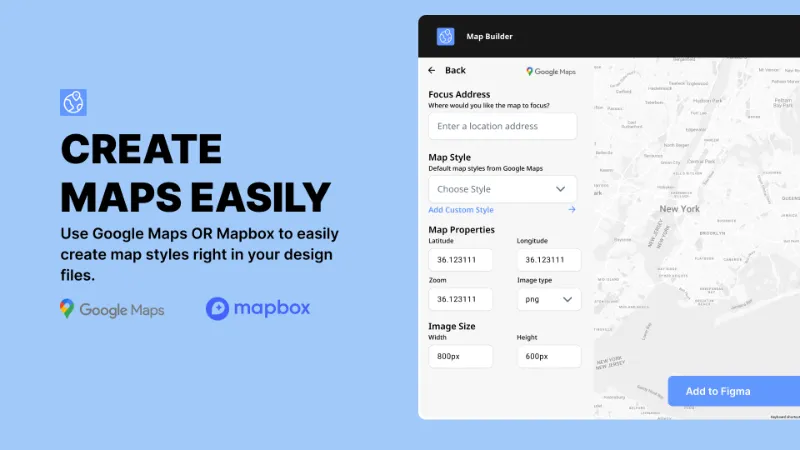
Revolutionize your design process with Map Builder for Figma. This powerful plugin allows you to seamlessly integrate maps within your design projects, offering a range of features that cater to both functionality and aesthetics. Enhance your projects with detailed maps that align perfectly with your design vision.
Features:
- Layer Selection: Effortlessly select specific layers within your Figma file to start building and integrating your maps.
- Map Integration: Integrate various map types directly into your designs, including roadmaps, satellite views, and terrain maps. Choose between Google Maps and Mapbox for a versatile mapping experience.
- Google Maps and Mapbox Functions: Create and visualize routes between multiple points, ideal for travel planning and logistics visualization.
- Free Usage and Upgrade Option: Enjoy a limited number of free map creations, with the option to upgrade to unlimited usage for a nominal fee.
- License Management: Enter your license code to unlock unlimited map-building capabilities and access premium support.
- User Notifications: Stay informed with notifications about your usage limits and easily upgrade to continue using the plugin without interruptions.
- Customer Support: Reach out to our dedicated support team for any assistance, ensuring a smooth and productive experience with the plugin.
Why Choose Map Builder?
Map Builder is designed to provide designers with a comprehensive tool for integrating maps within Figma. Whether you’re working on travel guides, logistical plans, or location-based projects, Map Builder offers the flexibility and functionality needed to create stunning maps.
Get Started Today!
Download and install Map Builder from the Figma Community Store and take your design projects to the next level with the power of integrated maps.
What's new
Version 2 · released Jul 16, 2024
- 1. Plugin to support multiple styles for different brand themes.
- 2. Accept the primary JSON type as the main functionality.
- 3. Fix plugin bugs
Permissions and privacy
Network access
Map Builder can only connect to the 7 domains declared in its manifest: *.lemonsqueezy.com, fonts.googleapis.com, fonts.gstatic.com, maps.google.com, maps.gstatic.com, *.googleapis.com and *.mapbox.com.
- *.lemonsqueezy.com
- fonts.googleapis.com
- fonts.gstatic.com
- maps.google.com
- maps.gstatic.com
- *.googleapis.com
- *.mapbox.com
Extra permissions
None beyond the standard access to the file you run it in.
Read from the plugin's published manifest.
Where Map Builder ranks
Map Builder alternatives
- 1

maps.to.design
by divRIOTS
516K users3.3KFreeMake Customized Map Blazing Fast
- 2

Google Maps
by Berry
235K users962FreeAdd a Google Map to your pages in 2 easy clicks :)
- 3

Vector Map Maker
by MapCrate Developer
58K users448FreeImport OpenStreeMap as customizable vector layers
- 4

Map Chart
by Genuine Impact
28K users86Free + paid features - 5

GMap
by Dživo Jelić
25K users104FreeEffortlessly Create Captivating Map Images
- 6

MapMaker
by Adee Labs
21K users83FreeSimple map maker for your figma projects
Map Builder FAQ
What does Map Builder do?
Design, Customize, and Integrate Stunning Maps Seamlessly with Map Builder for Figma. It's a Figma plugin by Alt Design Club that runs in Figma Design and FigJam.
Is Map Builder free?
Map Builder is free to install, but some features are unlocked through a paid plan on the developer's site.
Is Map Builder safe to use?
Figma plugins can only reach the internet through domains listed in their manifest. Map Builder can only connect to the 7 domains declared in its manifest: *.lemonsqueezy.com, fonts.googleapis.com, fonts.gstatic.com, maps.google.com, maps.gstatic.com, *.googleapis.com and *.mapbox.com. As with any plugin, check the developer's privacy policy before using it on client work.
How do I install Map Builder?
Open it on the Figma Community, or search for it in the Actions menu (Cmd/Ctrl + K) inside any file you can edit. See how to install Figma plugins.
What are the best alternatives to Map Builder?
By user count, the closest alternatives are maps.to.design, Google Maps and Vector Map Maker. Compare all of them on the best Figma plugins for maps.
Built this plugin?
Use this page as a landing page for Map Builder: link to it from your site, README or launch posts, or add a badge. Pick a style and copy the code.

Style
Label
Size
Code
<a href="https://figmaplugins.co/plugins/map-builder/" target="_blank" rel="noopener"><img src="https://figmaplugins.co/badges/featured-dark.svg" alt="Map Builder on figmaplugins.co" width="220" height="48"></a>