On this page
About Mobile Onboarding
Mobile Onboarding is a free Figma plugin published by Laurynas in 2023. It works in Figma Design and FigJam and has 49,434 users and 1,361 likes on the Figma Community. It ranks #12 in Design Systems on our lists.
In the developer's words
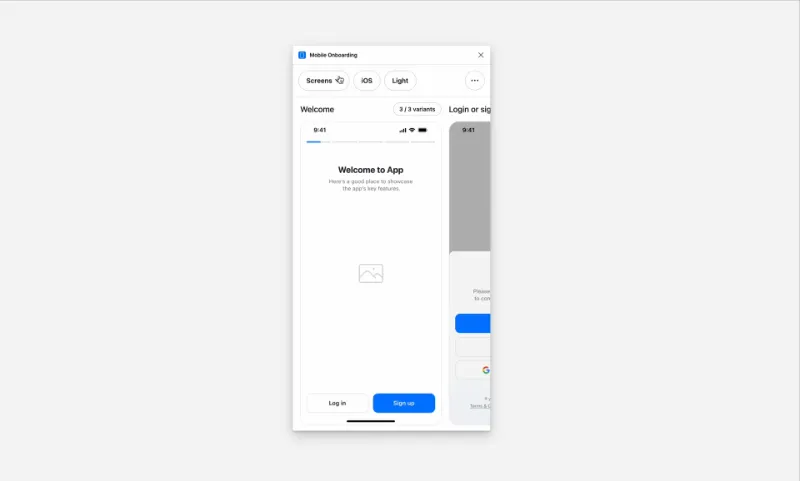
Effortlessly copy and paste stunning 200+ onboarding designs for iOS and Android, complete with light and dark modes.
Screens included
- Welcome
- Login or signup
- Confirm email
- Create password
- Reset password
- Phone
- Temporary code
- Success
- Basic details
- Address
- Country
- Multi-select
- Passcode
- Photo
- Biometrics
- Notifications
- Trial
- Paywall
Looking for desktop onboarding designs as well?
Visit componentful.com
What's new
Version 18 · released Aug 25, 2024
- Fixes and improvements.
Permissions and privacy
Network access
Mobile Onboarding can only connect to the 5 domains declared in its manifest: www.micro.design/, cdn.jsdelivr.net/gh/thomas-lowry/figma-plugin-ds/dist/, rsms.me, mobonboarding.com and www.mobonboarding.com.
- www.micro.design/
- cdn.jsdelivr.net/gh/thomas-lowry/figma-plugin-ds/dist/
- rsms.me
- mobonboarding.com
- www.mobonboarding.com
Extra permissions
None beyond the standard access to the file you run it in.
Read from the plugin's published manifest.
Where Mobile Onboarding ranks
Mobile Onboarding alternatives
- 1

Styler
by Andrei Iancu
237K users3.5KFreeBulk management of styles based on layer properties.
- 2

Design Lint
by Daniel Destefanis
147K users5.8KFreeFind and fix errors in your designs
- 3

Styles & Variables Organizer
by Chenmu Wu
140K users3.3KFree + $15 upgradeApply styles and variables to all your designs with one click!
- 4

Specs Classic
by Directed Edges Plugins
139K users5.6KFree + $8/mo upgradeGenerate component specs including anatomy, props and layout & spacing
- 5

Figr Identity
by figr.design
136K users4.2KFreeGenerate production-grade design systems with components, variables & style sheets setup in Figma
- 6
Typography Style Guide
by hiloki
116K users1.3KFreeCreate the Typography Style Guide page in one shot.
Mobile Onboarding FAQ
What does Mobile Onboarding do?
Onboarding design library for iOS and Android. It's a Figma plugin by Laurynas that runs in Figma Design and FigJam.
Is Mobile Onboarding free?
Yes. Mobile Onboarding is free to install and run from the Figma Community, with no paid tier listed.
Is Mobile Onboarding safe to use?
Figma plugins can only reach the internet through domains listed in their manifest. Mobile Onboarding can only connect to the 5 domains declared in its manifest: www.micro.design/, cdn.jsdelivr.net/gh/thomas-lowry/figma-plugin-ds/dist/, rsms.me, mobonboarding.com and www.mobonboarding.com. As with any plugin, check the developer's privacy policy before using it on client work.
How do I install Mobile Onboarding?
Open it on the Figma Community, or search for it in the Actions menu (Cmd/Ctrl + K) inside any file you can edit. See how to install Figma plugins.
What are the best alternatives to Mobile Onboarding?
By user count, the closest alternatives are Styler, Design Lint and Styles & Variables Organizer. Compare all of them on the best Figma plugins for design systems.
Built this plugin?
Use this page as a landing page for Mobile Onboarding: link to it from your site, README or launch posts, or add a badge. Pick a style and copy the code.

Style
Label
Size
Code
<a href="https://figmaplugins.co/plugins/mobile-onboarding/" target="_blank" rel="noopener"><img src="https://figmaplugins.co/badges/featured-dark.svg" alt="Mobile Onboarding on figmaplugins.co" width="220" height="48"></a>