
On this page
About Styles & Variables Organizer
Styles & Variables Organizer is a free Figma plugin with a paid upgrade ($15) published by Chenmu Wu in 2020. It works in Figma Design and FigJam and has 133,700 users and 3,237 likes on the Figma Community. It ranks #1 in Variables & Tokens, #4 in Design Systems and #8 in Productivity on our lists.
In the developer's words
Styles and Variables Organizer helps teams manage design systems and design tokens consistently across new work and legacy files.
Design System Management at Scale
- Daily design token implementation in active files.
- Legacy design file cleanup and migration.
- Applying newly added variables and styles to entire files quickly.
Features
1. Design Token Usage Assessment
- Assess token usage amounts to understand what is actually adopted.
- Filter variable properties to focus on the right migration scope.
2. Select, Link, Merge, and Bulk Apply Tokens
- Select all elements using the same value, style, or variable.
- Apply newly added variables and styles to the entire selection.
- Merge different styles and variables with the same value into a single source of truth.
- Speed up repetitive design token implementation tasks.
3. One-Click System Consolidation
- Automatically merge all available styles and variables with a single click.
- Keep your design system and token library clean over time.
Supported Variable and Style Types
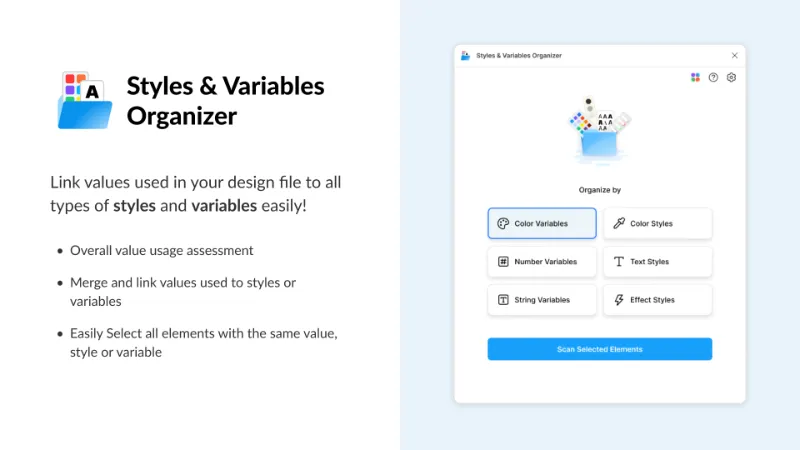
- Color Variables
- Number Variables
- String Variables
- Color Styles
- Text Styles
- Effect Styles
Practical Token Operation Examples
- Link all matching colors in a file to a color variable.
- Link all corner radius values in a file to number variables.
- Merge different styles with the same value into one shared style.
- Use your imagination!
Issues or Feature Requests
Email: contact@mureal.io
What's new
Version 11 · released May 4, 2026
- Network access removed
Permissions and privacy
Network access
Styles & Variables Organizer declares no network access, so it runs entirely inside Figma and can't send your file anywhere.
Extra permissions
- Reads your team's published libraries
- Can offer paid features through Figma's checkout
Read from the plugin's published manifest.
Where Styles & Variables Organizer ranks
Styles & Variables Organizer alternatives
- 1

Export/Import Variables
by Honza Toman
85K users1.7KFreeExport variables from one file and import them to another. Supports modes, references, and scopes.
- 2

Design Tokens
by Lukas Oppermann
62K users1.9KFreeExport design tokens to JSON or GitHub.
- 3

Figma Tailwindcss
by Jan D'Hollander
53K users606FreeExport design tokens to tailwind theme
- 4

Kigen
by vijay verma
34K users1.7KFreeCreate Design System Variables, Tokens, Styles and more with documentation
- 5

variables2css
by Kai-Uwe Hella
28K users353FreeConvert Figma Variables to CSS, Sass, Tailwind, Json, Javascript (Styled-Components), Less or Stylus
- 25K users188Free + paid features
Save, copy, and reorder variables across files easily

Styles & Variables Organizer FAQ
What does Styles & Variables Organizer do?
Apply styles and variables to all your designs with one click. It's a Figma plugin by Chenmu Wu that runs in Figma Design and FigJam.
Is Styles & Variables Organizer free?
Partly. Styles & Variables Organizer is free to install and use, and a paid upgrade on the Figma Community ($15 one-time) unlocks the rest.
Is Styles & Variables Organizer safe to use?
Figma plugins can only reach the internet through domains listed in their manifest. Styles & Variables Organizer declares no network access, so it runs entirely inside Figma and can't send your file anywhere. As with any plugin, check the developer's privacy policy before using it on client work.
How do I install Styles & Variables Organizer?
Open it on the Figma Community, or search for it in the Actions menu (Cmd/Ctrl + K) inside any file you can edit. See how to install Figma plugins.
What are the best alternatives to Styles & Variables Organizer?
By user count, the closest alternatives are Export/Import Variables, Design Tokens and Figma Tailwindcss. Compare all of them on the best Figma plugins for variables & tokens.
Built this plugin?
Use this page as a landing page for Styles & Variables Organizer: link to it from your site, README or launch posts, or add a badge. Pick a style and copy the code.

Style
Label
Size
Code
<a href="https://figmaplugins.co/plugins/styles-and-variables-organizer/" target="_blank" rel="noopener"><img src="https://figmaplugins.co/badges/featured-dark.svg" alt="Styles & Variables Organizer on figmaplugins.co" width="220" height="48"></a>