
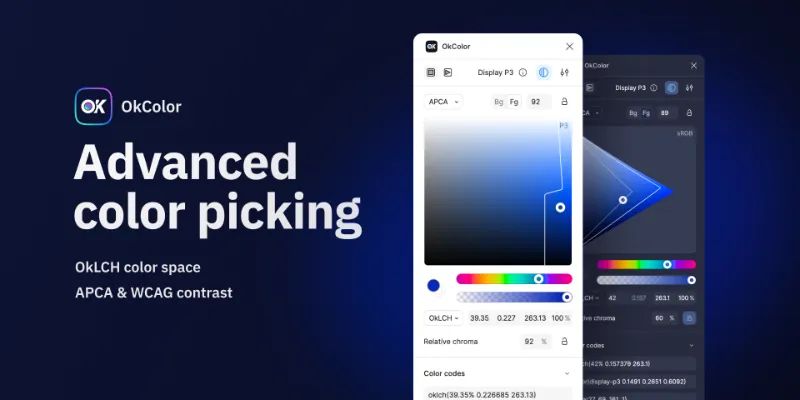
About OkColor
OkColor is a free Figma plugin published by Doko Zero in 2022. It works in Figma Design and FigJam and has 10,202 users and 424 likes on the Figma Community.
In the developer's words
Found a bug? You can open a new issue or email me (address on the right panel), I will provide a swift response for critical issues.
—
To know more about the plugin, please read the doc here.
What's new
Version 11 · released Apr 29, 2025
- Updated UI to the latest Figma UI3
- Updated auto-detection of file color profile
- Added square render for OkLCH (relative chroma on the x-axis)
- Added lightness and relative chroma updates with arrow keys in color picker
- Added hue updates with scroll wheel / trackpad in color picker
- Added support for math operations in inputs
- Deprecated OkHSL and OkHSV (still supported but not recommended)
- Fixed some render issues in Safari (color picker and slider handlers)
- Removed support for Ctrl key in color picker (only Shift is supported now)
- Updated Shift step value to 5 in color picker and inputs for consistency
- Added support for pasting oklch() value with decimal lightness (0 to 1, e.g. oklch(0.58 0.1776 259.41))
- Fixed current gamut value not updating when changing hue
- Updated code dependencies
Permissions and privacy
Network access
OkColor declares no network access, so it runs entirely inside Figma and can't send your file anywhere.
Extra permissions
None beyond the standard access to the file you run it in.
Read from the plugin's published manifest.
OkColor alternatives
- 1

Stark
by Stark
597K users10KFreeFix Color Contrast and Typography issues and add WCAG annotations for a smooth design to dev handoff
- 2

Contrast
by Alex Carr
527K users8.5KFreeQuickly check and scan for contrast issues on gradients, images, blends, and fills.
- 3

Color Palettes
by Manthankumar Satani
450K users4KFreeA free suite of integrated Color & Accessibility tools - 10+ tools free access 🔥
- 4

A11y
by Kelly Gorr
322K users4.8KFreeText color accessibility
- 5
Vectorized
by HurryFlash
242K users1.2KFreeConvert bitmap-type images into vector graphics
- 6
Image To Figma Design
by Crafttor
148K users863FreeTurn any UI screenshot into fully editable Figma layers — real components, auto layout, text & color
OkColor FAQ
What does OkColor do?
Advanced color picking, with OkLCH, APCA, WCAG and more. It's a Figma plugin by Doko Zero that runs in Figma Design and FigJam.
Is OkColor free?
Yes. OkColor is free to install and run from the Figma Community, with no paid tier listed.
Is OkColor safe to use?
Figma plugins can only reach the internet through domains listed in their manifest. OkColor declares no network access, so it runs entirely inside Figma and can't send your file anywhere. As with any plugin, check the developer's privacy policy before using it on client work.
How do I install OkColor?
Open it on the Figma Community, or search for it in the Actions menu (Cmd/Ctrl + K) inside any file you can edit. See how to install Figma plugins.
What are the best alternatives to OkColor?
By user count, the closest alternatives are Stark, Contrast by Alex Carr and Color Palettes.
Built this plugin?
Use this page as a landing page for OkColor: link to it from your site, README or launch posts, or add a badge. Pick a style and copy the code.

Style
Label
Size
Code
<a href="https://figmaplugins.co/plugins/okcolor/" target="_blank" rel="noopener"><img src="https://figmaplugins.co/badges/featured-dark.svg" alt="OkColor on figmaplugins.co" width="220" height="48"></a>Want it featured on figmaplugins.co? Submit it for review