
About Stark
Stark is a free Figma plugin published by Stark in 2019. It works in Figma Design, Dev Mode and Figma Slides and has 576,820 users and 9,955 likes on the Figma Community. It ranks #1 in Accessibility and #18 in Free on our lists.
In the developer's words
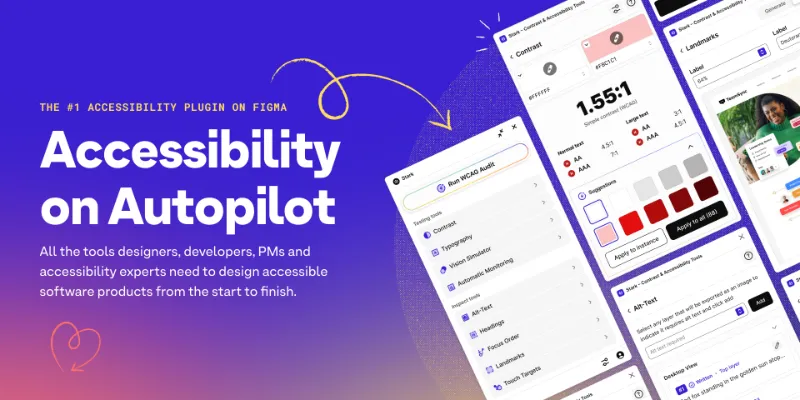
Tired of manually checking spreadsheets, messy handovers, and expensive retrofitting? The all-new Stark Suite is a powerful combination of integrated tools that help you streamline your accessibility workflow.
Now, you can create and test accessible software in record time. Whether you’re building a website, online shop, mobile app, or SaaS product, Stark gives every designer, engineer, PM, and QA expert the manual and automated tools to make it accessible with ease.
With tools like Contrast Checker, Focus Order, Alt-Text Annotations, Vision Simulator, and more all in one place, you can find accessibility issues in a design before it goes into production—or quickly analyze and fix what’s already in flight. Get started for free today!
Auto Scan and Fix with Sidekick
Designing with accessibility in mind just got ten times faster. Automatically scan your Figma files and, in only seconds, you’ll get suggestions for how to fix the accessibility issues in your design – no prior knowledge needed!
Contrast Checker with Color Suggestions
Check contrast ratios and get color suggestions to ensure your design always adheres to AA or AAA requirements. We'll even pull in local and remote library colors so you can compare with other colors in your design system.
Vision Simulator
Simulate what your design may look like for people with different types of vision, including 4 different forms of color blindness, as well as blurred vision, loss of contrast, ghosting, yellowing, and bright light simulations.
Vision Generator
Generate any simulation as a frame that lives alongside your existing design, so you can give your team a better sense of what people with different vision types might see.
Landmarks and Focus Order
Design for easy navigation with Landmarks and Focus Order, allowing anyone to experience your product with screen readers and other assistive technologies. Add notes to help your teammates during the handoff process.
Alt-Text Annotations
Get actionable suggestions when writing and testing for alt text optimized for screen reader users and even SEO ranking with search engines. We'll generate suggestions (in 5 languages!) if you're having trouble coming up with something.
Typography Analysis
Analyze the typography in your design to check that fonts and type styles are legible and readable for people with different vision types. Apply any changes to a single layer or all the layers that have the same font settings.
Touch Targets
Ensure touch targets in your mobile design and code are large enough for everyone to complete tasks with a tap.
Accessibility Notes
Make handoff a breeze by annotating your design with ARIA notes, VoiceOver, TalkBack, React Native, Narrator, and more.
Let Stark help you streamline your accessibility workflow to get your team to long-term, sustained compliance faster. Learn more about us at https://getstark.co.
What's new
Version 213 · released Jun 8, 2026
- Adds support for our new tool restriction Governance feature.
- Adds support for checking strokes on the Contrast screen.
Permissions and privacy
Network access
Stark can only connect to the 3 domains declared in its manifest: www.getstark.co, *.getstark.co and www.gravatar.com.
- www.getstark.co
- *.getstark.co
- www.gravatar.com
Extra permissions
- Reads your team's published libraries
Read from the plugin's published manifest. Questions about data handling go to the developer's support page.
Where Stark ranks
Stark alternatives
- 1
Contrast
by Alex Carr
515K users8.3KFreeQuickly check and scan for contrast issues on gradients, images, blends, and fills.
- 2
A11y
by Kelly Gorr
315K users4.7KFreeText color accessibility
- 3

UI Color Palette /one・WCAG Color Palette Manager for Apps & Websites
by Aurélien Grimaud
92K users814Free + $8/mo upgradeColor Palettes that meet WCAG Guidelines and Operations (tailored for individuals)
- 4
Color contrast
by Aleksandra Walczak
82K users474FreeColor contrast checker
- 5
Contrast
by Roman Nurik
72K users341FreeQuickly run a visual contrast report on your design.
- 6
Contrast Checker
by Lucas Amorim
54K users186FreeCheck contrast in your UI design
Stark FAQ
What does Stark do?
Fix Color Contrast and Typography issues and add WCAG annotations for a smooth design to dev handoff. It's a Figma plugin by Stark that runs in Figma Design, Dev Mode and Figma Slides.
Is Stark free?
Yes. Stark is free to install and run from the Figma Community, with no paid tier listed.
Is Stark safe to use?
Figma plugins can only reach the internet through domains listed in their manifest. Stark can only connect to the 3 domains declared in its manifest: www.getstark.co, *.getstark.co and www.gravatar.com. As with any plugin, check the developer's privacy policy before using it on client work.
How do I install Stark?
Open it on the Figma Community, or search for it in the Actions menu (Cmd/Ctrl + K) inside any file you can edit. See how to install Figma plugins.
What are the best alternatives to Stark?
By user count, the closest alternatives are Contrast by Alex Carr, A11y and UI Color Palette /one・WCAG Color Palette Manager for Apps & Websites. Compare all of them on the best Figma plugins for accessibility.
Built this plugin?
Use this page as a landing page for Stark: link to it from your site, README or launch posts, or add a badge. Pick a style and copy the code.

Style
Label
Size
Code
<a href="https://figmaplugins.co/plugins/stark/" target="_blank" rel="noopener"><img src="https://figmaplugins.co/badges/featured-dark.svg" alt="Stark on figmaplugins.co" width="220" height="48"></a>