On this page
About Placemark
Placemark is a free Figma plugin published by Tom MacWright in 2022. It works in Figma Design and has 18,264 users and 274 likes on the Figma Community. It ranks #7 in Maps on our lists.
In the developer's words
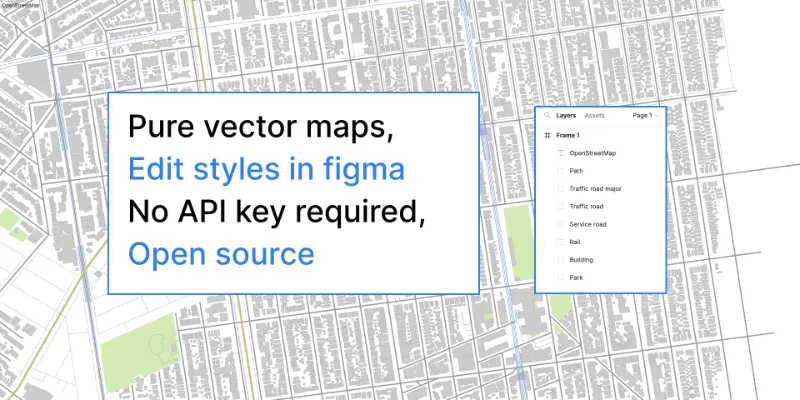
Use Figma to create purely vector street-level maps with Placemark. This plugin is a bit different than the rest. By loading data from OpenStreetMap, it enables you to create maps without an API key. As long as you credit OpenStreetMap, you can also freely print and republish the maps you make.
This plugin directly loads data and transforms it into vector data, which means:
- Styles for the map can be defined in Figma, rather than in a separate map design tool
- You can move, edit, and move map data like you do with any other drawn feature
Plus, some cool features
- Customizable label sizes with label collision detection to prevent overlapping labels
- Ability to add your own GeoJSON data to the map
Note that this is a particular solution to the problem, so it has certain caveats:
- Maps need to be zoomed in. You can't use this tool to create world-scale maps - it's better for mapping neighborhoods.
This plugin is open source! Follow along or contribute on GitHub.
Also check out Placemark Globe, the companion plugin that generates globes!
What's new
Version 16 · released May 29, 2026
- This release switches from overpass-api.de to overpass.kumi.systems as an overpass implementation. The former now requires query headers that we can't provide. The kumi.systems/private.coffee server does not, but is slower.
Permissions and privacy
Network access
Placemark can only connect to the 4 domains declared in its manifest: overpass-api.de, overpass.private.coffee, tile.openstreetmap.org and nominatim.openstreetmap.org.
- overpass-api.de
- overpass.private.coffee
- tile.openstreetmap.org
- nominatim.openstreetmap.org
Extra permissions
None beyond the standard access to the file you run it in.
Read from the plugin's published manifest.
Where Placemark ranks
Placemark alternatives
- 1

maps.to.design
by divRIOTS
516K users3.3KFreeMake Customized Map Blazing Fast
- 2

Google Maps
by Berry
235K users962FreeAdd a Google Map to your pages in 2 easy clicks :)
- 3

Vector Map Maker
by MapCrate Developer
58K users448FreeImport OpenStreeMap as customizable vector layers
- 4

Map Chart
by Genuine Impact
28K users86Free + paid features - 5

GMap
by Dživo Jelić
25K users104FreeEffortlessly Create Captivating Map Images
- 6

MapMaker
by Adee Labs
21K users83FreeSimple map maker for your figma projects
Placemark FAQ
What does Placemark do?
Free vector street maps. It's a Figma plugin by Tom MacWright that runs in Figma Design.
Is Placemark free?
Yes. Placemark is free to install and run from the Figma Community, with no paid tier listed.
Is Placemark safe to use?
Figma plugins can only reach the internet through domains listed in their manifest. Placemark can only connect to the 4 domains declared in its manifest: overpass-api.de, overpass.private.coffee, tile.openstreetmap.org and nominatim.openstreetmap.org. As with any plugin, check the developer's privacy policy before using it on client work.
How do I install Placemark?
Open it on the Figma Community, or search for it in the Actions menu (Cmd/Ctrl + K) inside any file you can edit. See how to install Figma plugins.
What are the best alternatives to Placemark?
By user count, the closest alternatives are maps.to.design, Google Maps and Vector Map Maker. Compare all of them on the best Figma plugins for maps.
Built this plugin?
Use this page as a landing page for Placemark: link to it from your site, README or launch posts, or add a badge. Pick a style and copy the code.

Style
Label
Size
Code
<a href="https://figmaplugins.co/plugins/placemark/" target="_blank" rel="noopener"><img src="https://figmaplugins.co/badges/featured-dark.svg" alt="Placemark on figmaplugins.co" width="220" height="48"></a>