
On this page
About Printery
Printery is a free Figma plugin published by Storyship in 2024. It works in Figma Buzz, Figma Design and FigJam and has 47,017 users and 412 likes on the Figma Community. It ranks #4 in PDF & Print on our lists.
In the developer's words
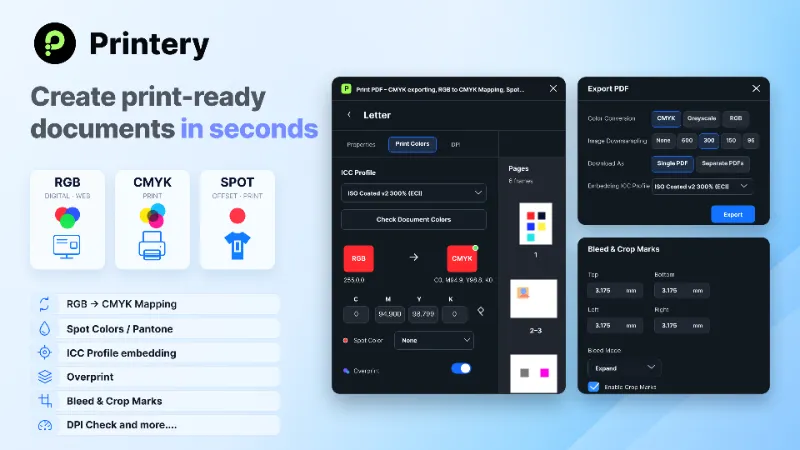
Printery turns Figma designs into professional, print-ready PDFs with CMYK conversion, bleed, crop marks, ICC profiles, spot colors, DPI control, and multi-page export.
Key features
✓ CMYK PDF export from Figma
✓ ICC-profile-based RGB to CMYK conversion
✓ Bleed, margins, safety zones, and crop marks
✓ Multi-page documents and facing-page spreads
✓ Image DPI control and downsampling
✓ Pantone / spot color mapping
✓ Overprint control
✓ Export as CMYK, RGB, or grayscale
Professional CMYK export
Convert RGB designs to CMYK using industry-standard ICC profiles, including PSO Coated v3, FOGRA39, ISO Coated v2, Japan Color, SWOP, and eciCMYK v2.
Manually adjust CMYK values, map colors to spot colors, and control overprint for more predictable print output.
Print setup
Prepare layouts with bleed, crop marks, margins, and safety zones for real print production. Use common print sizes such as Letter, Legal, Ledger, Tabloid, A-series, B-series, Business Card, Postcard, Poster, and custom sizes.
Multi-page PDF export
Create brochures, catalogs, booklets, reports, and marketing PDFs in one file. Export selected frames, print documents, or multi-page layouts without leaving Figma.
Free vs Pro
Free
✓ 5 document creations per month
✓ 3 lifetime PDF exports
✓ Try core print-export features
✓ No credit card required
Pro
✓ Unlimited documents
✓ Unlimited PDF exports
✓ Full CMYK export workflow
✓ ICC profiles
✓ Spot colors and overprint
✓ Bleed and crop marks
✓ DPI control
✓ Priority support
✓ Team licenses available
Security & Privacy
Printery is designed with privacy and security in mind. For details on how the plugin works and what data is handled, please visit:
Quick Tips
- Press
Ctrl/Cmd + Shift + 4to preview bleed areas - Use 300 DPI for standard commercial printing
- Add 3-5 mm bleed for professional print production
- Use crop marks when sending files to a print shop.
Frequently Asked Questions
- I purchased, but Pro features are still locked / it still shows FreeYour status may not have synced yet. Please refresh the Figma page (Cmd/Ctrl + R) and reopen the Printery plugin.
- Do I get a license key?It depends on what you purchased:1) Direct Subscription: no key — Pro is activated automatically for the current account. 2) Team License: license keys are provided for distributing to teammates.Team license info: https://docs.printery.app/licensing/team-licenses
- How do I cancel my subscription / stop auto-renewal?Subscriptions are managed via PayPro Global. Use the Customer Panel / Manage Subscription link in your PayPro confirmation email to cancel. If you can’t find the email, contact us with your Order ID and we can help.
- Can you transfer my access to a teammate?Yes. We’ll need the target person’s Figma User ID (email alone isn’t enough). They can find it in the plugin: Settings → Account → User ID. Send it to us and we’ll transfer it.
- I need an invoice update (Company details / VAT ID)?Invoice details are handled by PayPro Global. Please update them via the PayPro Customer Panel (Support section), or reply to your PayPro receipt email and request an invoice update.
Support
Documentation: Docs
Email: support@cooderspro.com
Discord: https://discord.gg/59f6fHAZ7m
Try Printery free today — 3 PDF exports included, no credit card required.
What's new
Version 163 · released May 26, 2026
The developer didn't publish release notes for this version.
Permissions and privacy
Network access
Printery can only connect to the 8 domains declared in its manifest: api.cooderspro.com, printery.app, www.printery.app, print-for-figma.com, www.print-for-figma.com, www.cooderspro.com, replicate.delivery and *.clarity.ms.
- api.cooderspro.com
- printery.app
- www.printery.app
- print-for-figma.com
- www.print-for-figma.com
- www.cooderspro.com
- replicate.delivery
- *.clarity.ms
Extra permissions
- Reads your Figma name and avatar
Read from the plugin's published manifest.
Where Printery ranks
Printery alternatives
- 1

Print for Figma
by Ben Katz
253K users3.6KFree + $12/mo upgradeExport Figma to CMYK with Bleed, Crop Marks, DPI, and more ...
- 2

Compressed PDF and Image Exporter
by Taylor Osborn
136K users537Free + paid featuresExport compressed PDFs and images at efficient file sizes from Figma while controlling for quality.
- 3

Free Compressed PDF and Image Exporter
by Compressify
93K users719FreeExport compressed PNG, PDF, JPG, SVG, WebP & merge multiple frames into one PDF—fast & easy! 🚀
- 4

Export PDF
by Kuntal
33K users356FreeExport your selected artboards into a High-Quality PDF—fast, reliable, and totally free!
- 5

MKitFPdf: PDF Export with TEXT and VECTOR objects
by MkitPlugins
28K users396FreeText and vector objects are retained, compresses the file size. Search engines can read the text!
- 6

Lazy››PDF
by Karl Koch
27K users161FreeCreate combined PDFs from your selection
Printery FAQ
What does Printery do?
CMYK PDF export with bleed, crop marks, ICC profiles, spot colors & DPI control. It's a Figma plugin by Storyship that runs in Figma Buzz, Figma Design and FigJam.
Is Printery free?
Yes. Printery is free to install and run from the Figma Community, with no paid tier listed.
Is Printery safe to use?
Figma plugins can only reach the internet through domains listed in their manifest. Printery can only connect to the 8 domains declared in its manifest: api.cooderspro.com, printery.app, www.printery.app, print-for-figma.com, www.print-for-figma.com, www.cooderspro.com, replicate.delivery and *.clarity.ms. As with any plugin, check the developer's privacy policy before using it on client work.
How do I install Printery?
Open it on the Figma Community, or search for it in the Actions menu (Cmd/Ctrl + K) inside any file you can edit. See how to install Figma plugins.
What are the best alternatives to Printery?
By user count, the closest alternatives are Print for Figma, Compressed PDF and Image Exporter and Free Compressed PDF and Image Exporter. Compare all of them on the best Figma plugins for pdf & print.
Built this plugin?
Use this page as a landing page for Printery: link to it from your site, README or launch posts, or add a badge. Pick a style and copy the code.

Style
Label
Size
Code
<a href="https://figmaplugins.co/plugins/printery/" target="_blank" rel="noopener"><img src="https://figmaplugins.co/badges/featured-dark.svg" alt="Printery on figmaplugins.co" width="220" height="48"></a>