
On this page
About Propstar
Propstar is a free Figma plugin with a paid upgrade ($7) published by Henrique Gusso in 2022. It works in Figma Design and has 58,504 users and 2,738 likes on the Figma Community. It ranks #19 in Productivity on our lists.
In the developer's words
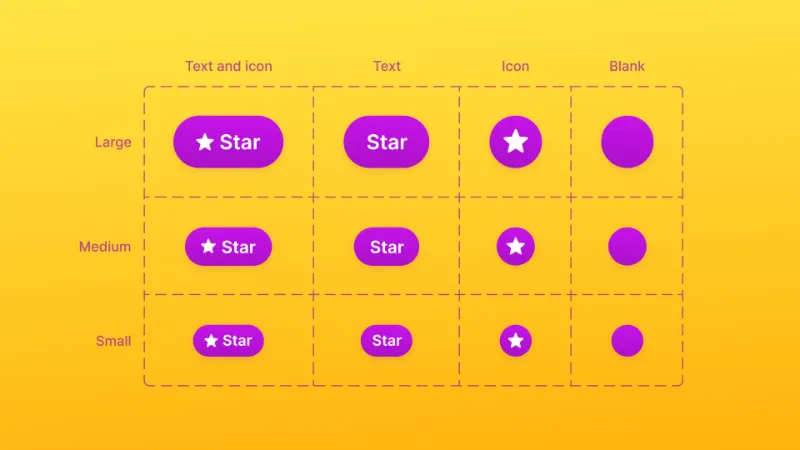
Generate all possible instances for your components, including every combination of variants and component properties, all in a tidy labelled table.
Creating tables
- Select one or multiple components or component sets.
- Run Propstar > Create property table.
- That's it! A table of instances will be generated behind your component, displaying your main component alongside all possible instances.
Settings
The settings panel allows you to customise several aspects of your property table. Here's what you can do:
- By default Propstar saves your settings locally on your computer, but you can change it to remember different settings for each file or each individual component.
- Include boolean instances to generate every possible permutation of your component, or disable them to simply organise your component set.
- [★Pro]Enable Nested instances to show the properties of exposed nested instances on the table as well.
- Toggle Standalone to create your property table separately from your source component.
- [★Pro]Customise color, font size, stroke weight, padding, and the opacity that highlights generated instances. Please send a message in the comments if you want to customise other aspects of the table.
Unlock Propstar Pro
Support the development of Propstar by unlocking Pro with a one-time fee of $7.
Ordering
To change the order of instances on the table, reorder the properties and values directly on Figma, using the controls on the right sidebar.
The property values of your default variants are prioritised so that the main components stay on the left, while the generated instances are spread around the rest of the table.
Figma does not currently support mixing the order between variant and component properties.
What's new
Version 41 · released Feb 17, 2026
- ⬥ Added layout setting with option to overlay the component set in front of the property table, similar to previous behaviour.
Permissions and privacy
Network access
Propstar declares no network access, so it runs entirely inside Figma and can't send your file anywhere.
Extra permissions
- Can offer paid features through Figma's checkout
Read from the plugin's published manifest.
Where Propstar ranks
Propstar alternatives
- 1

Table Creator
by Gavin McFarland
795K users6.5KFreeEasily create tables that can be edited, resized and maintained using your design system
- 2

Table Generator & Creator
by Appcano
201K users1.1KFree + $5/mo upgradeGenerate and customize tables in seconds
- 3

Rename It
by Rodrigo Soares
197K users3.6KFree - 4

Tablefy
by Kiko Herrschaft
184K users245Free - 5

Downsize
by Alex Einarsson
147K users2.2KFreeCompress and resize images without leaving Figma!
- 6

Design Lint
by Daniel Destefanis
142K users5.7KFreeFind and fix errors in your designs
Propstar FAQ
What does Propstar do?
Generate every possible instance for your components, all in a tidy labelled table. It's a Figma plugin by Henrique Gusso that runs in Figma Design.
Is Propstar free?
Partly. Propstar is free to install and use, and a paid upgrade on the Figma Community ($7 one-time) unlocks the rest.
Is Propstar safe to use?
Figma plugins can only reach the internet through domains listed in their manifest. Propstar declares no network access, so it runs entirely inside Figma and can't send your file anywhere. As with any plugin, check the developer's privacy policy before using it on client work.
How do I install Propstar?
Open it on the Figma Community, or search for it in the Actions menu (Cmd/Ctrl + K) inside any file you can edit. See how to install Figma plugins.
What are the best alternatives to Propstar?
By user count, the closest alternatives are Table Creator by Gavin McFarland, Table Generator & Creator and Rename It. Compare all of them on the best Figma plugins for productivity.
Built this plugin?
Use this page as a landing page for Propstar: link to it from your site, README or launch posts, or add a badge. Pick a style and copy the code.

Style
Label
Size
Code
<a href="https://figmaplugins.co/plugins/propstar/" target="_blank" rel="noopener"><img src="https://figmaplugins.co/badges/featured-dark.svg" alt="Propstar on figmaplugins.co" width="220" height="48"></a>