
On this page
About random number generator
random number generator is a free Figma plugin published by Dan Araujo in 2021. It works in Figma Design and has 9,617 users and 59 likes on the Figma Community. It ranks #15 in Mock Data & Content on our lists.
In the developer's words
Select text layers and replace them with randomly generated numbers, lightning fast. Replace existing numbers within a text layer, reuse a custom range, disable duplicates, and format long numbers with commas.
🎥 Watch demo video
Check out this quick video to see what this plugin can do!
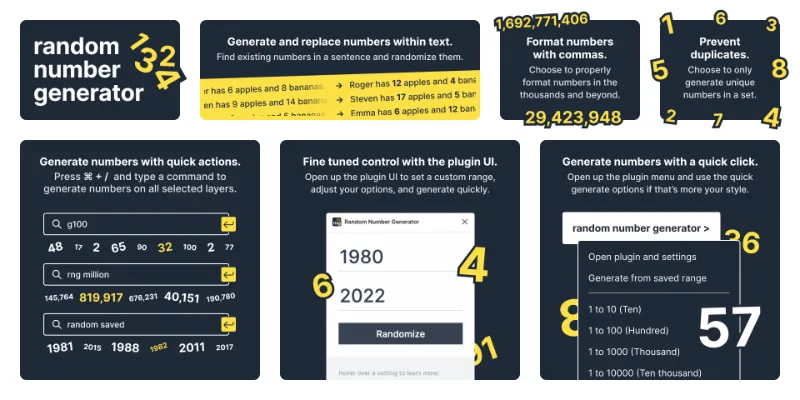
⚡️ Generating numbers with quick action commands
The quickest way to use this plugin is to use Figma's quick actions menu. To open this menu on Mac, use Cmd + /or Cmd + P. On Windows, use Ctrl + / or Ctrl + P. With this menu open, you can type a command and hit enter to quickly generate random numbers.
[-] Type a valid prefix before the command
‣ g| For example: g100 / gthousand / gsaved
‣ rng| For example: rng10000 / rng million / rng saved
‣ random| For example: random10 / random hundred / randomsaved
‣ num| For example: num1000000 / numhundredthousand / numsaved
‣ [-]10, [-]100, ... , [-]1000000
This will generate random numbers for all selected text layers between 1 and whatever amount of zeros you typed. For example, pressing Cmd + /,typing g100000,and hitting Enter will generate numbers between 1 - 100,000.
‣ [-] ten, [-] hundred, ... , [-] million
This has the same functionality as the above, but you can type the name of the number instead. For example, pressing Cmd + /,typing random ten,and hitting Enter will generate numbers between 1 - 10.
‣ [-] saved
This will generate numbers from your saved range. By default, this will be 1 through 50, but you can change it in the plugin UI. For example, pressing Cmd + /,typing rng saved,and hitting Enter will generate numbers between Custom X - Custom Y.
⚙️ Using the plugin UI
Open up the plugin UI by navigating to it in your Plugins dropdown, or open up the quick actions menu (Cmd + /) and type rng settings. In the plugin settings window, you can do the following:
‣ Modify your saved range
Set up your minimum and maximum to generate your random numbers from. You can go really high (into the billions), so go wild. The plugin will remember this range, and you can also quickly generate new numbers from your saved range without the plugin open. See [-] saved above.
‣ Rapidly generate numbers
Keep clicking "Randomize" or hitting the Enter key and you'll regenerate numbers for all your selected text layers. Keep going until you see a set of numbers that is perfect.
‣ Toggle the "Only replace existing numbers" setting(Off by default)
Decide whether to replace the entire contents of a selected text layer with a generated number, or scan through the layer and replace any numbers found with newly generated number. Text layers without numbers in them will not be affected.
‣ Toggle the "Prevent Duplicate" setting(Off by default)
Decide whether to prevent duplicate numbers when generating numbers. This is a good way to generate unique sets of numbers or randomize list order. If the amount of numbers you are generating exceeds the amount you define in your range, the plugin will need to generate some duplicates.
‣ Toggle the "Format with commas" setting(On by default)
Decide whether to show commas for numbers above 999. For example, you'd want to toggle this on if you're generating regular numbers, but you might want to toggle it off if you're generating numbers for a data centric UI or a random list of years (2021 vs 2,021).
☕️ Support the plugin
If you love the plugin and feel inclined to provide some small financial support to encourage the development of new features and bug fixes, that would be greatly appreciated. No pressure, of course!
_
What's new
Version 5 · released Mar 5, 2024
- Hotfix
Permissions and privacy
Network access
random number generator can only connect to the 2 domains declared in its manifest: unpkg.com and fonts.googleapis.com.
- unpkg.com
- fonts.googleapis.com
Extra permissions
None beyond the standard access to the file you run it in.
Read from the plugin's published manifest.
Where random number generator ranks
random number generator alternatives
- 1

Content Reel
by Eugene Gavriloff
1.1M users16KFreeDesign layouts more efficiently by pulling text strings, images, and icons.
- 2

Logoipsum
by Rizal Renaldi
167K users720FreeLorem ipsum of logo
- 3

JSON to Figma
by Pavel Laptev
87K users931Free + $17 upgradejson, population, images
- 4

Avatars
by Alohe
68K users868FreeAvatars is a comprehensive collection of diverse and eye-catching avatar images
- 5

FishText in Russian by Pavel Sherer
by Pavel Sherer
50K users721FreeСамый удобный генератор случайного текста, умный Lorem Ipsum на русском языке
- 6

Faker
by Cory Etzkorn
50K users762FreeRealistic placeholder text. Names, emails, URLs, headlines, and more.
random number generator FAQ
What does random number generator do?
Select text layers and replace them with randomly generated numbers, lightning fast. It's a Figma plugin by Dan Araujo that runs in Figma Design.
Is random number generator free?
Yes. random number generator is free to install and run from the Figma Community, with no paid tier listed.
Is random number generator safe to use?
Figma plugins can only reach the internet through domains listed in their manifest. random number generator can only connect to the 2 domains declared in its manifest: unpkg.com and fonts.googleapis.com. As with any plugin, check the developer's privacy policy before using it on client work.
How do I install random number generator?
Open it on the Figma Community, or search for it in the Actions menu (Cmd/Ctrl + K) inside any file you can edit. See how to install Figma plugins.
What are the best alternatives to random number generator?
By user count, the closest alternatives are Content Reel, Logoipsum and JSON to Figma. Compare all of them on the best Figma plugins for mock data & content.
Built this plugin?
Use this page as a landing page for random number generator: link to it from your site, README or launch posts, or add a badge. Pick a style and copy the code.

Style
Label
Size
Code
<a href="https://figmaplugins.co/plugins/random-number-generator/" target="_blank" rel="noopener"><img src="https://figmaplugins.co/badges/featured-dark.svg" alt="random number generator on figmaplugins.co" width="220" height="48"></a>