
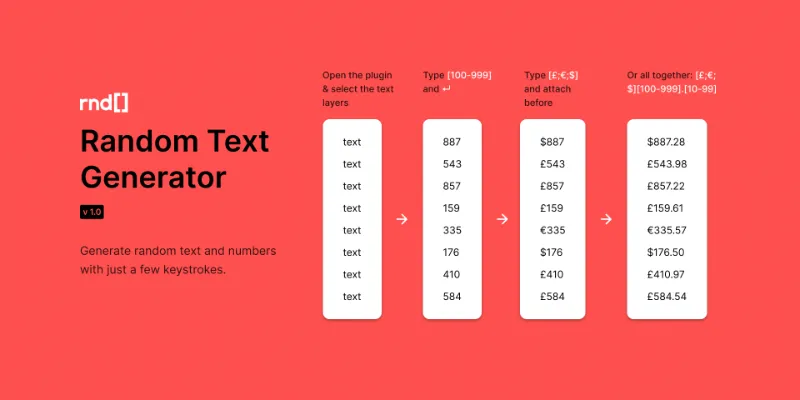
About Random Text Generator
Random Text Generator is a free Figma plugin published by Javi Delgado in 2021. It works in Figma Design and FigJam and has 24,173 users and 134 likes on the Figma Community.
In the developer's words
A lean plugin that generates randomized text and numbers for multiple layers as effortlessly as possible.
This plugin was created with productivity in mind, allowing you to create randomized data for prototypes with just a few keystrokes.
How to use it
- Run the Random Text Generator plugin
- Select the text layers
- Write the text you want to use, wrapping the randomized data in as described.
- Choose between Replace text (default) or attach to the beginning or end of the selected text layers.
- Press return or click the Change text button. Voilà!
Example uses
- Currency amounts → $[100-999].[10-99]
- Last online → Last online [1-9][d;hr;m] ago
- Phone numbers → +1 (800) [100-999]-[1000-9999]
- Status → [Online;Offline;Away;Do not disturb]
- Adding emails to a list of names using Append after → @[gmail;hotmail;yahoo;company].com
What's coming next
- Find and replace within the selected layers.
- Allow faster execution of the plugin, using Parameters through Figma Quick Actions menu: ⌘ /
Support or feature requests
Feel free to reach out on Twitter at twitter.com/uxjavi
What's new
Version 1 · released Oct 15, 2021
The developer didn't publish release notes for this version.
Permissions and privacy
Network access
This plugin's manifest doesn't declare its network access, which is common for older plugins. Figma shows a warning on the Community page for plugins like this.
Extra permissions
None beyond the standard access to the file you run it in.
Read from the plugin's published manifest. Questions about data handling go to the developer's support page.
Random Text Generator alternatives
- 1

Stark
by Stark
597K users10KFreeFix Color Contrast and Typography issues and add WCAG annotations for a smooth design to dev handoff
- 2

Contrast
by Alex Carr
527K users8.5KFreeQuickly check and scan for contrast issues on gradients, images, blends, and fills.
- 3

Color Palettes
by Manthankumar Satani
450K users4KFreeA free suite of integrated Color & Accessibility tools - 10+ tools free access 🔥
- 4

A11y
by Kelly Gorr
322K users4.8KFreeText color accessibility
- 5

Vectorized
by HurryFlash
242K users1.2KFreeConvert bitmap-type images into vector graphics
- 6

Image To Figma Design
by Crafttor
148K users863FreeTurn any UI screenshot into fully editable Figma layers — real components, auto layout, text & color
Random Text Generator FAQ
What does Random Text Generator do?
It's a Figma plugin by Javi Delgado that runs in Figma Design and FigJam.
Is Random Text Generator free?
Yes. Random Text Generator is free to install and run from the Figma Community, with no paid tier listed.
How do I install Random Text Generator?
Open it on the Figma Community, or search for it in the Actions menu (Cmd/Ctrl + K) inside any file you can edit. See how to install Figma plugins.
What are the best alternatives to Random Text Generator?
By user count, the closest alternatives are Stark, Contrast by Alex Carr and Color Palettes.
Built this plugin?
Use this page as a landing page for Random Text Generator: link to it from your site, README or launch posts, or add a badge. Pick a style and copy the code.

Style
Label
Size
Code
<a href="https://figmaplugins.co/plugins/random-text-generator/" target="_blank" rel="noopener"><img src="https://figmaplugins.co/badges/featured-dark.svg" alt="Random Text Generator on figmaplugins.co" width="220" height="48"></a>Want it featured on figmaplugins.co? Submit it for review