
About Roller
Roller is a free Figma plugin published by Toybox in 2019. It works in Figma Design and has 20,647 users and 613 likes on the Figma Community. It ranks #16 in Design Systems on our lists.
In the developer's words
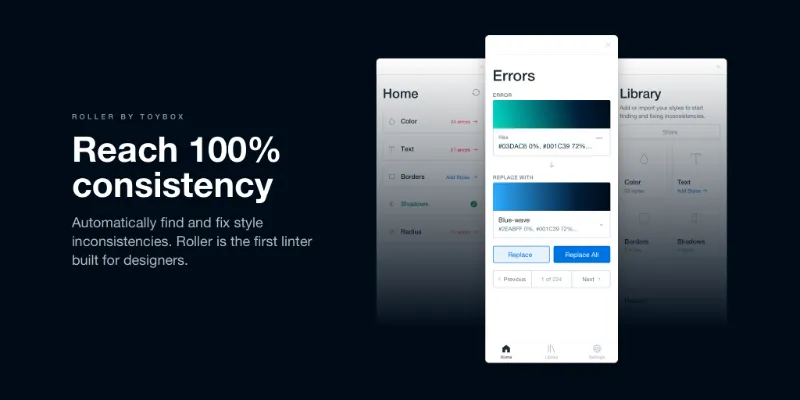
Roller is the first ever Design Linter - giving you the power to automatically find and fix style inconsistencies in your files. Be confident every design you hand-off is 100% consistent with your Style Guide or Design System.
How to use Roller
1 - Import or add your styles to the Roller Library
2 - Roller then automatically finds any inconsistencies (Errors) on the page that don’t match what is in your Library
3 - Replace the Error with one of your Library’s styles
4 - Rinse & repeat to reach 100% consistency
Lint in the following categories
• Colors - Quickly fix the 50 (or 5,000) shades of gray that are lurking in your designs.
• Text - If a subtle line-height or letter-spacing is off, Roller will pick them up and get you back on system.
• Borders - Roller lets you add the width and colors of your borders - making it easy to find any rogue input field or card.
• Shadows - Roller gives you superhuman eyes - making it possible to detect subtle differences in shadow blurs or x, y offsets.
• Radiuses - Be confident that any button, card, input etc. has the correct border-radiuses applied.
Keep your team in-sync
Roller lets you store and share your Library with teammates. Make sure everyone on your team has up-to-date resources and styles when linting.
What's new
Version 15 · released Jan 5, 2021
- Bug fixes and improvements
Permissions and privacy
Network access
This plugin's manifest doesn't declare its network access, which is common for older plugins. Figma shows a warning on the Community page for plugins like this.
Extra permissions
None beyond the standard access to the file you run it in.
Read from the plugin's published manifest.
Where Roller ranks
Roller alternatives
- 1

Styler
by Andrei Iancu
229K users3.4KFreeBulk management of styles based on layer properties.
- 2

Design Lint
by Daniel Destefanis
142K users5.7KFreeFind and fix errors in your designs
- 3

Specs Classic
by Directed Edges Plugins
136K users5.5KFree + $8/mo upgradeGenerate component specs including anatomy, props and layout & spacing
- 4

Styles & Variables Organizer
by Chenmu Wu
134K users3.2KFree + $15 upgradeApply styles and variables to all your designs with one click!
- 5

Instance Finder
by Idan Arbel
96K users1.8KFree - 6

Color Style Guide
by hiloki
79K users1.4KFreeCreate the brillant Color Styleguide page using your local Color Styles.
Roller FAQ
What does Roller do?
It's a Figma plugin by Toybox that runs in Figma Design.
Is Roller free?
Yes. Roller is free to install and run from the Figma Community, with no paid tier listed.
How do I install Roller?
Open it on the Figma Community, or search for it in the Actions menu (Cmd/Ctrl + K) inside any file you can edit. See how to install Figma plugins.
What are the best alternatives to Roller?
By user count, the closest alternatives are Styler, Design Lint and Specs Classic. Compare all of them on the best Figma plugins for design systems.
Built this plugin?
Use this page as a landing page for Roller: link to it from your site, README or launch posts, or add a badge. Pick a style and copy the code.

Style
Label
Size
Code
<a href="https://figmaplugins.co/plugins/roller/" target="_blank" rel="noopener"><img src="https://figmaplugins.co/badges/featured-dark.svg" alt="Roller on figmaplugins.co" width="220" height="48"></a>