
On this page
About Select Layers
Select Layers is a free Figma plugin published by Yuan Qing Lim in 2020. It works in Figma Design and has 45,772 users and 807 likes on the Figma Community. It ranks #12 in Layer Management on our lists.
In the developer's words
Select layers based on name, type, or similarity.
Fund my work on Figma plugins →
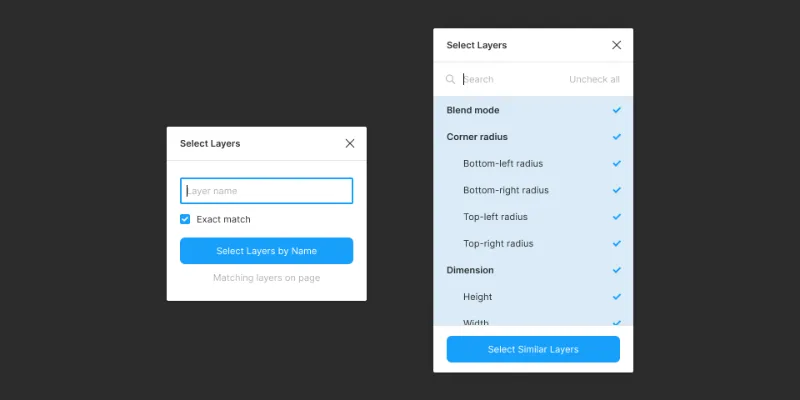
Select Layers by Name
Selects layers that partially or exactly match the given name.
Select Layers by Type
Selects layers of a particular type:
- Component
- Variant
- Instance Layer
- Section
- Frame
- Group
- Slice
- Vector Layer
- Rectangle
- Line
- Ellipse
- Polygon
- Star
- Boolean Group
- Image
- Text Layer
Select Mask Layers / Hidden Layers / Locked Layers / Layers With Exports
Selects layers with the specified attribute.
Select Parent Layers / Root Layers
Selects layers at the specified hierarchy.
Select Similar Layers
Selects layers with one or more attributes that are identical to the one currently-selected layer.
With the exception of Select Similar Layers, all commands make a sub-selection within the currently-selected layers, or creates a new selection of layers if the selection is empty.
What's new
Version 12 · released Aug 1, 2025
- Fix a regression with the text field not getting selected by default in the Select Layers by Name command.
Permissions and privacy
Network access
Select Layers declares no network access, so it runs entirely inside Figma and can't send your file anywhere.
Extra permissions
None beyond the standard access to the file you run it in.
Read from the plugin's published manifest. Questions about data handling go to the developer's support page.
Where Select Layers ranks
Select Layers alternatives
- 1

Find and Replace
by Jackie Chui
223K users2.6KFreeFind and replace text in your file like a text editor
- 2

Rename It
by Rodrigo Soares
197K users3.6KFree - 3

Detach Component
by Patrick Morgan
140K users1.3KFree - 4

Similayer
by Dave
136K users3.1KFree - 5

Clean Document
by Yuan Qing Lim
124K users3KFree + paid featuresAutomagically organize and clean up your Figma document
- 6

Sorter
by Tom
81K users1.5KFreeQuickly sort layers in different ways
Select Layers FAQ
What does Select Layers do?
Select layers based on name, type, or similarity. It's a Figma plugin by Yuan Qing Lim that runs in Figma Design.
Is Select Layers free?
Yes. Select Layers is free to install and run from the Figma Community, with no paid tier listed.
Is Select Layers safe to use?
Figma plugins can only reach the internet through domains listed in their manifest. Select Layers declares no network access, so it runs entirely inside Figma and can't send your file anywhere. As with any plugin, check the developer's privacy policy before using it on client work.
How do I install Select Layers?
Open it on the Figma Community, or search for it in the Actions menu (Cmd/Ctrl + K) inside any file you can edit. See how to install Figma plugins.
What are the best alternatives to Select Layers?
By user count, the closest alternatives are Find and Replace by Jackie Chui, Rename It and Detach Component. Compare all of them on the best Figma plugins for layer management.
Built this plugin?
Use this page as a landing page for Select Layers: link to it from your site, README or launch posts, or add a badge. Pick a style and copy the code.

Style
Label
Size
Code
<a href="https://figmaplugins.co/plugins/select-layers/" target="_blank" rel="noopener"><img src="https://figmaplugins.co/badges/featured-dark.svg" alt="Select Layers on figmaplugins.co" width="220" height="48"></a>