
On this page
About Skeleton Craft
Skeleton Craft is a free Figma plugin with a paid upgrade ($5) published by Tomasz Ostrowski in 2025. It works in Figma Design and has 5,449 users and 29 likes on the Figma Community. It ranks #17 in Wireframing on our lists.
In the developer's words
What is Skeleton Craft?
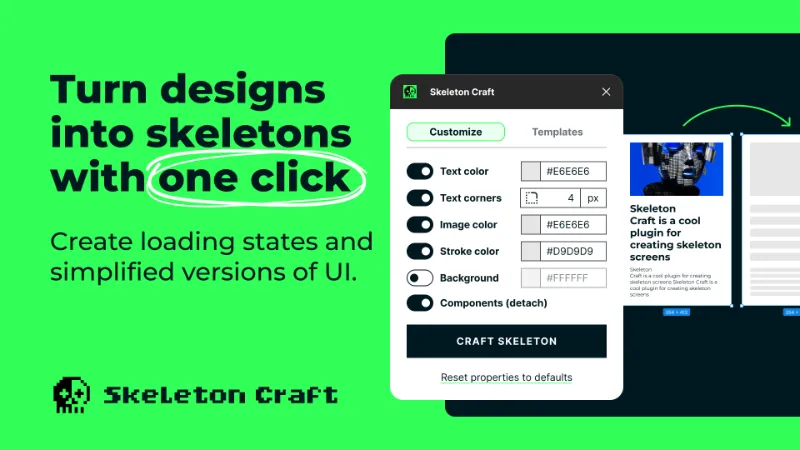
Skeleton Craft is a Figma plugin designed to help you create skeleton screens from your existing designs, enhancing your workflow efficiency. It supports elements like text (color and corner radius), strokes (color), inputs, images (color), and detaching component instances.
New in v2.0: Professional template system with 5 built-in themes, custom template saving and sharing, plus intelligent background color modes for complete loading state mockups.
Whether you're working on prototypes, preparing presentations, or creating simplified graphics for marketing and web interfaces, Skeleton Craft provides a powerful yet straightforward solution for visualizing and iterating on your designs.
Use cases:
- Loading screens: Generate skeleton screens to simulate loading states, improving user experience during transitions.
- Design system integration: Create and share skeleton templates that match your design system, ensuring consistent loading states across teams.
- Simplified graphics: Create minimalistic interface graphics for marketing and web purposes, ensuring clarity in your visual communication.
- Rapid prototyping: Quickly iterate on loading state variations using built-in templates or your own custom presets.
How to use:
- Select the elements you want to transform.
- Choose a template (optional) or customize colors, corners, and background settings.
- Click "Craft Skeleton" and watch your loading states appear instantly.
- Your original designs remain untouched while skeletons are created alongside.
Pro tips:
- Try different built-in templates to find the perfect style
- Save your custom settings as templates for quick reuse
- Use Background Auto mode for intelligent element preservation
- Share template codes with your team for consistency
Trial & premium features
- 7-day free trial: Try all features completely free for 7 days
- After-purchase: Unlimited access to all current and future features
- One-time purchase: No subscriptions, just a single payment for lifetime access
What's new
Version 8 · released Oct 26, 2025
- ### 🎨 What's New
- #### Template system
- Transform your workflow with a powerful new template system:
- Built-in Professional Themes**: Choose from 5 expertly crafted skeleton themes:
- Clean Light** - Clean, minimal skeletons with crisp edges and soft neutral contrast
- Deep Dark** - Dark skeletons with balanced tone and quiet contrast for dark-themed designs
- Soft Rounded** - Elegant skeletons with soft corners and airy tones
- Faint Lines** - Delicate skeletons that blend seamlessly into white UIs without vanishing
- Heavy Shade** - Strong gray tones with solid contrast for expressive skeleton states
- Custom Templates**: Save your current settings as reusable templates for instant access
- Template Sharing**: Share templates with your team via easy copy/paste codes
- Quick Apply**: One-click application of templates for consistent skeleton states across your designs
- #### Background mode
- Create complete loading state mockups with new background control:
- Background Color Control**: Apply background colors to skeleton containers
- Three Intelligent Modes**:
- Auto Mode** - Smart application that keeps container backgrounds and protects specif
Permissions and privacy
Network access
Skeleton Craft declares no network access, so it runs entirely inside Figma and can't send your file anywhere.
Extra permissions
- Can offer paid features through Figma's checkout
Read from the plugin's published manifest.
Where Skeleton Craft ranks
Skeleton Craft alternatives
- 1

Relume
by Relume
302K users6.2KFreeWebsites designed & built faster with AI
- 2

Ghost
by Christopher Kark
85K users2.8KFreeGhost is a lightweight plugin that converts high fidelity mockups to loading or “skeleton” screens.
- 3

Higherframer
by Joe Fajnor
53K users342FreeConvert high fidelity screens to wireframe!
- 4

AI Design Copilot: Text to UI Generator
by Vova Parkhomchuk
51K users675FreeBanani AI. Generate design wireframes filled with a copy in seconds. Use full power of GPT.
- 5
Wireframe Generator
by Matheus Duarte
24K users106FreeWireframes in seconds: choose your options, click "generate" and your wireframes will be created
- 6

MockFlow
by MockFlow
23K users163Free + paid featuresExport MockFlow Wireframes to Figma
Skeleton Craft FAQ
What does Skeleton Craft do?
Turn Designs into Skeletons with One Click, Design tools. It's a Figma plugin by Tomasz Ostrowski that runs in Figma Design.
Is Skeleton Craft free?
Partly. Skeleton Craft is free to install and use, and a paid upgrade on the Figma Community ($5 one-time) unlocks the rest.
Is Skeleton Craft safe to use?
Figma plugins can only reach the internet through domains listed in their manifest. Skeleton Craft declares no network access, so it runs entirely inside Figma and can't send your file anywhere. As with any plugin, check the developer's privacy policy before using it on client work.
How do I install Skeleton Craft?
Open it on the Figma Community, or search for it in the Actions menu (Cmd/Ctrl + K) inside any file you can edit. See how to install Figma plugins.
What are the best alternatives to Skeleton Craft?
By user count, the closest alternatives are Relume, Ghost and Higherframer. Compare all of them on the best Figma plugins for wireframing.
Built this plugin?
Use this page as a landing page for Skeleton Craft: link to it from your site, README or launch posts, or add a badge. Pick a style and copy the code.

Style
Label
Size
Code
<a href="https://figmaplugins.co/plugins/skeleton-craft/" target="_blank" rel="noopener"><img src="https://figmaplugins.co/badges/featured-dark.svg" alt="Skeleton Craft on figmaplugins.co" width="220" height="48"></a>