On this page
About Spacing Manager
Spacing Manager is a free Figma plugin published by Farid Sabitov in 2020. It works in Figma Design and has 23,914 users and 528 likes on the Figma Community. It ranks #15 in Dev Handoff on our lists.
In the developer's words
The Purpose
I think we all know that sometimes designers making different spacings between the elements. In some cases, we have 15px spacing, and in another place, 14px. It's hard always to update all these spacings manually.
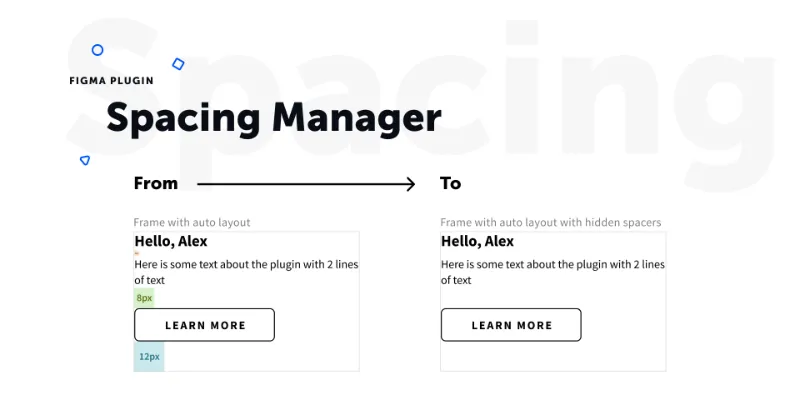
With the help of auto layout, we can resolve this problem. Just turn on the auto layout feature with zero spacing between the elements and use "spacers" between.
There are different ways, but I prefer to use the 8-Point Grid System. You can use premade "spacers" from the public library (https://www.figma.com/c/file/809152234949654615/Spacings) and place them between the elements. In that case, you will make sure that the spacings between the components are consistent.
How it works
Add the library https://www.figma.com/c/file/809152234949654615/Spacings or have own symbols that have "$spacing" word in the name;
Use them when needed
If you want to hide them, select a parent frame and run the plugin. It will look for all spacers that were used on the frame and will set zero opacity
If you want to show spacers back, just rerun the plugin. If the first spacer on the row will have zero opacity, it will set 100% for all spacers found on the selected frame.
Pro tip
You can use smart spacing prediction feature! Here is how it works https://twitter.com/faridsabitov/status/1281697269948067845
Pro tip
You can set "cmd"+"option"+"H" hotkey via system preferences in Mac to toggle spacers visibility quickly. You can read more about setting the hotkeys in Figma here: https://hustle.bizongo.in/custom-shortcuts-for-figma-8c93f3bc9ca2
What's new
Version 8 · released Jul 12, 2020
- added message if user don't have spacing components on the page
Permissions and privacy
Network access
This plugin's manifest doesn't declare its network access, which is common for older plugins. Figma shows a warning on the Community page for plugins like this.
Extra permissions
None beyond the standard access to the file you run it in.
Read from the plugin's published manifest. Questions about data handling go to the developer's support page.
Where Spacing Manager ranks
Spacing Manager alternatives
- 1

Zeplin
by Zeplin Crew
293K users2.9KFree + paid featuresDesign tools are for designing. Zeplin is for clear, structured design delivery.
- 2

Measure
by Philip
161K users3.3KFreeAdd measurement lines and additional helpful information to your designs
- 3

Redlines
by Danny Keane
143K users3.8KFree - 4

DesignDoc [Spectral]
by Marka Plugin Dev
141K users3.2KFree📐 Effortlessly hand off your Figma designs to the development team
- 5

Specs Classic
by Directed Edges Plugins
139K users5.6KFree + $8/mo upgradeGenerate component specs including anatomy, props and layout & spacing
- 6

Inspect Styles
by max.denaro
139K users4KFreeInspect styles from Figma and transform to CSS
Spacing Manager FAQ
What does Spacing Manager do?
It's a Figma plugin by Farid Sabitov that runs in Figma Design.
Is Spacing Manager free?
Yes. Spacing Manager is free to install and run from the Figma Community, with no paid tier listed.
How do I install Spacing Manager?
Open it on the Figma Community, or search for it in the Actions menu (Cmd/Ctrl + K) inside any file you can edit. See how to install Figma plugins.
What are the best alternatives to Spacing Manager?
By user count, the closest alternatives are Zeplin, Measure and Redlines. Compare all of them on the best Figma plugins for dev handoff.
Built this plugin?
Use this page as a landing page for Spacing Manager: link to it from your site, README or launch posts, or add a badge. Pick a style and copy the code.

Style
Label
Size
Code
<a href="https://figmaplugins.co/plugins/spacing-manager/" target="_blank" rel="noopener"><img src="https://figmaplugins.co/badges/featured-dark.svg" alt="Spacing Manager on figmaplugins.co" width="220" height="48"></a>