
About Typist
Typist is a free Figma plugin published by Jay Stakelon in 2023. It works in Figma Design and has 41,561 users and 505 likes on the Figma Community. It ranks #16 in Animation on our lists.
In the developer's words
Typist helps make your prototypes look so so real by turning text layers into animated, typing text components. No more super-fake janky forms! Bring that chat interface you're working on to life!
What Typist does
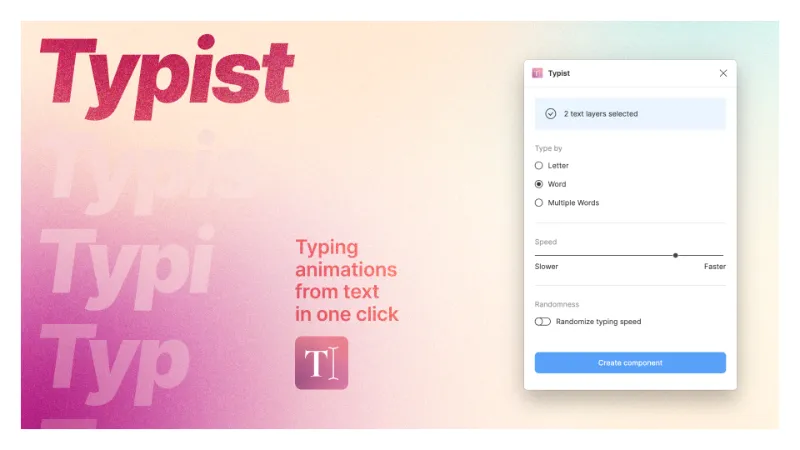
Typist generates components for you from text layers in your Figma file. These can help dial up the realism on your presentations and can be indispensable for stress-testing text-based chat UI. The components that Typist generates are animated based on your preferences, and all you have to do is drop them into your prototype to get some of your very own RAD TEXT TYPING ACTION.
How to use Typist
- Select one or more text layers in your Figma file and run the plugin.
- Specify how you want the typing animation to look.
- Hit the "Create component" button to generate components from your selected text layers.
- Use those components as you wish in your prototypes.
Typist tips n' tricks
First of all, Typist respects your text layers' width settings. If you create a component from a text layer set to Auto Width, the component will resize horizontally. If you create one from a text layer set to Auto Height, it'll resize vertically.
- Auto width text fields are better for single line forms, cause you can put them into an Auto Layout with a cursor gif and it looks cool
- Auto height text fields are better for multiple-turn chat animations that build up vertically, because you can wrap the whole thing in an Auto Layout and it'll manage it's own height
- Examples of both of these most common use cases are in the Playground file, pls enjoy
The "Type by"setting tells Typist whether you want to animate individual letters, words, or chunks of text. It's basically the first of two speed controls.
- The default setting, Type by Word, works pretty well for a paragraph or two of text, like you might see as a response when you're chatting with an AI.
- If you want to simulate form input or a single line of text, Type by Letter will get you there.
- If you have a TON of text you can try Type by Multiple Words so you're not waiting around all day.
The"Speed" setting controls the timing between animation steps.
And "Randomness" will apply a little staggery swagger to the generated component. It's less noticeable at faster speed values.
Enjoy!
~ Jay
What's new
Version 4 · released Dec 21, 2023
- Updated speed/timing values
Permissions and privacy
Network access
Typist declares no network access, so it runs entirely inside Figma and can't send your file anywhere.
Extra permissions
None beyond the standard access to the file you run it in.
Read from the plugin's published manifest.
Where Typist ranks
Typist alternatives
- 1

LottieFiles
by LottieFiles
990K users15KFreeAnimate Your Designs with Lottie Animations
- 2

Figmotion
by L
513K users7.4KFreeBringing motion to your Figma designs
- 3

Jitter
by Jitter
507K users12KFreeAnimate your Figma designs, export to video / GIF / Lottie, handoff animation specs to developers
- 4

Motion
by Pavel Babkin
367K users5.6KFree + paid featuresAnimate UI in Figma. Export to video, GIF, SVG.
- 5

Export to GIF/Video
by Evan at CreativeFlow
311K users3KFree + paid featuresExport animations to GIF or Video in one-click
- 6

Aninix
by Tony Pinkevych
160K users2.4KFree + paid featuresCreate motion design within Figma. Export Lottie animations, GIFs, or mp4.
Typist FAQ
What does Typist do?
Generate animated typing components from any text layer. It's a Figma plugin by Jay Stakelon that runs in Figma Design.
Is Typist free?
Yes. Typist is free to install and run from the Figma Community, with no paid tier listed.
Is Typist safe to use?
Figma plugins can only reach the internet through domains listed in their manifest. Typist declares no network access, so it runs entirely inside Figma and can't send your file anywhere. As with any plugin, check the developer's privacy policy before using it on client work.
How do I install Typist?
Open it on the Figma Community, or search for it in the Actions menu (Cmd/Ctrl + K) inside any file you can edit. See how to install Figma plugins.
What are the best alternatives to Typist?
By user count, the closest alternatives are LottieFiles, Figmotion and Jitter. Compare all of them on the best Figma plugins for animation.
Built this plugin?
Use this page as a landing page for Typist: link to it from your site, README or launch posts, or add a badge. Pick a style and copy the code.

Style
Label
Size
Code
<a href="https://figmaplugins.co/plugins/typist/" target="_blank" rel="noopener"><img src="https://figmaplugins.co/badges/featured-dark.svg" alt="Typist on figmaplugins.co" width="220" height="48"></a>