
About UXMagic
UXMagic is a free Figma plugin published by UXMagic.ai in 2024. It works in Figma Design and has 38,859 users and 397 likes on the Figma Community. It ranks #19 in Website to Figma on our lists.
In the developer's words
UXMagic: AI UI Generator for Figma
Transform ideas into beautiful, editable Figma designs with AI.
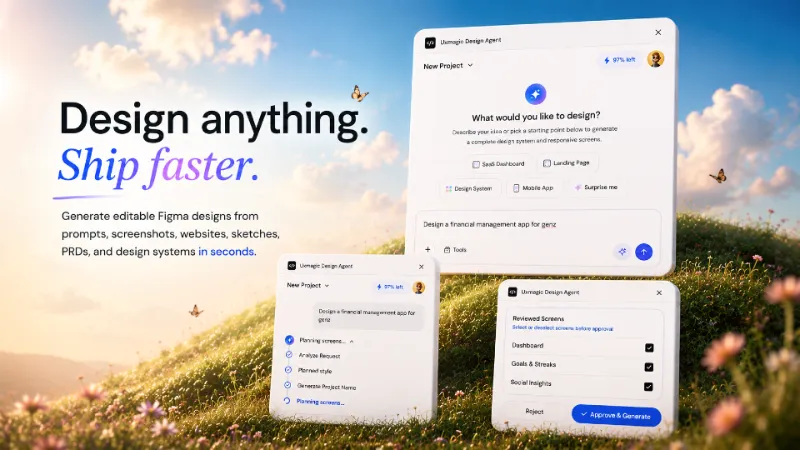
UXMagic helps designers, product teams, founders, agencies, and developers generate complete user interfaces from prompts, screenshots, websites, sketches, PRDs, and design systems. Create wireframes, polished UI screens, and multi-screen product flows in minutes instead of days.
Whether you're brainstorming a new product, redesigning an existing website, building an MVP, or exploring multiple design directions, UXMagic accelerates your workflow from concept to production-ready design.
Who It's For
• Product Designers
• UI/UX Designers
• Product Managers
• Startup Founders
• Design Agencies
• Developers
• Marketing Teams
Why Teams Choose UXMagic
• Generate UI 10× Faster – Explore ideas instantly and iterate rapidly.
• Prompt to UI – Generate complete web and mobile interfaces from text descriptions.
• Website to Figma – Convert websites into editable Figma designs.
• Screenshot to UI – Recreate screenshots as structured, editable designs.
• Sketch to Design – Transform hand-drawn wireframes into polished interfaces.
• PRD to UI – Generate screens and user flows directly from product requirements.
• Design System Aware – Generate designs aligned with your components and brand styles.
• Multi-Screen Flows – Create complete onboarding, dashboard, checkout, and product journeys.
• Figma Ready – Continue editing and collaborating directly in Figma.
Key Features
AI UI Generator
Generate modern web and mobile interfaces from simple prompts.
Website to Figma
Convert websites into editable layouts, sections, and UI components.
Screenshot to Editable Design
Upload screenshots and recreate them as fully editable Figma designs.
Sketch to UI
Transform rough sketches and wireframes into polished product designs.
PRD to Design
Generate screens, states, and user flows directly from product requirement documents.
AI Wireframe Generator
Create low-fidelity wireframes for planning, workshops, and rapid ideation.
Design System Integration
Generate interfaces using your own design language, typography, and components.
Multi-Screen Flow Generation
Create onboarding flows, dashboards, authentication experiences, profile pages, checkout flows, settings pages, and more.
Export to Figma
Generate editable designs that fit naturally into your existing workflow.
Popular Use Cases
• Website Cloning
• SaaS Dashboard Design
• Mobile App Design
• Landing Page Design
• Website Redesign
• MVP Design
• E-commerce Interfaces
• Admin Dashboards
• Design System Exploration
• User Flow Generation
• Rapid Prototyping
• Client Presentations
• Product Concept Validation
How It Works
1. Start with anything. Use a prompt, screenshot, website URL, sketch, PRD, or design system.
2. Generate instantly. Create wireframes, screens, components, and complete user flows using AI.
3. Edit and ship. Continue refining your designs directly inside Figma.
What's new
Version 18 · released May 28, 2026
- 1. Improved export accuracy so generated designs match intended frame sizes more consistently.
- 2. Fixed frame placement after export to keep results aligned on the canvas.
- 3. Improved mobile and preset-based dimension handling for more reliable screen outputs.
- 4. General bug fixes and stability improvements for smoother plugin performance.
Permissions and privacy
Network access
UXMagic can only connect to the 17 domains declared in its manifest: localhost:3001, localhost:3000, api.uxmagic.ai, uxmagic.ai, *.uxmagic.ai, cdn.tailwindcss.com, cdn.jsdelivr.net, code.iconify.design, api.iconify.design, api.simplesvg.com, api.unisvg.com, fonts.googleapis.com, fonts.gstatic.com, images.unsplash.com, plus.unsplash.com, unsplash.com and uxmagic.blob.core.windows.net.
- localhost:3001
- localhost:3000
- api.uxmagic.ai
- uxmagic.ai
- *.uxmagic.ai
- cdn.tailwindcss.com
- cdn.jsdelivr.net
- code.iconify.design
- api.iconify.design
- api.simplesvg.com
- api.unisvg.com
- fonts.googleapis.com
- fonts.gstatic.com
- images.unsplash.com
- plus.unsplash.com
- unsplash.com
- uxmagic.blob.core.windows.net
Extra permissions
None beyond the standard access to the file you run it in.
Read from the plugin's published manifest.
Where UXMagic ranks
UXMagic alternatives
- 1

html.to.design
by divRIOTS
2.7M users39KFree + $18/mo upgradeConvert any website into fully editable Figma designs
- 2

Convertify Sketch/Adobe/Google
by Hypermatic
539K users5.3KFree + paid featuresExport to Sketch, XD, After Effects, PSD, InDesign — or — Import XD, Illustrator, PSD, InDesign, PDF
- 3

PDF to Figma
by Gautham 🌶
337K users2.7KFreeImport a PDF file into Figma as an image
- 4

Codia AI Design
by Codia.AI
334K users6.1KFreeCapture, Transform, Create! Transform Screenshot into Stunning Editable Figma Designs with Ease!
- 5

Web to Figma
by Web to Figma
267K users3.5KFree + paid featuresImport any website or HTML code to Figma editable design. Goodbye screenshots.
- 6

pdf.to.design
by divRIOTS
245K users2.7KFreeConvert any PDF document into Figma designs. 100% PRIVATELY.
UXMagic FAQ
What does UXMagic do?
Generate editable Figma designs from prompts, screenshots, websites, sketches, PRDs, & system fast. It's a Figma plugin by UXMagic.ai that runs in Figma Design.
Is UXMagic free?
Yes. UXMagic is free to install and run from the Figma Community, with no paid tier listed.
Is UXMagic safe to use?
Figma plugins can only reach the internet through domains listed in their manifest. UXMagic can only connect to the 17 domains declared in its manifest: localhost:3001, localhost:3000, api.uxmagic.ai, uxmagic.ai, *.uxmagic.ai, cdn.tailwindcss.com, cdn.jsdelivr.net, code.iconify.design, api.iconify.design, api.simplesvg.com, api.unisvg.com, fonts.googleapis.com, fonts.gstatic.com, images.unsplash.com, plus.unsplash.com, unsplash.com and uxmagic.blob.core.windows.net. As with any plugin, check the developer's privacy policy before using it on client work.
How do I install UXMagic?
Open it on the Figma Community, or search for it in the Actions menu (Cmd/Ctrl + K) inside any file you can edit. See how to install Figma plugins.
What are the best alternatives to UXMagic?
By user count, the closest alternatives are html.to.design, Convertify Sketch/Adobe/Google and PDF to Figma. Compare all of them on the best Figma plugins for website to figma.
Built this plugin?
Use this page as a landing page for UXMagic: link to it from your site, README or launch posts, or add a badge. Pick a style and copy the code.

Style
Label
Size
Code
<a href="https://figmaplugins.co/plugins/uxmagic/" target="_blank" rel="noopener"><img src="https://figmaplugins.co/badges/featured-dark.svg" alt="UXMagic on figmaplugins.co" width="220" height="48"></a>