Best Figma plugins for user flows and flowcharts
Simpleflow is the most-used Figma plugin for user flows, with 107K users. It brings FigJam-style connectors into Figma Design files and keeps them attached when you move screens around. It's a paid plugin; if you want a free option, ProToFlow (81K users) draws flow arrows from the prototype links you've already set up.
Top 20 picks


Simpleflow
#1 · 107K users
Quick answer
Our top picks
- #1
Most used
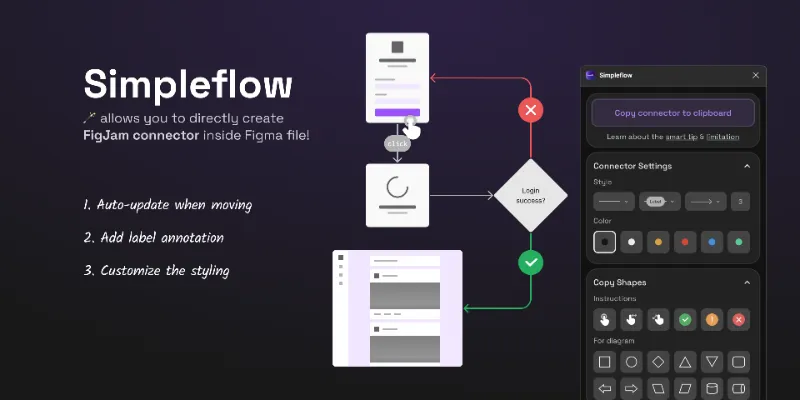
Simpleflow
by Lichin
Simpleflow creates flowcharts inside Figma Design using native FigJam connectors, and the arrows update as you move and edit your screens. It suits designers who present flows next to high-fidelity UI rather than on a separate board. It's the one paid plugin among the top five, which is worth weighing if you only draw flows a few times a year.107K 1.9KFree + $10 - #2
Best free option

ProToFlow
by Saeed Alipoor
ProToFlow reads the prototype interactions in your file and generates flow arrows from them, so the diagram matches what you've wired. If you prefer FigJam connectors, you can copy one into the file and hand it to the plugin to use as the arrow style. It's free and runs in Figma Design only, and the result is only as tidy as your prototype links.81K 1.1KFree - #4
Best for diagrams as code

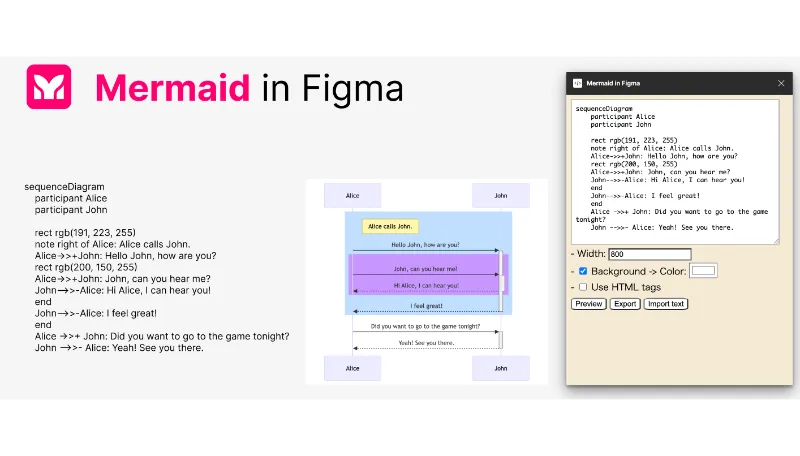
Mermaid in Figma
by art
Write Mermaid code in a text layer, select it, and Mermaid in Figma renders the diagram into your Figma Design or FigJam file. It's free and suits system diagrams that engineers already maintain in Mermaid. The output is a chart image, so restyling individual boxes means going back to the code.46K 291Free
Outside the ranking · Disclosure
The full list
The 20 most-used Figma plugins for flowcharts & user flows
- 01
Simpleflow
🪄 Create flowcharts in Figma with native FigJam connectors — stay perfectly in sync as you design!
Free + $10 · 1.9K likes
107K1.9KFree + $10 - 0281K1.1KFree
- 03
 70K85Free
 - 0446K291Free
- 05

Flowy
Effortlessly create and customize connections (user flows) between components in Figma.
Free · 439 likes
41K439Free - 06
Flow Connect
Free · 27 likes
33K27Free - 07
 24K325Free
 - 08
 17K154Free
 - 09
 17K155Free
 - 10
 16K295Free
 - 11
 15K69Free
 - 12
 14K59Free
 - 13
 11K57Free
 - 14

AI Mind Maps Maker
Mind mapping tool based on ChatGPT creates and edits mind maps from text, PDF, video,and web pages.
Free · 52 likes
11K52Free - 15
 10K27Free
 - 16
 7.8K45Free
 - 17
 7.5K26Free
 - 18

Hand drawing sketching
Hand-drawn look and feel tool for arrows, paths boxes and circles
Free + $4/mo · 18 likes
6.5K18Free + $4/mo - 19

Path Arrows
Quickly connect screens, buttons, and elements with arrows to show how your interface works
Free · 4 likes
6.3K4Free - 20
 6.1K28Free
Buying guide
What to look for
Connectors are a FigJam feature, and FigJam also has FigJam AI for generating flow charts from a prompt and accepts pasted Mermaid syntax. If the flow lives on a workshop board, you may not need a plugin at all. Plugins matter when the arrows have to sit next to real screens in a design file for a review or a handoff. Our guide to flow arrows in Figma covers the manual methods too.
The list splits three ways. Some plugins draw live connectors you place yourself (Simpleflow, Flowy, Target Flow), ProToFlow builds arrows from prototype interactions, and a third group turns text into diagrams, whether that's Mermaid code or a plain-text description of screens (Mermaid in Figma, UI flows for Figma).
- 01
Arrows that follow the screens
The main reason to use a plugin over the line tool is that arrows reroute when you move a frame. Test this with a real flow of 15 or more screens before relying on it.
- 02
Where the flow comes from
Decide between drawing connections by hand, generating them from prototype links, or writing them as text. Prototype-based flows stay honest to what you built; text-based ones are faster to edit in bulk.
- 03
Which editor it runs in
Some plugins only run in Figma Design, others in FigJam too. Simpleflow works in Figma Design, Slides and FigJam.
- 04
Labels and line styles
Flows get read by product managers and developers. Check that you can label connectors, change arrowheads, and colour error or alternate paths differently from the main path.
FAQ
Frequently asked questions
Can you make a flowchart in Figma Design?
Yes, with shapes and the arrow tool, but the arrows won't follow your frames when you move them. Native connectors only exist in FigJam. Plugins like Simpleflow and Flowy add connectors to design files. See our flow arrows guide for both approaches.
How do I show a user flow between screens in Figma?
Lay out the screens in order, then connect them with arrows drawn by hand or by a plugin. If you've already prototyped the flow, ProToFlow turns those prototype links into visible arrows so you don't draw them twice.
Is FigJam better than Figma for flowcharts?
For early flows and workshops, usually yes: connectors snap to shapes, FigJam AI can generate a flow chart from a prompt, and you can paste Mermaid syntax onto the board. For flows annotated on top of finished UI, Figma Design plus a connector plugin works better. More options are on our FigJam plugins page.
Can I turn Mermaid code into a Figma diagram?
Yes. In FigJam you can paste Mermaid syntax directly onto the board. In design files, Mermaid in Figma renders it as an image, Mermaid-to-Flow converts it into FigJam flowcharts, and FigJam ↔ Mermaid Converter goes in both directions.
Keep exploring
Related lists and guides



Prototyping
prototyping and user testing
See the top picks


FigJam
FigJam whiteboards
See the top picks



Annotations
annotating designs
See the top picksGuides
- How to Make Flow Arrows in FigmaFigma Design has no connector tool, but you can still draw flow arrows that stick to frames. The native options, the FigJam copy trick, and plugins, explained.
- Figma plugin vs widget: what's the difference?A Figma plugin runs for one person and closes when done. A widget is an object on the canvas everyone can see and use. When to pick which, with examples.