The best Figma plugins for vectorizing images and SVG in 2026
Image Tracer is the best Figma vectorize plugin for most people: 809K designers use it to turn raster images into coloured vector layers or a quick tracing mask, and it's free with a paid license for more. The most-installed plugin on this list overall is To Path (866K users), but it bends text and shapes along a curve rather than tracing images.
Top 20 picks
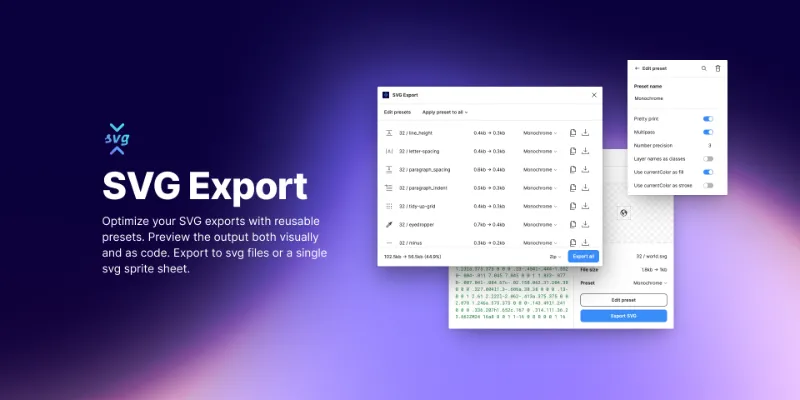
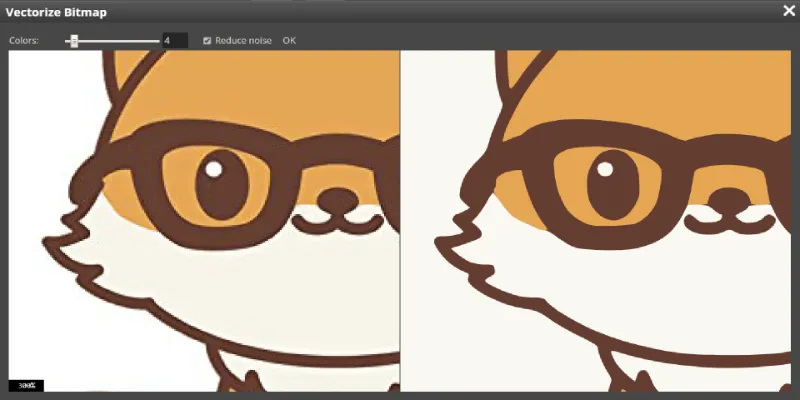
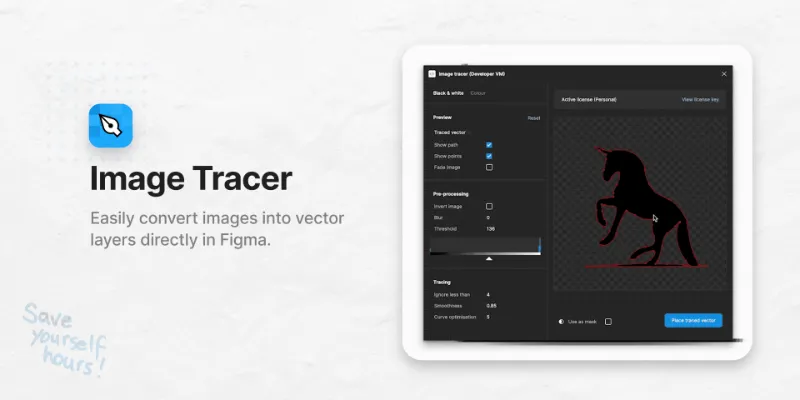

Image Tracer
#1 · 809K users
Quick answer
Our top picks
- #2
Best overall tracer
Image Tracer
by Dave
Image Tracer converts a selected image into coloured vector layers, or traces it as a mask you can restyle. With 809K users it's the most-used true vectorizer in Figma. It's free to try with a license sold separately, so heavy users should budget for that.809K 7.8KFree + paid - #3
Best free tracer

Vectorize Bitmap
by Patrik Schiller
Vectorize Bitmap is a free bitmap tracer that handles transparency and multiple colours, which covers logos and flat illustrations well. It has 242K users. Photos with soft gradients will turn into a lot of paths, as with any tracer, so simplify the source image first.242K 1.3KFree - #8
Best for clean SVG export

SVG Export
by Hamish
SVG Export runs your exports through svgo and lets you save presets, so every icon in a set comes out with the same trimmed, consistent code. It's free and used by 122K designers. It doesn't trace anything; pair it with a tracer if you start from a bitmap.122K 1.1KFree
The full list
The 20 most-used Figma plugins for svg & vector
- 01

To Path
Free · 12K likes
866K12KFree - 02809K7.8KFree + paid
- 03242K1.3KFree
- 04
 214K1.2KFree
 - 05

Vectorize
Free · 1.2K likes
212K1.2KFree - 06

BlendingMe
BlendingMe is a user-friendly plugin that allows you to blend two paths, lines, ellipses, rectangles
Free · 2.4K likes
159K2.4KFree - 07
 129K268Free + paid
 - 08
SVG Export
Export tiny SVG files and control every aspect of how they're exported with presets. Powered by svgo
Free · 1.1K likes
122K1.1KFree - 09

Quick Tracing
Free · 1.4K likes
113K1.4KFree - 10
 113K854Free
 - 11
 93K408Free
 - 12

Trace Image
Transform photos into editable vector designs. Adjust the threshold or invert the source if needed.
Free · 681 likes
78K681Free - 13
 74K321Free + paid
 - 14

Vectorized
Convert bitmap-type images/PNG to SVG vectors quickly and easily (Image Tracer).
Free · 64 likes
32K64Free - 15

Advanced SVG Export
Free · 356 likes
29K356Free - 16
 28K114Free
 - 17

Really Flatten Vectors
Free · 218 likes
27K218Free - 18
 26K191Free
 - 19

Codia AI VectorMagic: Image to Full-Color Vector/PNG to SVG
Seamlessly convert Pixel Images/JPG/PNG to Full-Color Vector Graphics with AI automation
Free · 247 likes
25K247Free - 20

Images Tracer
Transform images to SVG vectors with one click, easily create illustration styles
Free · 149 likes
22K149Free
Buying guide
What to look for
Since February 2026 Figma has its own Vectorize tool in Figma Design, Draw, Slides and Buzz. It's on paid plans only and each conversion draws on Figma's shared AI credits, so free-plan users and anyone tracing in bulk still have good reasons to reach for a plugin. Plugins also give you knobs the native tool doesn't: colour count, thresholds, inversion and local processing.
The list mixes three jobs. Tracers (Image Tracer, Vectorize Bitmap, Tracer, Trace Images) convert pixels to paths. Path tools (To Path, BlendingMe, Really Flatten Vectors) reshape vectors you already have. Exporters (SVG Export, Advanced SVG Export) clean up the SVG code Figma writes. If you're after icon libraries rather than conversion, see icon plugins.
- 01
Colour or monochrome tracing
Logos and line art trace well in one colour with a threshold slider (Trace Image does this). Illustrations need multi-colour output; check how many colours a tracer allows before it merges shades.
- 02
Path count
A traced photo can produce thousands of anchor points. Look for smoothing or detail settings, and run Really Flatten Vectors afterwards to merge overlapping shapes.
- 03
Where the image is processed
Some tracers send your image to a server, others run locally. For client work under NDA, pick one that says it processes on your machine, like Free Vectorizer.
- 04
Limits on the free tier
Image Tracer, Vectorizer and Image2Vector sell licenses or credits in the plugin. Free ones like Vectorize Bitmap and Tracer have no paywall but fewer settings.
FAQ
Frequently asked questions
Can Figma vectorize an image without a plugin?
Yes, on paid plans. Figma's native Vectorize tool (launched February 2026) converts a raster image on the canvas into editable vectors in colour, grayscale or black and white, using AI credits. On the free plan you'll need a plugin such as Vectorize Bitmap.
How do I convert a PNG to SVG in Figma?
Place the PNG, select it, run a tracer like Image Tracer to get vector layers, then select the result and export it as SVG from the Export panel. Clean up stray shapes before exporting.
Why is my traced SVG so large?
Tracers create a path for every colour region, so gradients and photo noise multiply the node count. Reduce colours, raise the threshold, and run the export through an optimiser like SVG Export or Advanced SVG Export.
How do I put text on a path in Figma?
Figma Draw has a native Text on a path tool: pick it from the toolbar, hover a vector until the cursor changes, and type. To Path predates it and also places shapes and groups along a curve, which is why it's still the most-installed plugin here.
Keep exploring
Related lists and guides




Icons
icons
See the top picks



Background Remover
removing image backgrounds
See the top picks


Effects & Textures
noise, texture, glass and shadow effects
See the top picksGuides
- How to Outline a Stroke in FigmaOutline stroke in Figma turns a stroke into a filled shape with Cmd+Option+O. How it differs from Flatten and Outline mode, plus the shortcuts for each one.
- Figma Boolean Operations: How Union, Subtract, Intersect and Exclude WorkUnion, Subtract, Intersect and Exclude in Figma: the Alt+Shift shortcuts, which layer sets the style, why booleans fail on frames, and how to undo a union.
- How to Mask in Figma (and Why Use as Mask Isn't Working)Mask in Figma with Ctrl+Cmd+M: put the shape below the content, select both, apply. Why Use as mask fails, how to edit or remove a mask, and inverse masks.
- How to add icons in FigmaAdd icons in Figma with an icon plugin, a shared icon library, or by pasting SVG code, which imports as editable vectors. Plus how to recolour and export icons.
- How to Make a Seamless Pattern in FigmaMake a seamless pattern in Figma: pick a tile size, wrap shapes that cross an edge to the opposite side, preview with a pattern fill, and generate grids faster.