
On this page
About Animate it
Animate it is a free Figma plugin published by vijay verma in 2025. It works in Figma Design and has 23,235 users and 751 likes on the Figma Community. It ranks #8 in Prototyping on our lists.
In the developer's words
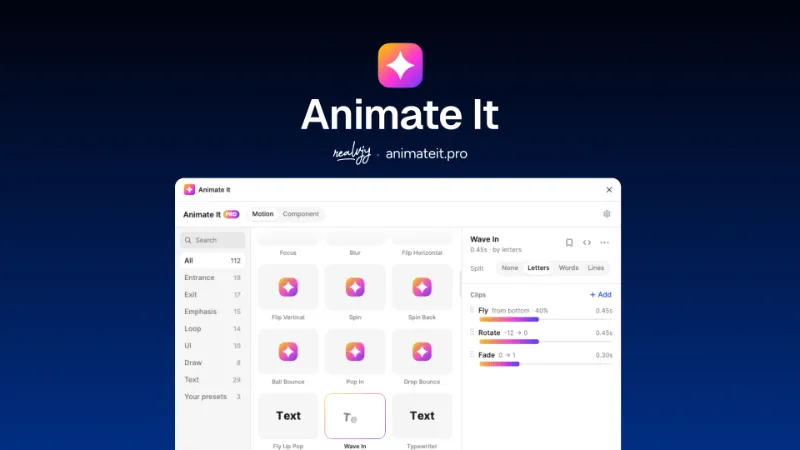
Animate any layer in one click. Animate It writes real keyframes onto Figma's Motion timeline,so you can keep editing them there.
Pick, tweak, apply
- 109 presets: entrances, exits, emphasis, loops, UI micro-interactions, paths that draw on, and text.
- Every preset previews live before you apply it. Picking one never touches your file; only Apply does.
- Each preset is a stack of clips (fade, fly, scale, spin, wiggle, blur, shadow, color, draw…). Change any value, drag the timing bars, add, hide, or remove clips.
- Values in px or %. Percent scales with the layer, so one preset looks right on an icon and on a hero card.
Text that moves (Motion Presets)
- Split text by letters, words, or lines, with stagger orders: forward, reverse, center out, edges in, random.
- Pieces sit exactly where Figma drew them, so spacing and line breaks stay the same.
Customize and Easy
Select many layers and they play one after another. Add more motion and arrange timeline easy way
Ready for code
- What you see easy to code.
- Open Code on any stack and copy it as CSS, as JSON for any platform, or as a prompt for your AI coding agent (Claude Code, Cursor, and others).
- Same times, values, and easing curves as your Figma timeline.
Free
37 presets (including text animations), 10 clip types, up to 3 clips per stack, and Component mode for prototype animations.
Pro
unlocks all 109 presets, every clip, split text on any stack, unlimited clips, and saving your own presets.
--------
Get Pro at animateit.pro
Works with Figma's Motion timeline. Docs: animateit.pro/docs
Need helps @realvjy
What's new
Version 2 · released Feb 10, 2025
- Fix: Auto layout issue
Permissions and privacy
Network access
Animate it declares no network access, so it runs entirely inside Figma and can't send your file anywhere.
Extra permissions
None beyond the standard access to the file you run it in.
Read from the plugin's published manifest.
Where Animate it ranks
Animate it alternatives
- 1

ProtoPie
by ProtoPie ENG
201K users3.5KFree + paid featuresHigh-fidelity prototyping for Figma. Import Figma designs and add dynamic, conditional interactions.
- 2

Attention Insight
by Donatas Puidokas
80K users1.5KFree + paid featuresInstantly generate AI heatmaps with predictive eye-tracking technology. Boost conversions.
- 3

Axure
by Axure
50K users1.3KFreeImport and transform your designs into rich, interactive prototypes with the power of Axure RP
- 4

Prototyper
by Jordan Singer
44K users1.4KFreePowerful prototyping with code
- 5

NB heatmap
by NB Charts
36K users297Free - 6

Interactive Input Fields
by Florian Voit
26K users573Free + $6/mo upgradeEasily create highly interactive & custom input fields for your prototypes – directly in Figma.
Animate it FAQ
What does Animate it do?
Create animated smart components from presets quickly. It's a Figma plugin by vijay verma that runs in Figma Design.
Is Animate it free?
Yes. Animate it is free to install and run from the Figma Community, with no paid tier listed.
Is Animate it safe to use?
Figma plugins can only reach the internet through domains listed in their manifest. Animate it declares no network access, so it runs entirely inside Figma and can't send your file anywhere. As with any plugin, check the developer's privacy policy before using it on client work.
How do I install Animate it?
Open it on the Figma Community, or search for it in the Actions menu (Cmd/Ctrl + K) inside any file you can edit. See how to install Figma plugins.
What are the best alternatives to Animate it?
By user count, the closest alternatives are ProtoPie, Attention Insight and Axure. Compare all of them on the best Figma plugins for prototyping.
Built this plugin?
Use this page as a landing page for Animate it: link to it from your site, README or launch posts, or add a badge. Pick a style and copy the code.

Style
Label
Size
Code
<a href="https://figmaplugins.co/plugins/animate-it/" target="_blank" rel="noopener"><img src="https://figmaplugins.co/badges/featured-dark.svg" alt="Animate it on figmaplugins.co" width="220" height="48"></a>