
On this page
About Attention Insight
Attention Insight is a free + paid features Figma plugin published by Donatas Puidokas in 2021. It works in Figma Design and has 79,530 users and 1,509 likes on the Figma Community. It ranks #2 in Prototyping and #18 in AI on our lists.
In the developer's words
See how your designs perform before you click "publish"
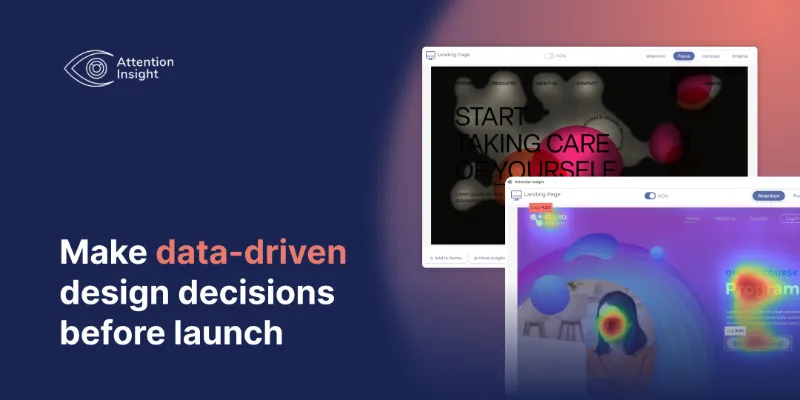
Artificial Intelligence instantly predicts where users will look after engaging with your design so you can save time and avoid fixes after the launch. Don’t doubt even for a moment & prove your design vision!
Learn if the CTA button is visible enough, conduct A/B testing, see which object attracts the most attention, and create a better user experience based on data!
🤔 How Does It Work
Select a Figma Frame which you want to test;
Go to: Plugins > Attention Insight > 🎈Analyse design;
Choose design type: Desktop, Mobile, Posters, Packaging, Shelves, Marketing Material;
Wait for 30 seconds 🕓 and check the results.
👑 Features
💎 Attention Heatmap
💎 Focus Map & Focus Score
💎 Clarity Score
💎 Percentage of Attention
💎 Contrast Map
💎 Bulk Analyses
🤖 Technology
Our attention prediction model is based on deep learning and can automatically detect visual attention shifts. More about the technology - https://attentioninsight.com/technology/
🧐 Hey, Don’t You Have an Account Yet?
No worries! Register for a Free Trial and get 7 free tests.
What's new
Version 14 · released May 5, 2025
- Introduced Figma Hero plan & small fixes
Permissions and privacy
Network access
Attention Insight can only connect to the 4 domains declared in its manifest: attentioninsight.com, app.attentioninsight.com, dev.runwiththelions.eu and *.ingest.sentry.io.
- attentioninsight.com
- app.attentioninsight.com
- dev.runwiththelions.eu
- *.ingest.sentry.io
Extra permissions
None beyond the standard access to the file you run it in.
Read from the plugin's published manifest.
Where Attention Insight ranks
Attention Insight alternatives
- 1

ProtoPie
by ProtoPie ENG
201K users3.5KFree + paid featuresHigh-fidelity prototyping for Figma. Import Figma designs and add dynamic, conditional interactions.
- 2

Axure
by Axure
50K users1.3KFreeImport and transform your designs into rich, interactive prototypes with the power of Axure RP
- 3

Prototyper
by Jordan Singer
44K users1.4KFreePowerful prototyping with code
- 4

NB heatmap
by NB Charts
36K users297Free - 5

Interactive Input Fields
by Florian Voit
26K users573Free + $6/mo upgradeEasily create highly interactive & custom input fields for your prototypes – directly in Figma.
- 6
Interactive Typing Input
by Philips
24K users214FreeVariable-controlled, scaleable, interactive input component for typing on prototype..
Attention Insight FAQ
What does Attention Insight do?
Instantly generate AI heatmaps with predictive eye-tracking technology. Boost conversions. It's a Figma plugin by Donatas Puidokas that runs in Figma Design.
Is Attention Insight free?
Attention Insight is free to install, but some features are unlocked through a paid plan on the developer's site.
Is Attention Insight safe to use?
Figma plugins can only reach the internet through domains listed in their manifest. Attention Insight can only connect to the 4 domains declared in its manifest: attentioninsight.com, app.attentioninsight.com, dev.runwiththelions.eu and *.ingest.sentry.io. As with any plugin, check the developer's privacy policy before using it on client work.
How do I install Attention Insight?
Open it on the Figma Community, or search for it in the Actions menu (Cmd/Ctrl + K) inside any file you can edit. See how to install Figma plugins.
What are the best alternatives to Attention Insight?
By user count, the closest alternatives are ProtoPie, Axure and Prototyper by Jordan Singer. Compare all of them on the best Figma plugins for prototyping.
Built this plugin?
Use this page as a landing page for Attention Insight: link to it from your site, README or launch posts, or add a badge. Pick a style and copy the code.

Style
Label
Size
Code
<a href="https://figmaplugins.co/plugins/attention-insight-ai-heatmap-clarity-score-focus-map-contras/" target="_blank" rel="noopener"><img src="https://figmaplugins.co/badges/featured-dark.svg" alt="Attention Insight on figmaplugins.co" width="220" height="48"></a>Want it featured on figmaplugins.co? Submit it for review