
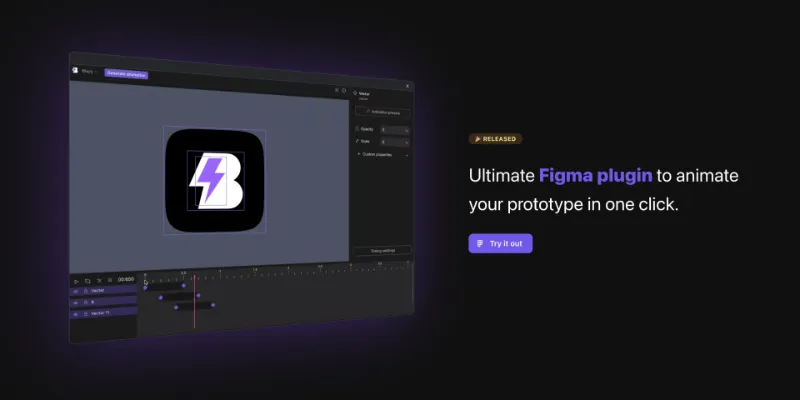
About Blazy
Blazy is a free Figma plugin published by Orkhan Jafarov in 2023. It works in Figma Design and Dev Mode and has 9,976 users and 194 likes on the Figma Community. It ranks #12 in Prototyping on our lists.
In the developer's words
Blazy Figma plugin
Say goodbye to the challenges of motion design and embrace the power of Blazy, the ultimate Figma plugin that transforms your static designs into stunning animations with ease.
Leave behind the time-consuming struggle of manual animation editing. With Blazy, transform your designs into engaging animations instantly, eliminating the need for complex timelines.
Check out Blazy templates.
- Advanced Mode:Tailored for users who demand intricate control and sophistication in their Figma animations.
- Basic Mode: A user-friendly approach for straightforward animation additions.
- Timeline and Keyframes: Create complex animations with multiple elements and control them using the timeline.
- Dev Mode: Get CSS/React code for your animated elements.
- Animation Presets: Access a library of 40+ animation presets for quick and easy animation creation.
- Animation Timing:Fine-tune animation timing with easing controls and looping options.
- Custom Properties: Add custom properties like opacity, scale, rotation, and more to your elements for unique animations.
- Triggers: Assign triggers to keyframes to initiate animations on hover, click, drag, and more.
- Saved Presets: Save your keyframe animations as presets for future use.
- Text Animations: Create fully customizable text animations with Blazy's text splitting feature.
For more information and support, visit blazy.studio.
What's new
Version 32 · released Feb 19, 2024
The developer didn't publish release notes for this version.
Permissions and privacy
Network access
Blazy can only connect to the 4 domains declared in its manifest: blazy.studio, api.lemonsqueezy.com, *.sentry.io and api-js.mixpanel.com.
- blazy.studio
- api.lemonsqueezy.com
- *.sentry.io
- api-js.mixpanel.com
Extra permissions
- Reads your Figma name and avatar
Read from the plugin's published manifest.
Where Blazy ranks
Blazy alternatives
- 1

ProtoPie
by ProtoPie
199K users3.4KFree + paid featuresHigh-fidelity prototyping for Figma. Import Figma designs and add dynamic, conditional interactions.
- 2

Attention Insight: AI heatmap, clarity score, focus map, contrast map
by Donatas Puidokas
78K users1.5KFree + paid featuresInstantly generate AI heatmaps with predictive eye-tracking technology. Boost conversions.
- 3

Axure
by Axure
49K users1.2KFreeImport and transform your designs into rich, interactive prototypes with the power of Axure RP
- 4

Prototyper
by Jordan Singer
43K users1.4KFreePowerful prototyping with code
- 5

Interactive Input Fields
by Florian Voit
24K users566Free + $6/mo upgradeEasily create highly interactive & custom input fields for your prototypes – directly in Figma.
- 6
Interactive Typing Input
by Philips
23K users207FreeVariable-controlled, scaleable, interactive input component for typing on prototype..
Blazy FAQ
What does Blazy do?
Ultimate Figma plugin to animate your prototype in one click. It's a Figma plugin by Orkhan Jafarov that runs in Figma Design and Dev Mode.
Is Blazy free?
Yes. Blazy is free to install and run from the Figma Community, with no paid tier listed.
Is Blazy safe to use?
Figma plugins can only reach the internet through domains listed in their manifest. Blazy can only connect to the 4 domains declared in its manifest: blazy.studio, api.lemonsqueezy.com, *.sentry.io and api-js.mixpanel.com. As with any plugin, check the developer's privacy policy before using it on client work.
How do I install Blazy?
Open it on the Figma Community, or search for it in the Actions menu (Cmd/Ctrl + K) inside any file you can edit. See how to install Figma plugins.
What are the best alternatives to Blazy?
By user count, the closest alternatives are ProtoPie, Attention Insight: AI heatmap, clarity score, focus map, contrast map and Axure. Compare all of them on the best Figma plugins for prototyping.
Built this plugin?
Use this page as a landing page for Blazy: link to it from your site, README or launch posts, or add a badge. Pick a style and copy the code.

Style
Label
Size
Code
<a href="https://figmaplugins.co/plugins/blazy/" target="_blank" rel="noopener"><img src="https://figmaplugins.co/badges/featured-dark.svg" alt="Blazy on figmaplugins.co" width="220" height="48"></a>