
On this page
About Clean Document
Clean Document is a free + paid features Figma plugin published by Yuan Qing Lim in 2019. It works in Figma Design and has 123,799 users and 2,968 likes on the Figma Community. It ranks #5 in Layer Management and #10 in Productivity on our lists.
In the developer's words
Automagically organize and clean up your Figma document.
[Fund my work on Figma plugins →](https://ko-fi.com/yuanqing)
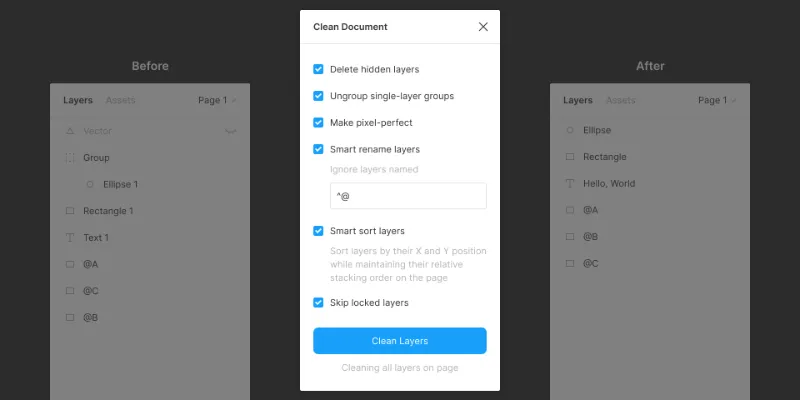
Delete Hidden Layers
Deletes all hidden layers within the selection or on the current page.
Ungroup Single-Layer Groups
Ungroups single-layer groups within the selection or on the current page that have no background, blend mode, effect or export setting.
Make Pixel-Perfect
Rounds the X and Y position and dimensions of layers within the selection or on the current page to the nearest pixel.
Smart Rename Layers
Intelligently renames layers within the selection or on the current page.
- Text layers will be named based on their text content.
- Instance layers will be given the same name as their main component.
- Other layer types will be named based on their layer type. (For example, a rectangle layer will be named “Rectangle”, a group layer will be named “Group”, and so on.)
- Layers with export settings will not be renamed.
- Frames and instances that are at the top-level of the page or that are the children of sections will not be renamed.
Optionally specify a Regular Expression to skip the renaming of particular layers.
Smart Sort Layers
Sort layers within the selection or on the current page by their X and Y position while maintaining their relative stacking order on the page.
Position Canvas at (0, 0)
Reposition all layers on the page such that the Y position of the top-most layer is 0 and the X position of the left-most layer is 0.
Clean Layers
Run all the above commands on layers within the selection or on the current page. Optionally skip processing of locked or instance layers.
Sort Pages
Sorts pages of the current document in alphabetical order.
Reset Plugin
Resets all settings to their defaults.
What's new
Version 35 · released Aug 4, 2025
- Fix a bug with the Position Canvas at (0, 0) command.
Permissions and privacy
Network access
Clean Document declares no network access, so it runs entirely inside Figma and can't send your file anywhere.
Extra permissions
None beyond the standard access to the file you run it in.
Read from the plugin's published manifest. Questions about data handling go to the developer's support page.
Where Clean Document ranks
Clean Document alternatives
- 1

Find and Replace
by Jackie Chui
223K users2.6KFreeFind and replace text in your file like a text editor
- 2

Rename It
by Rodrigo Soares
197K users3.6KFree - 3

Detach Component
by Patrick Morgan
140K users1.3KFree - 4

Similayer
by Dave
136K users3.1KFree - 5

Sorter
by Tom
81K users1.5KFreeQuickly sort layers in different ways
- 6

Super Tidy
by Ismael Canal
77K users2KFreeClean and organize your canvas in one click.
Clean Document FAQ
What does Clean Document do?
Automagically organize and clean up your Figma document. It's a Figma plugin by Yuan Qing Lim that runs in Figma Design.
Is Clean Document free?
Clean Document is free to install, but some features are unlocked through a paid plan on the developer's site.
Is Clean Document safe to use?
Figma plugins can only reach the internet through domains listed in their manifest. Clean Document declares no network access, so it runs entirely inside Figma and can't send your file anywhere. As with any plugin, check the developer's privacy policy before using it on client work.
How do I install Clean Document?
Open it on the Figma Community, or search for it in the Actions menu (Cmd/Ctrl + K) inside any file you can edit. See how to install Figma plugins.
What are the best alternatives to Clean Document?
By user count, the closest alternatives are Find and Replace by Jackie Chui, Rename It and Detach Component. Compare all of them on the best Figma plugins for layer management.
Built this plugin?
Use this page as a landing page for Clean Document: link to it from your site, README or launch posts, or add a badge. Pick a style and copy the code.

Style
Label
Size
Code
<a href="https://figmaplugins.co/plugins/clean-document/" target="_blank" rel="noopener"><img src="https://figmaplugins.co/badges/featured-dark.svg" alt="Clean Document on figmaplugins.co" width="220" height="48"></a>