
On this page
About CopyDoc Text Kit
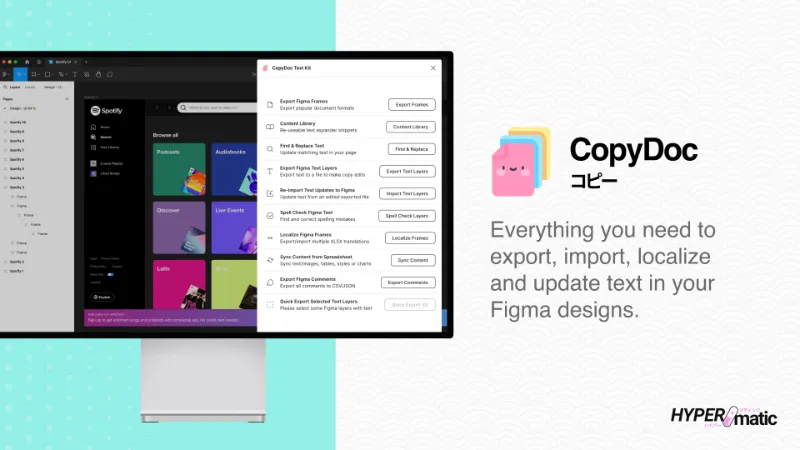
CopyDoc Text Kit is a free + paid features Figma plugin published by Hypermatic in 2020. It works in Figma Buzz, Figma Design and Figma Slides and has 123,582 users and 1,282 likes on the Figma Community. It ranks #1 in Translation and #18 in Import & Export on our lists.
In the developer's words
Documentation & Video Tutorials
For plugin documentation and step by step video tutorials, please visit https://docs.hypermatic.com/copydoc
Questions & Support
CopyDoc is still a baby panda, so if you notice any bugs or have any questions about the plugin, please get in touch directly via https://hypermatic.com/contact and we'll help you troubleshoot and resolve them as quickly as possible.
Security
CopyDoc is designed to be privacy and security focused — for details about security and how the plugin works, please visit https://docs.hypermatic.com/copydoc/security
Features
- Privacy focused — no data or content ever leaves your Figma file.
- Export Figma text layers to XLSX, DOCX, CSV, Markdown and JSON files directly to your computer (or to Airtable).
- Bulk update Figma text layers via XLSX, DOCX, CSV, Markdown or JSON import directly from your computer (or from Airtable).
- Create a custom content library inside your Figma file, with optional Google Sheets, Airtable and Figma Variable integrations.
- Sync repeating text/image content or CSS styles from a Google Sheet or XLSX/CSV file.
- Automatically generate Figma data tables from a Google Sheet or XLSX/CSV.
- Seamless design localization and translations via OpenAI, Claude, Gemini or Excel (XLSX) spreadsheet export/import.
- Find & Replace feature to quickly update any matching text.
- Automatically generate Charts by adding your own spreadsheet data.
- Export frames to DOCX, XLSX, TXT, EPUB, HTML or PDF.
- Quickly export selected text layers to XLSX, DOCX, CSV, Markdown, JSON or XLIFF files.
- Spell check your Figma text in dozens of languages.
- Download all Figma comments to CSV and JSON files.
- Include design references for text and comment exports.
Batch export/import Figma text content with one click.
Export every text layer in your design to Excel (XLSX), CSV, DOCX, Markdown or JSON files with one click, then instantly re-import any updated text content from the edited file back into Figma.
Privacy and security focused — nothing ever leaves your Figma file.
CopyDoc doesn’t upload, store or process any Figma data outside of the plugin, everything happens securely inside your Figma file, and any exported files are downloaded directly to your computer.
Sync repeatable Figma layer text and image content from spreadsheets with one click.
Easily sync repeating text content (or layer names), image/video content or CSS styles to your Figma layers from any spreadsheet, or automatically generate a table in Figma — just drop an Excel (XLSX) file, CSV file or paste a Google Sheets or Airtable link.
Create your own text expander content library.
Easily create a content library directly inside CopyDoc with snippets expandable via '//' shortcuts or with one-click. Optionally extensible with Google Sheets, Figma Variables and Airtable integrations, and also includes a broad library of realistic placeholder data (or classic Lorem Ipsum).
Seamless text localization and translations
Translate all your UX copy via OpenAI, Claude, Gemini or Excel (XLSX) spreadsheet export/import to easily create new languages for your Figma designs.
Find and replace any text content in your Figma layers.
Quickly find and replace any text content in your Figma designs to save time manually changing the same word across all your layers..
Spell check and fix typos in Figma with one click.
Check your designs for embarrassing spelling mistakes (in dozens of languages) before exporting your text or sharing designs with stakeholders.
Export your Figma designs to popular document formats.
Export your Figma frames to Microsoft Word (.docx), Microsoft Excel (.xlsx), E-Book (.epub), Plain Text (.txt) or PDF files.
CopyDoc Pro
10 free trials of CopyDoc Pro are included with the free version, and if you're a casual user, you can continue using the free version of CopyDoc forever.
If you're a power user, you can optionally upgrade to continue using all the extra features that are only available in the pro version of CopyDoc.
To learn more about CopyDoc Pro, please visit https://www.hypermatic.com/copydoc/#pro
What's new
Version 357 · released May 27, 2026
The developer didn't publish release notes for this version.
Permissions and privacy
Network access
CopyDoc Text Kit can only connect to the 3 domains declared in its manifest: *.hypermatic.com, *.figma.com and *.gstatic.com.
- *.hypermatic.com
- *.figma.com
- *.gstatic.com
Extra permissions
- Reads your Figma name and avatar
- Sees who else is in the file
Read from the plugin's published manifest.
Where CopyDoc Text Kit ranks
CopyDoc Text Kit alternatives
- 1

Translator
by Dustin Mierau
84K users994Free + $9/mo upgradeLanguage superpowers for Figma.
- 2

Parrot
by Samuel Stroschein
56K users375FreeLet Your Designs Speak All Languages
- 3

Translations for figma
by figmat
38K users344Free + $5 upgradeTranslate, localize, and perfect design for global audience - i18n
- 4

Content Buddy
by Ismael Canal
32K users454FreeTranslate, iterate and replace your content with ease.
- 5

Lokalise
by Lokalise
22K users324Free + paid featuresQuickly include translated content in your designs
- 6

Frontitude • UX Content Management
by Frontitude
17K users431Free + paid featuresCreate, collaborate, and translate UX content with a single source of truth.
CopyDoc Text Kit FAQ
What does CopyDoc Text Kit do?
Everything you need to easily export, import, localize, spell check, and update Figma text. It's a Figma plugin by Hypermatic that runs in Figma Buzz, Figma Design and Figma Slides.
Is CopyDoc Text Kit free?
CopyDoc Text Kit is free to install, but some features are unlocked through a paid plan on the developer's site.
Is CopyDoc Text Kit safe to use?
Figma plugins can only reach the internet through domains listed in their manifest. CopyDoc Text Kit can only connect to the 3 domains declared in its manifest: *.hypermatic.com, *.figma.com and *.gstatic.com. As with any plugin, check the developer's privacy policy before using it on client work.
How do I install CopyDoc Text Kit?
Open it on the Figma Community, or search for it in the Actions menu (Cmd/Ctrl + K) inside any file you can edit. See how to install Figma plugins.
What are the best alternatives to CopyDoc Text Kit?
By user count, the closest alternatives are Translator, Parrot and Translations for figma. Compare all of them on the best Figma plugins for translation.
Built this plugin?
Use this page as a landing page for CopyDoc Text Kit: link to it from your site, README or launch posts, or add a badge. Pick a style and copy the code.

Style
Label
Size
Code
<a href="https://figmaplugins.co/plugins/copydoc-text-kit/" target="_blank" rel="noopener"><img src="https://figmaplugins.co/badges/featured-dark.svg" alt="CopyDoc Text Kit on figmaplugins.co" width="220" height="48"></a>