
On this page
About DeepL Translator
DeepL Translator is a free Figma plugin published by Koji in 2025. It works in Figma Design and has 3,671 users and 28 likes on the Figma Community. It ranks #17 in Translation on our lists.
In the developer's words
DeepL Translator
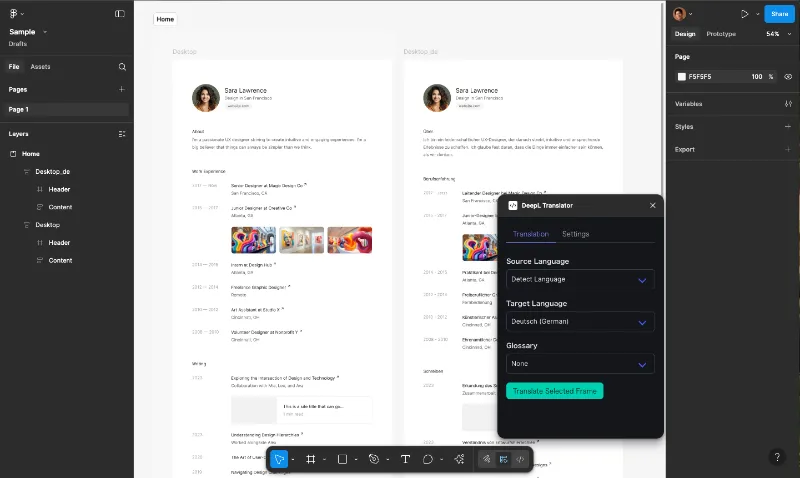
A Figma plugin that quickly translates text within frames using the DeepL API.
Supports your own DeepL API key, with acceleration for faster and more cost-efficient translations.
The acceleration feature enables faster translations and cost savings.
Features
- 🚀 Fast Translation: Re-use past translation history for fast translation (Acceleration Feature)
- 💰️ Cost Saving:Save API Usage by Re-use past translation history (Acceleration Feature)
- 🌐 Multi-language Support: Supports 29 languages
- 📚 Glossary Support: Use DeepL glossaries for consistent translations
- 🌍 Auto Detection: Automatic source language detection
- 📝 Non-destructive: Creates new frames for translations while preserving originals
- 🎯 Simple Operation: Just select languages and click translate
How to Use
- Sign In With Figma
- Get a DeepL API key (see below)
- Select a frame containing text to translate
- Choose source and target languages
- (Optional) Select a glossary
- Click "Translate"
- Translation results appear in a new frame
Getting a DeepL API Key
1. Sign up for a DeepL API account at DeepL.
- Developer plan available for free (1,000,000 characters)
2. Get your API key:
- Log in to your DeepL account
- Go to "Account" → "API keys & limits"
- Create key
- Copy your generated API key
3. Enter your API key in the plugin settings
Glossary
You can set up glossary on DeepL Web Console.
https://support.deepl.com/hc/en-us/articles/360021634540-About-the-glossary
https://www.deepl.com/ja/glossary?sortColumn=name&sortDirection=asc
Please let me know via feedback form if you have a good reason to edit the Glossary on the Plugin directly.
Supported Languages
See the complete list of supported languages for details.
Major languages include
- English (EN)
- Chinese (ZH)
- Korean (KO)
- German (DE)
- French (FR)
- Spanish (ES)
- Italian (IT)
- Dutch (NL)
- Japanese (JA)
- Portuguese (PT)
- Russian (RU)
And 18 more languages
Notes
- DeepL API key required (available with free plan)
- Free plan includes 500,000 characters per month
- Source language must be specified when using glossaries
- API keys are securely encrypted and stored
Support & Feedback
We welcome your feedback! Please contact to developer through:
- Contact Form for:
- Questions & Inquiries
- Feature Requests
- Bug Reports
- General Feedback
Privacy
- DeepL API keys are securely encrypted
- Translation data is processed on DeepL servers and not stored on this plugin server.
What's new
Version 19 · released Mar 19, 2026
- Fix unexceptional login error
Permissions and privacy
Network access
DeepL Translator can only connect to the 2 domains declared in its manifest: cdn.jsdelivr.net and w8o6h3dw0g.execute-api.ap-northeast-1.amazonaws.com.
- cdn.jsdelivr.net
- w8o6h3dw0g.execute-api.ap-northeast-1.amazonaws.com
Extra permissions
- Reads your Figma name and avatar
Read from the plugin's published manifest.
Where DeepL Translator ranks
DeepL Translator alternatives
- 1

CopyDoc Text Kit
by Hypermatic
124K users1.3KFree + paid featuresEverything you need to easily export, import, localize, spell check, and update Figma text
- 2

Translator
by Dustin Mierau
84K users994Free + $9/mo upgradeLanguage superpowers for Figma.
- 3

Parrot
by Samuel Stroschein
56K users375FreeLet Your Designs Speak All Languages
- 4

Translations for figma
by figmat
38K users344Free + $5 upgradeTranslate, localize, and perfect design for global audience - i18n
- 5

Content Buddy
by Ismael Canal
32K users454FreeTranslate, iterate and replace your content with ease.
- 6

Lokalise
by Lokalise
22K users324Free + paid featuresQuickly include translated content in your designs
DeepL Translator FAQ
What does DeepL Translator do?
Translate texts in Figma by DeepL with your own DeepL API Key. It's a Figma plugin by Koji that runs in Figma Design.
Is DeepL Translator free?
Yes. DeepL Translator is free to install and run from the Figma Community, with no paid tier listed.
Is DeepL Translator safe to use?
Figma plugins can only reach the internet through domains listed in their manifest. DeepL Translator can only connect to the 2 domains declared in its manifest: cdn.jsdelivr.net and w8o6h3dw0g.execute-api.ap-northeast-1.amazonaws.com. As with any plugin, check the developer's privacy policy before using it on client work.
How do I install DeepL Translator?
Open it on the Figma Community, or search for it in the Actions menu (Cmd/Ctrl + K) inside any file you can edit. See how to install Figma plugins.
What are the best alternatives to DeepL Translator?
By user count, the closest alternatives are CopyDoc Text Kit, Translator and Parrot. Compare all of them on the best Figma plugins for translation.
Built this plugin?
Use this page as a landing page for DeepL Translator: link to it from your site, README or launch posts, or add a badge. Pick a style and copy the code.

Style
Label
Size
Code
<a href="https://figmaplugins.co/plugins/deepl-translator/" target="_blank" rel="noopener"><img src="https://figmaplugins.co/badges/featured-dark.svg" alt="DeepL Translator on figmaplugins.co" width="220" height="48"></a>