
On this page
About Figma to HTML with Framer
Figma to HTML with Framer is a free Figma plugin published by Framer in 2021. It works in Figma Design and has 612,282 users and 11,110 likes on the Figma Community. It ranks #5 in Figma to Code and #15 in Free on our lists.
In the developer's words
Export Figma to HTML for free with Framer
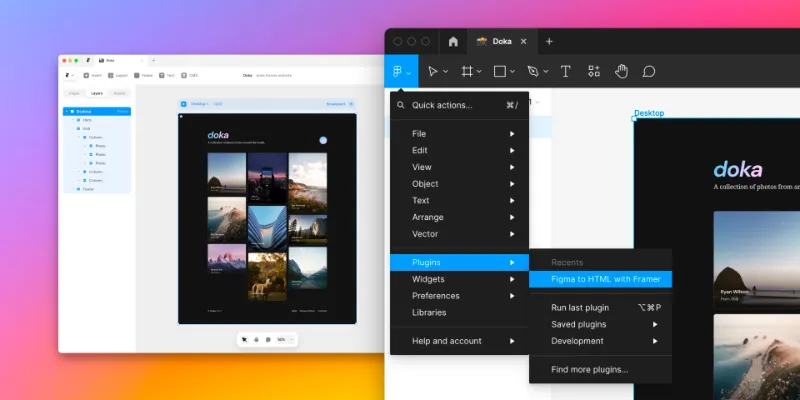
Copy, paste, and publish. Export your Figma designs by simply copying what's on the canvas and pasting it in Framer. This Figma to HTML plugin takes care of adapting your design to Framer’s layout tools in real time, so you can focus solely on making a great website.
- Learn more at www.framer.com/figma
- Check out our Free SaaS UI Kit for Figma & Framer: Live Framer Demo Website →
How to use this plugin:
- Install the Free Figma plugin
- Copy your Figma designs
- Paste in Framer
- Continue editing like in Figma
- Make it responsive
- Add effects and animations
- Add pages & links
- Publish to a free domain
Watch the video tutorial athttps://www.framer.com/academy/lessons/import-from-figma
Skip the manual HTML conversion process.
The Framer workflow is optimized for going from Figma to website with ease. The cool thing about this is that you don't have to convert your design to code — with Framer, you can paste your Figma file into Framer and publish it as-is. All layer names and groups are fully preserved.
All layer names and groups are fully preserved.
Your layer structure and naming will all be carried over, so it is easy to pick up where you've left off. You can continue editing your website and make it more engaging, or you can simply hit the publish button.
Exporting with ease.
When you publish with Framer, we make sure your site is built using all the best practices, so it loads quickly on mobile devices and gets a good ranking in Google search results. We convert your design mockups into HTML, CSS, and React code. We also optimize for performance by minifying all the JavaScript and image files.
What's new
Version 28 · released Feb 12, 2025
- Fixed a bug that caused the Figma plugin to not work in the Figma app
Permissions and privacy
Network access
This plugin's manifest doesn't declare its network access, which is common for older plugins. Figma shows a warning on the Community page for plugins like this.
Extra permissions
None beyond the standard access to the file you run it in.
Read from the plugin's published manifest.
Where Figma to HTML with Framer ranks
Figma to HTML with Framer alternatives
- 1

Figma to Code
by Bernardo Ferrari
2.3M users8.5KFreeCode Conversion Made Easy: Figma to Web & Apps
- 2

Anima
by Anima
1.8M users17KFreeAnima - AI Powered Design to code
- 3

Builder.io
by Steve Sewell
1.3M users23KFreeExport designs to clean, responsive code or turn Figma screens into AI apps and prototypes.
- 4

Figma to HTML
by Figma2HTML
670K users6.7KFreeConvert Figma design to HTML
- 5

Locofy Lightning
by Locofy.ai
594K users5.3KFreeConvert Figma designs to code in a flash: React, React Native, Flutter, HTML/CSS, Angular, Next, Vue
- 6

TeleportHQ
by teleportHQ
408K users3.4KFreeTeleportHQ - Figma to Code
Figma to HTML with Framer FAQ
What does Figma to HTML with Framer do?
Convert your Figma design to HTML code in seconds with Framer. It's a Figma plugin by Framer that runs in Figma Design.
Is Figma to HTML with Framer free?
Yes. Figma to HTML with Framer is free to install and run from the Figma Community, with no paid tier listed.
How do I install Figma to HTML with Framer?
Open it on the Figma Community, or search for it in the Actions menu (Cmd/Ctrl + K) inside any file you can edit. See how to install Figma plugins.
What are the best alternatives to Figma to HTML with Framer?
By user count, the closest alternatives are Figma to Code, Anima and Builder.io. Compare all of them on the best Figma plugins for figma to code.
Built this plugin?
Use this page as a landing page for Figma to HTML with Framer: link to it from your site, README or launch posts, or add a badge. Pick a style and copy the code.

Style
Label
Size
Code
<a href="https://figmaplugins.co/plugins/figma-to-html-with-framer/" target="_blank" rel="noopener"><img src="https://figmaplugins.co/badges/featured-dark.svg" alt="Figma to HTML with Framer on figmaplugins.co" width="220" height="48"></a>