
On this page
About Figma to Code
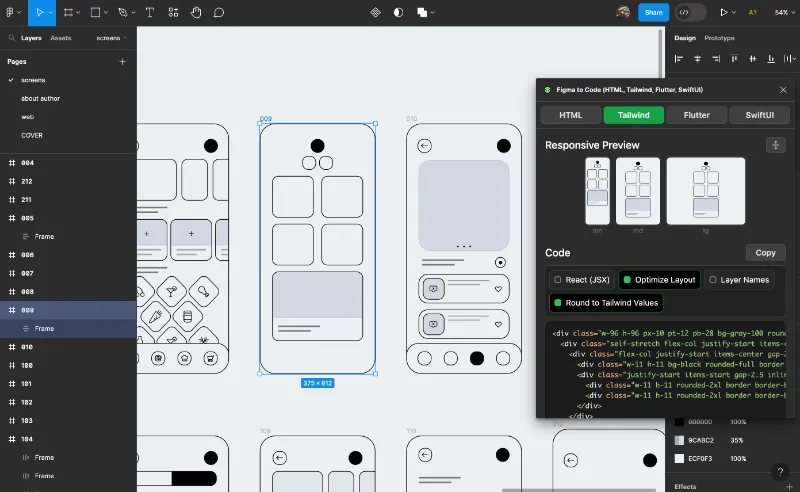
Figma to Code is a free Figma plugin published by Bernardo Ferrari in 2020. It works in Figma Design and Dev Mode and has 2,305,074 users and 8,502 likes on the Figma Community. It ranks #1 in Free and #1 in Figma to Code on our lists.
In the developer's words
Say goodbye to tedious manual coding. Whether you’re a designer or developer, this plugin effortlessly converts your Figma layouts into responsive webpages (HTML, Tailwind, Svelte, or styled-components) or mobile apps (Flutter or SwiftUI) — all while preserving every detail of your original design.
Why You’ll Love It
- Save Time: Automate the conversion process and skip hours of repetitive work.
- Great Results: Optimized layouts and clean, accurate code that matches your vision.
- Total Flexibility: Choose your preferred framework.
- Fast: This is the fastest design to code plugin.
- Privacy Guaranteed: Your designs stay secure. All processing happens locally on your device — no data ever leaves your computer.
What Sets Us Apart
- Free: No costs, no in-app purchases.
- Open-Source: Built by community for community.
- Top-Notch Quality: Generates code that follows the best design and programming practices.
- Age: This plugin is over 5 years old and has worked with every Tailwind version since the first one.
Supported Formats
- Web: HTML, Tailwind, React (JSX), Svelte, styled-components
- Mobile: Flutter, SwiftUI
Privacy policy
This app collects no data, works completely offline. Since no personal data is collected or stored, there is no risk of your information being compromised. I do not employ cookies, trackers, or any other methods to gather information about you. I welcome your questions or concerns about this privacy policy. Feel free to contact me for clarifications.
What's new
Version 77 · released May 13, 2026
- 2026 redesign. Redesign loading, empty, every button and every interaction.
Permissions and privacy
Network access
Figma to Code declares no network access, so it runs entirely inside Figma and can't send your file anywhere.
Extra permissions
None beyond the standard access to the file you run it in.
Read from the plugin's published manifest. Questions about data handling go to the developer's support page.
Where Figma to Code ranks
Figma to Code alternatives
- 1

Anima
by Anima
1.8M users17KFreeAnima - AI Powered Design to code
- 2

Icons8 Background Remover
by Icons8 Team
1.3M users13KFreeRemove background from one or many images at once!
- 3

Builder.io
by Steve Sewell
1.3M users23KFreeExport designs to clean, responsive code or turn Figma screens into AI apps and prototypes.
- 4

Content Reel
by Eugene Gavriloff
1.1M users16KFreeDesign layouts more efficiently by pulling text strings, images, and icons.
- 5

Feather Icons
by Cole Bemis
1M users9.5KFreeQuick access to Feather icons in Figma
- 6

LottieFiles
by LottieFiles
990K users15KFreeAnimate Your Designs with Lottie Animations
Figma to Code FAQ
What does Figma to Code do?
Code Conversion Made Easy: Figma to Web & Apps. It's a Figma plugin by Bernardo Ferrari that runs in Figma Design and Dev Mode.
Is Figma to Code free?
Yes. Figma to Code is free to install and run from the Figma Community, with no paid tier listed.
Is Figma to Code safe to use?
Figma plugins can only reach the internet through domains listed in their manifest. Figma to Code declares no network access, so it runs entirely inside Figma and can't send your file anywhere. As with any plugin, check the developer's privacy policy before using it on client work.
How do I install Figma to Code?
Open it on the Figma Community, or search for it in the Actions menu (Cmd/Ctrl + K) inside any file you can edit. See how to install Figma plugins.
What are the best alternatives to Figma to Code?
By user count, the closest alternatives are Anima, Icons8 Background Remover and Builder.io. Compare all of them on the best Figma plugins for free.
Built this plugin?
Use this page as a landing page for Figma to Code: link to it from your site, README or launch posts, or add a badge. Pick a style and copy the code.

Style
Label
Size
Code
<a href="https://figmaplugins.co/plugins/figma-to-code/" target="_blank" rel="noopener"><img src="https://figmaplugins.co/badges/featured-dark.svg" alt="Figma to Code on figmaplugins.co" width="220" height="48"></a>